

Your Bose Sport Earbuds suddenly stop playing audio, refuse to pair, or sit completely unresponsive in the case. This frustrating issue happens to many users, but the fix is usually simple. The root cause is almost always a corrupted Bluetooth cache or a stuck pairing state, not broken hardware. In fact, 90% of Bose Sport Earbuds not working cases resolve with a proper hard reset.
This guide walks you through the exact reset protocols Bose recommends, plus advanced troubleshooting for stubborn problems. You will learn how to clear the Bluetooth device list, perform a factory restoration, and prevent future glitches. Most fixes take under 5 minutes.
Perform a Hard Reset on Your Bose Sport Earbuds

A hard reset clears temporary glitches and forces the Bluetooth module to re-initialize. This is the first solution to try when your Bose Sport Earbuds are not working.
Remove Both Earbuds From the Case
Open the charging case and take out both earbuds. The reset cannot start while they sit inside the case. Place them on a clean, flat surface where you can hear audio feedback.
Press and Hold the Right Earbud Button
Locate the small, raised Bluetooth button on the right earbud. This is a physical button, not a touch sensor. Press it and keep holding without releasing.
Listen for the Correct Voice Prompts
The right earbud will announce three prompts in sequence:
- Battery level (for example, “Battery low”)
- “Ready to connect”
- “Bluetooth device list is cleared”
You must keep holding through the first two prompts. The reset only completes when you hear the third prompt about the device list being cleared.
⚠️ Do not release early. Stopping at “Ready to connect” only activates pairing mode. It does not clear the memory.
Reconnect to Your Device
Once the device list clears, the earbuds return to a discoverable state:
- Open the charging case near your phone or tablet.
- Go to your device’s Bluetooth settings.
- Tap “Bose Sport Earbuds” to pair.
Test the audio and touch controls to confirm the fix worked.
Clear Persistent Connection Issues
If the earbuds still refuse to connect or keep dropping out, the problem runs deeper. You need to remove all paired device data from both the earbuds and your phone.
Delete the Earbuds From the Bose Music App
The app can block re-pairing if it thinks the earbuds remain linked. Remove them completely:
- Open the Bose Music app.
- Tap the account icon in the top right corner.
- Select “Manage Products.”
- Tap “Edit,” find your Sport Earbuds, then tap “Delete.”
- Confirm by selecting “Remove.”
This severs the digital link between your earbuds and the Bose ecosystem.
Forget All Bluetooth Entries on Your Phone
Your phone may hold onto corrupted connections that cause pairing loops. Clear them all:
- Open Bluetooth settings on your phone.
- Look for entries named “Bose Sport Earbuds” and any starting with “LE-“ followed by numbers.
- Tap each one and select “Forget” or “Unpair.”
✅ Pro Tip: Restart your phone after deleting entries. This clears the Bluetooth cache and resets the wireless adapter.
Execute a Full Factory Reset
When standard fixes fail, a factory reset wipes all settings, customizations, and pairing history. This returns the earbuds to their original out-of-box state.
Ensure Stable Power Before Resetting
Voltage fluctuations can interrupt a factory reset. Use a reliable power source:
- Plug the charging case into a USB wall charger.
- Avoid laptops, power banks, or low-power hubs.
- Place both earbuds inside the case and close the lid.
- Wait at least 30 seconds to confirm they charge properly.
🔋 Low battery can mimic hardware failure. Always rule out power issues before assuming a defect.
Initiate the Full System Wipe
Some firmware-level problems persist even after a hard reset. Use this verified sequence:
- Remove both earbuds from the case.
- Press and hold the right earbud button for 30 seconds.
- Watch for LED feedback:
– Blinking blue means the reset is in progress.
– Five white blinks confirm the reset completed.
– Amber glow signals factory defaults are restored. - If no lights appear, check the charging contacts for dirt.
🔄 No voice prompt? That is normal during a deep reset. Rely on LED signals instead.
Re-Pair From Scratch
After the factory reset finishes:
- Open the case near your phone.
- Launch the Bose Music app.
- Follow the setup prompts to re-pair and re-register the earbuds.
The app will check for firmware updates. Allow the update to install. Updated firmware often fixes stability bugs that cause Bose Sport Earbuds not working issues.
Troubleshoot Common Failure Modes

Not every problem has the same fix. Match your symptoms to the correct solution below.
No Power or LED Lights
If the earbuds show no signs of life:
- Clean the charging pins on both earbuds and inside the case with a dry cotton swab.
- Try a different charging cable and wall adapter.
- Leave the earbuds in the case for at least 30 minutes before testing again.
❌ Still no light after charging? The battery may be dead. Contact Bose support for service options.
Only One Earbud Produces Sound
If the left or right earbud stays silent:
- Place both earbuds in the case and close the lid for 10 seconds.
- Open the lid and remove both earbuds.
- Wait for the “Ready to connect” voice prompt.
- Re-pair the earbuds with your device.
If one side still fails:
- Reset the earbuds again with both fully charged.
- Check the audio balance settings in the Bose Music app. Make sure the slider sits in the center.
Audio Cuts Out or Sounds Distorted
Interference or a corrupted audio profile usually causes this:
- Move away from Wi-Fi routers, microwaves, or crowded Bluetooth areas.
- Delete the earbuds from the Bose Music app and your phone’s Bluetooth settings.
- Perform a factory reset.
- Reconnect in a quiet environment with minimal wireless traffic.
🎧 Pro Tip: Disable Bluetooth on nearby devices like laptops and smartwatches while re-pairing.
Clean and Maintain Your Earbuds
Dirt on charging contacts causes power failures and connection problems. A simple weekly routine prevents most issues.
Wipe Charging Contacts Weekly
- Use a dry, soft cloth or cotton swab.
- Gently clean the gold pads on each earbud.
- Wipe the metal pins inside the charging case.
- Repeat this every 7 to 10 days.
Store the Earbuds Properly
Keep the charging case closed when not in use. This prevents dust and moisture from settling on the contacts. Avoid leaving the case in direct sunlight or extreme temperatures.
Update Firmware for Long-Term Stability
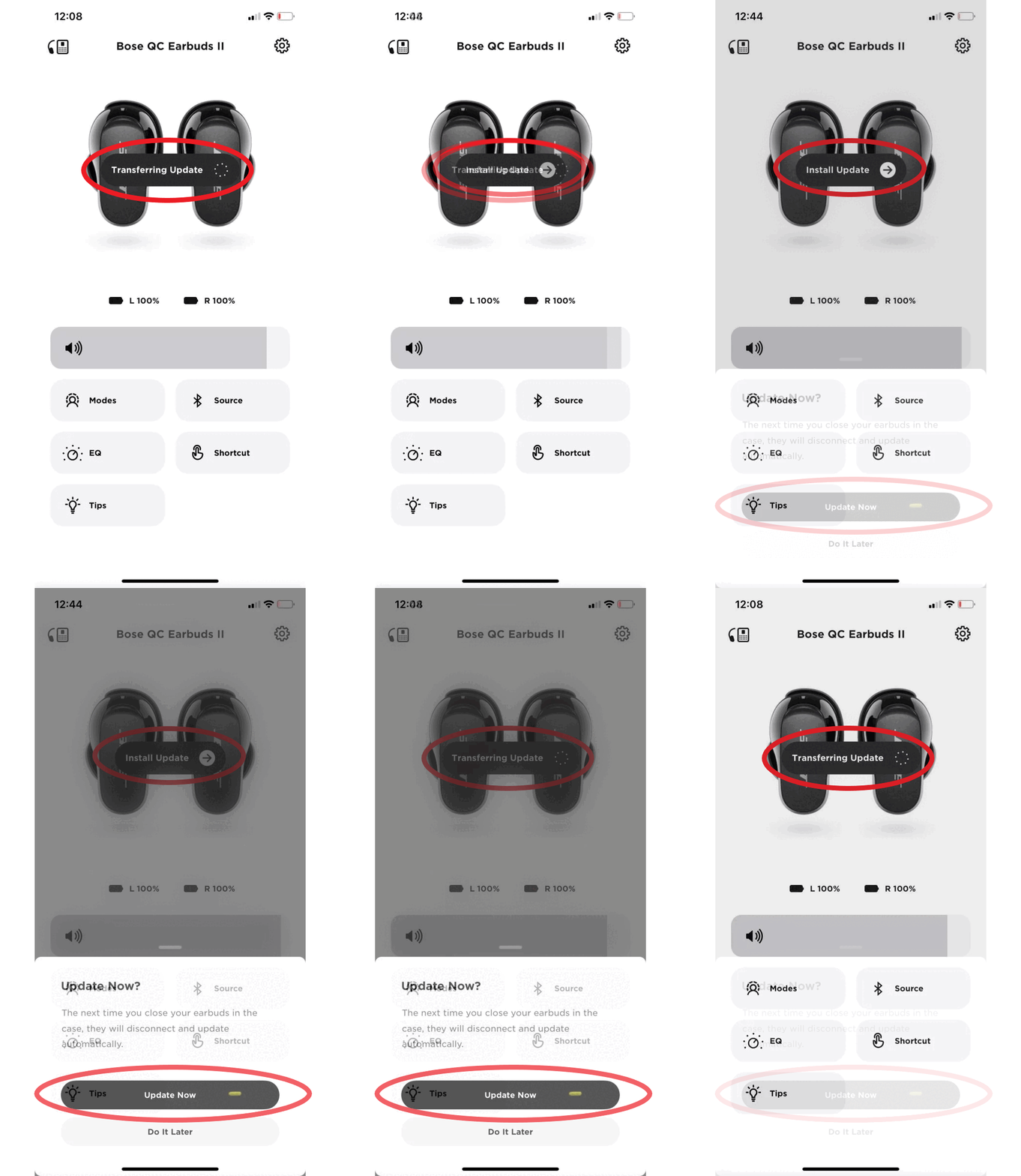
Outdated firmware causes glitches, dropouts, and pairing failures. Bose releases updates that fix known bugs.
Check for Updates in the Bose Music App
- Open the app with your earbuds connected.
- The app automatically checks for firmware updates.
- If an update appears, tap “Install.”
- Keep the earbuds in the charging case during the update.
Why Firmware Matters
Firmware updates patch Bluetooth stack errors, improve battery management, and fix audio bugs. Skipping updates leaves your earbuds vulnerable to recurring problems.
When to Contact Bose Support
If you have completed every step above and your Bose Sport Earbuds are still not working, the issue may be a hardware defect.
Signs You Need Professional Help
- One earbud stays permanently silent
- No lights or sounds appear after 30 minutes of charging
- Resets fail repeatedly with no voice or LED feedback
Warranty Information
Bose Sport Earbuds include a 1-year limited warranty. Visit the Bose support website to start a service request. Have your serial number ready. Phone support often resolves cases faster than online forms.
Frequently Asked Questions About Bose Sport Earbuds Not Working
Why Won’t My Bose Sport Earbuds Turn On?
Dead batteries, dirty charging contacts, or a stuck firmware state usually cause this. Charge the case using a wall adapter for at least 30 minutes, then clean the gold contacts with a dry cotton swab. If the earbuds still show no lights, perform a hard reset by holding the right earbud button until you hear “Bluetooth device list is cleared.”
How Do I Reset Bose Sport Earbuds That Won’t Pair?
Remove both earbuds from the case and press and hold the Bluetooth button on the right earbud. Keep holding past the “Ready to connect” prompt until you hear “Bluetooth device list is cleared.” Then forget the earbuds in your phone’s Bluetooth settings and re-pair from scratch.
Why Is Only One Bose Sport Earbud Working?
This usually happens when the earbuds lose sync with each other. Place both in the charging case for 10 seconds, then remove them together. Wait for the “Ready to connect” prompt. If one side still fails, perform a factory reset and check the audio balance slider in the Bose Music app.
How Long Does It Take to Reset Bose Sport Earbuds?
A standard hard reset takes about 10 to 15 seconds. You must hold the right earbud button until the third voice prompt announces “Bluetooth device list is cleared.” A full factory reset takes up to 30 seconds of button holding plus additional time for the earbuds to reinitialize.
Why Do My Bose Sport Earbuds Keep Disconnecting?
Bluetooth interference, outdated firmware, or a corrupted device list causes frequent dropouts. Move away from Wi-Fi routers and microwaves, update the firmware through the Bose Music app, and clear the Bluetooth device list with a hard reset.
Will a Factory Reset Delete All My Settings?
Yes. A factory reset wipes all paired devices, custom touch control settings, and audio profiles. Your firmware version stays current, but you must re-register the earbuds in the Bose Music app and re-pair them with every device you use.
Final Takeaways for Bose Sport Earbuds Not Working

Bose Sport Earbuds not working issues almost always stem from software glitches or corrupted pairing data, not broken hardware. The single most effective fix is holding the right earbud button until you hear “Bluetooth device list is cleared.” This one step resolves the majority of cases in under a minute.
For stubborn problems, escalate to a full factory reset. Remove the earbuds from the Bose Music app, forget all Bluetooth entries on your phone, then perform the hardware reset with stable wall-charger power. Keep your firmware updated and clean the charging contacts weekly to prevent future failures.
Start with the hard reset right now. Your earbuds should be working again within minutes.



