
Forgetting your smartwatch PIN can feel like being locked out of your digital life, especially when you rely on it for fitness tracking, notifications, and health monitoring. The good news is that you can reset a smart watch without a PIN using built-in recovery modes, companion apps, or forced reset techniques. This guide covers every proven method to wipe your watch and start fresh, whether you own a Samsung Galaxy Watch, a budget DM28 model, or a generic Android device.
You’ll learn hardware button combinations, app-based reset methods, default password tricks, and how to handle activation locks after resetting. Each method includes step-by-step instructions tailored to specific watch brands and models.
Use Hardware Buttons to Access Recovery Mode
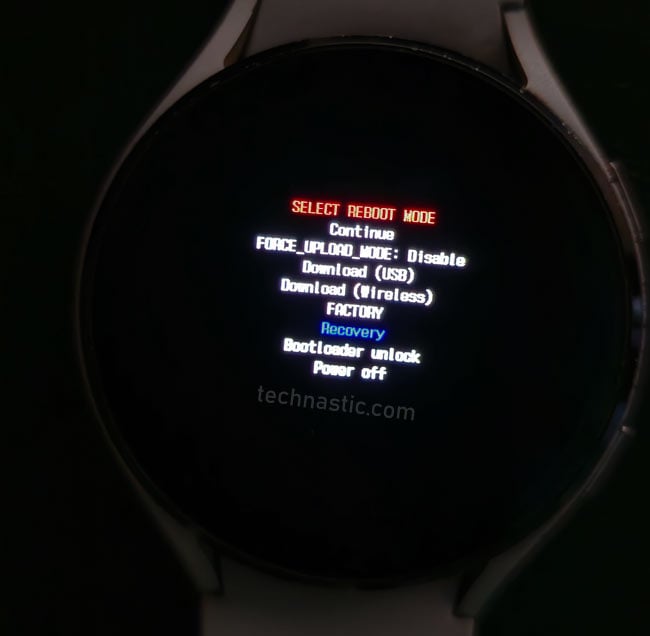
The most reliable way to reset a locked smartwatch is through physical button combinations that trigger recovery mode. This method bypasses the screen lock entirely and works on most Android-based and RTOS-powered devices.
Samsung Galaxy Watch (4, 5, 6) Button Sequence
- Press and hold both side buttons until the screen turns off.
- When “Samsung Rebooting” appears, release both buttons.
- Immediately tap the top button repeatedly until the recovery menu shows.
- Use the bottom button to scroll to Recovery, then press the top button to select.
- Wait for the Android robot to appear.
- Scroll to Wipe Data / Factory Reset with the bottom button.
- Confirm with the top button.
- Select Yes to proceed.
- After completion, choose Reboot System Now.
This clears the PIN but may prompt for the original Google or Samsung account during setup.
Blackview and Generic Android Watches
- Power off the device completely.
- Hold Power + Volume Up or Power + Back until the logo appears.
- Release and wait for recovery mode.
- Navigate using side buttons to select Wipe Data / Factory Reset.
- Confirm and reboot when done.
If no volume key exists, try pressing both side buttons simultaneously and holding for 10 or more seconds.
What to Look For
Vibration or logo flash indicates successful button combo. The recovery menu typically has a text-only interface. Use physical buttons to navigate since the touchscreen is inactive in recovery mode.
Button sequences vary by model. If one combo fails, check your watch manual or brand support page.
Trigger Reset via Failed PIN Attempts
Some smartwatches automatically offer a factory reset option after repeated failed unlock attempts. This works well on models like the DM28 and other Chinese RTOS-based devices.
DM28 Pattern Lock Bypass
- Enter any incorrect pattern or PIN until lockout occurs, usually after 5 to 6 tries.
- Wait 30 seconds to 1 minute for the timer to expire.
- Try another wrong input.
- After a second failed attempt, a Factory Reset prompt may appear.
- Tap the check mark or Done to confirm.
- The watch resets automatically.
One DM28 owner regained access after six months of inactivity using this method with no tools or cables needed.
Does Your Watch Support This
This feature is common in RTOS-based watches with basic security. It is rare on Wear OS or Apple devices because they have more secure lockout mechanisms. You may require two or more lockout cycles before the reset appears.
If your watch locks for increasing durations like 30 seconds, 1 minute, then 5 minutes, keep trying. Eventually it might trigger the reset pop-up.
Reset Using Companion Smartphone App
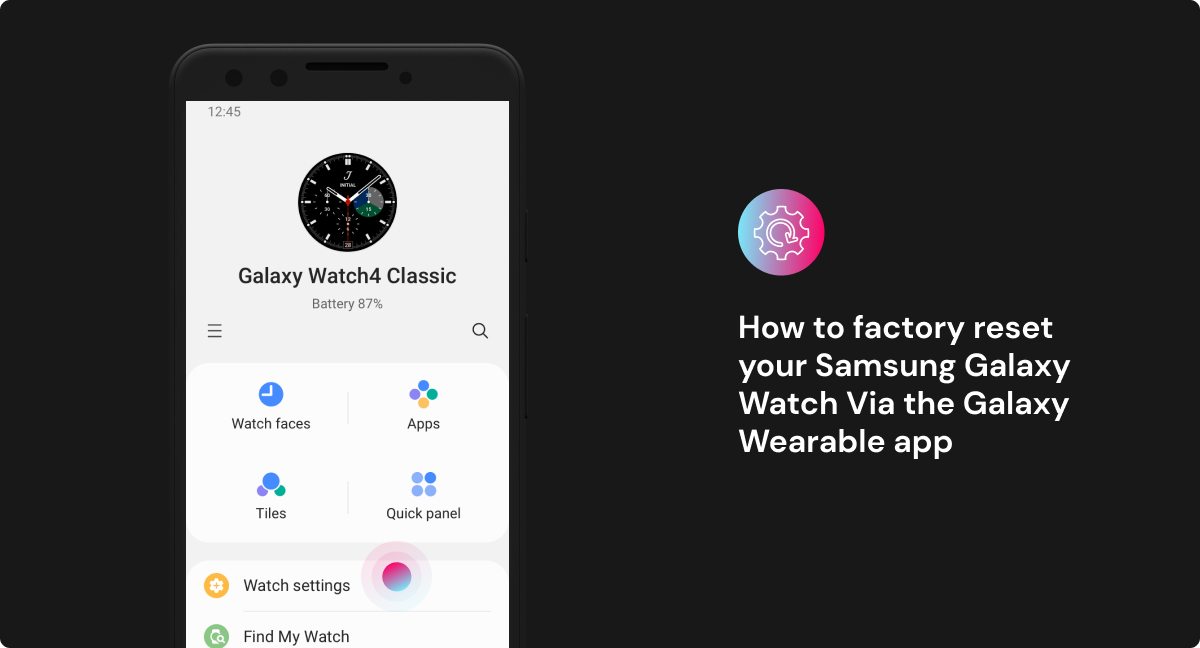
If your watch is still paired and responsive, you can remotely erase it using the official app on your phone. No PIN is required for this method.
Supported Apps and Devices
| Watch Type | Companion App | Reset Path |
|---|---|---|
| DM28, W29 Pro | MacT Pro, VeryFitPro | Settings → Factory Reset |
| Samsung Galaxy Watch | Galaxy Wearable | Manage Watch → Reset |
| Wear OS (Pixel, Fossil) | Wear OS by Google | Settings → Disconnect & Reset |
| Generic Android Watches | Da Fit, Zeroner | Device → Restore Default |
How to Remote Reset
- Open the companion app on your smartphone.
- Ensure Bluetooth is connected to the watch.
- Go to Device Settings or Watch Management.
- Tap Factory Reset, Erase Device, or Restore to Default.
- Confirm the action.
- Wait 1 to 2 minutes for the watch to wipe and restart.
This method is fast, safe, and does not risk bricking the device. However, it only works if the watch is paired and responsive.
Best Practices
Keep the app updated to avoid command failures. Re-pair after reset by forgetting the device in phone Bluetooth settings. For second-hand watches, ensure the previous owner unlinked their account first.
Try Default Factory Passwords First
Before wiping your device, test known default PINs. Some budget smartwatches ship with hardcoded credentials that still work if never changed.
Common Default Passwords
The code 000000 is the default on many generic models. The code 1819 is the factory code for W29 Pro with MacT Pro app.
How to Use Default Passwords
- On the lock screen, enter 000000.
- If rejected, try 1819.
- If either works, go to settings and disable the lock or change the PIN.
- Optionally, perform a full reset via app afterward.
These defaults only work if the original user never set a new password. Success rate is higher on unused or resold devices.
Force Reboot After Battery Drain
When no recovery mode appears and the app will not respond, fully draining the battery can sometimes force a reboot into recovery mode.
Steps to Force Reset
- Use the watch until it shuts down from low battery.
- Leave it off for 4 to 6 hours to ensure complete discharge.
- Plug in and charge for 10 to 15 minutes.
- Immediately press and hold Power + Volume Up or both side buttons.
- Hold for 15 or more seconds.
- If successful, the recovery menu will appear. Proceed with Wipe Data.
Deep discharge resets firmware state, making hidden recovery modes accessible. This method works best on older models, unknown brands, or watches with corrupted software.
Handle Activation Lock After Reset

Even after a successful wipe, you may face activation lock. This is a cloud-based security feature that requires the original account login.
Common Lock Types by Brand
| Brand | Lock Name | Required Post-Reset |
|---|---|---|
| Samsung | Google FRP / Samsung Account | Original Google or Samsung ID |
| Apple | Activation Lock (iCloud) | Apple ID and password |
| Huawei | Huawei ID Lock | Huawei account verification |
| Generic Android Watches | Google FRP | Google account linked at setup |
Can You Bypass Activation Lock
No, activation locks cannot be bypassed without credentials. Yes, if the previous owner removes the device remotely via their account.
Always ask the seller to unpair and unclaim the watch before purchasing. For owners, remove your watch from your account before selling or resetting.
How to Remove from Account
For Samsung or Google, open Galaxy Wearable or Find My Device to unpair. For Apple, use Find My iPhone to remove from account. For Huawei, log into Huawei Cloud and remove device. For other brands, use the companion app to unlink device.
Re-Pair and Set Up After Reset
Once wiped, your smartwatch behaves like new. Follow these steps to get it working again.
Step-by-Step Reconnection
- On your phone, go to Settings → Bluetooth.
- Find your watch in Paired Devices and tap Forget.
- On the watch, start setup and enable pairing mode.
- Open the companion app and follow the onboarding steps.
- Re-enable notifications, health tracking, and sync preferences.
Install the companion app first, even if you had it before. A fresh install avoids sync errors.
Customize Security Settings
Disable screen lock if convenience matters more than security. Set a new, memorable PIN if keeping lock enabled. Back up data through the app to avoid future loss.
Prevent Future Lockouts
Avoid getting locked out again with these simple habits.
Smartwatch Security Best Practices
Store your PIN in a password manager. Turn off screen lock on personal-use devices like for kids or elderly. Keep companion app installed and do not delete it after setup. Link to an active account you will remember like personal email, not work. Test reset process on spare devices to learn the steps.
If managing multiple watches for family, label each with its PIN in a secure place.
Summary: Reset Methods by Watch Type
| Method | Best For | Bypasses PIN | Risk Level | Notes |
|---|---|---|---|---|
| Hardware Button Combo | Samsung, Blackview, Android watches | Yes | Low | Most reliable |
| Companion App Reset | Paired, responsive watches | Yes | Very Low | No data loss before reset |
| Default Passwords | DM28, W29 Pro, generic models | Yes | Low | Try 000000, 1819 first |
| Failed Attempt Trigger | DM28, RTOS watches | Yes | Medium | Wait for reset pop-up |
| Battery Drain + Reboot | Old or unknown models | Yes | High | Last resort |
| Activation Lock Removal | Samsung, Apple, Huawei | No | N/A | Requires original account |
Frequently Asked Questions About Resetting Smart Watch Without PIN
Can I reset any smartwatch without the PIN?
Most smartwatches can be reset without the PIN using hardware button combinations, companion apps, or default passwords. However, some devices like Apple Watch may have stricter security that requires the original paired iPhone for reset.
Does factory reset remove the PIN on all watches?
Yes, a factory reset removes the PIN, pattern, or password from the local device. However, it does not remove activation locks tied to cloud accounts like Google FRP, Samsung Account, or Apple ID.
What happens to my data after resetting?
All data including apps, health records, settings, and Bluetooth pairings are permanently deleted. Data not backed up to the cloud or companion app cannot be recovered.
Can I use a second-hand smartwatch after resetting it?
You can use it only if the previous owner removed their account from the device. Otherwise, you will encounter activation lock and need the original account credentials to set it up.
How do I reset a Samsung Galaxy Watch without PIN?
Press and hold both side buttons until the screen turns off. When Samsung Rebooting appears, tap the top button repeatedly to enter recovery mode. Select Wipe Data / Factory Reset and confirm to complete the reset.
Key Takeaways for Resetting Your Smart Watch Without PIN
You can reset a smart watch without a PIN using the right method for your model. Hardware button combinations work on most Samsung, Blackview, and Android watches. Companion apps provide the safest remote reset option for paired devices. Default passwords like 000000 or 1819 may unlock budget Chinese watches. Always verify account status before resetting, especially on second-hand devices, to avoid activation lock issues. With this guide, you are equipped to regain control, re-pair your watch, and prevent future lockouts for good.



