

You glance at your analog watch and notice the day still reads “Wednesday” on a Friday morning. Frustrating, right? Whether you’ve just wound a vintage timepiece, returned from travel, or your watch stopped overnight, knowing how to set the day correctly is essential, especially if you own a day-date complication watch. But here’s the catch: not all watches adjust the same way. Some let you change the day with a simple twist, while others require you to rotate the hands through midnight, twice. This guide breaks down every method, from quick-set to non-quick-set, so you can confidently update the day on any analog watch without damaging delicate internal gears.
Identify Your Watch’s Mechanism Type
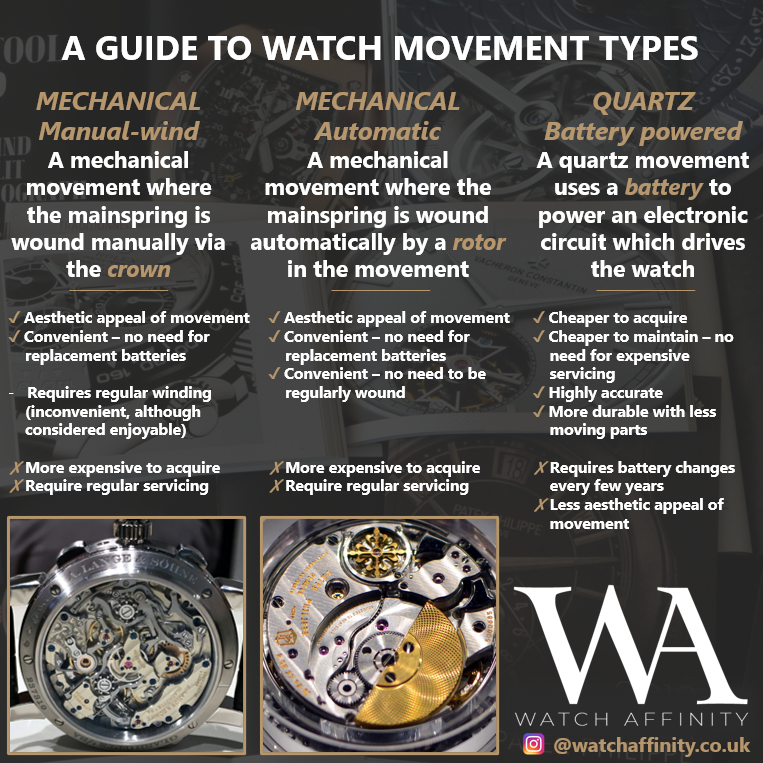
Before touching the crown, determine how your watch adjusts the day. The method depends entirely on the internal movement design.
Quick-Set Day and Date (Dual Independent)
High-end or specialty models like certain IWCs or fully jeweled Day-Date watches allow independent adjustment of both day and date without moving the hands. These are rare but efficient.
• Found in premium or custom automatic watches
• Uses crown direction to control function
• Clockwise rotation advances the date
• Counter-clockwise rotation advances the day
• No need to pass midnight
If your watch lets you change the day instantly in the first crown position, you likely have a dual quick-set model.
Quick-Set Date Only (e.g., Rolex Day-Date)
Despite the name, standard Rolex Day-Date watches do not have a quick-set day. Only the date adjusts directly.
• Pull crown to first position to rotate and change the date
• The day must be set by advancing the hour hand past midnight
• Requires setting the date one day early, then cycling to trigger both updates
This is the most common setup among luxury day-date watches.
Non-Quick-Set (Time-Cycling Required)
Basic mechanical, vintage, or economical quartz watches lack dedicated adjustment mechanisms.
• No intermediate crown position exists
• Must manually rotate hands forward through 24-hour cycles
• Each full rotation advances the day by one
• Common in 1970s wind-up models and entry-level automatics
If your crown only has one pull position, you are using a non-quick-set movement.
Use the Correct Crown Positions

The crown is your control center. Knowing its positions prevents damage and ensures accurate setting.
Position 1: Halfway Out (Date or Quick-Set Day)
• Function: Adjusts date or day directly if supported
• Action: Pull gently until you feel a click
• Use for: Quick-set date or dual-direction day adjustment
• Avoid: Forcing if no movement occurs, could indicate non-quick-set or danger zone
On Rolex models, this position changes only the date.
Position 2: Fully Pulled Out (Time Setting)
• Function: Sets hours and minutes
• Use for: Advancing the day via 24-hour cycle
• Critical: Always move hands forward, never backward
• Note: In Timex models, this position also advances the day
Never force the crown. If it resists, check if it is a screw-down type.
Position 3: Screw-Down Crown (Unscrew First)
• Found on: Rolex, Omega, dive watches
• Action: Turn counter-clockwise to unscrew before pulling
• After use: Push in and screw clockwise until tight
• Purpose: Maintain water resistance
Forgetting to screw down the crown compromises protection against moisture and dust.
Set the Day on Quick-Set Models
If your watch supports direct day adjustment, follow these steps carefully.
Adjust Day and Date Separately (Dual Quick-Set)
For rare models with independent controls:
- Unscrew the crown if applicable
- Pull to Position 1
- Rotate clockwise to set date
- Rotate counter-clockwise to set day
- Pull to Position 2, set correct time
- Push crown in and screw down securely
Always set the day to one day before your target, then pass midnight for clean synchronization.
Set Date Only, Then Cycle for Day (Rolex-Style)
Even with quick-set date, the day must be cycled:
- Set time to 3:00 PM (safe zone)
- Pull crown to Position 1
- Rotate clockwise to set date to yesterday (e.g., Monday for Tuesday)
- Pull to Position 2
- Rotate forward until the date flips to target, the day changes correctly, and time reaches desired hour
- Secure the crown
Never reverse hands. Always move forward to protect the gear train.
Set the Day on Non-Quick-Set Watches
No quick-set? You will need patience and precision.
Rotate Hands Forward Through Midnight
Basic mechanical and vintage watches require manual cycling:
- Pull crown to time-setting position
- Rotate hands forward until they pass 12:00 AM
- The day and date will advance simultaneously
- Repeat for each day needed
Each full 24-hour cycle advances the day by one.
Correct Date Without Changing Day
Need to fix the date but keep the day?
- After midnight flip, rotate hands backward to 6:00 PM
- Then rotate forward again to 12:00 AM
- Repeat until date is correct
- Continue forward to set day and time
This back-and-forth method avoids advancing the day, ideal for fine-tuning.
Timex-Specific Day Setting
Timex analogs use a unique three-position system.
Set the Day: Full Hand Rotation
- Pull crown to third position (fully out)
- Rotate hands forward in 24-hour increments
• Each full cycle advances the day by one - Stop when correct day appears
- Push crown in fully
Example: From Monday to Thursday requires three full rotations past midnight.
Set the Date: Halfway Position
- Pull crown to second position (halfway)
- Turn to adjust date forward or backward
- Push crown in
Some Timex models display AM/P on the day wheel (e.g., A equals AM, P equals PM).
Avoid the Danger Zone (9 PM – 3 AM)
This is the most critical rule in calendar adjustment.
Why It Is Risky
Between 9 PM and 3 AM, the internal gears are actively advancing the day and date.
• Adjusting now can strip gears
• May misalign the date wheel
• Can damage the jumper spring or clutch
Even quick-set functions should be avoided during this window.
Safe Adjustment Practice
- Before any setting, move time to 6:00 AM or 6:00 PM
- Perform all adjustments
- Reset to correct time afterward
This simple step prevents 90% of mechanical issues.
Follow Best Practices for Accuracy
Use these proven techniques to protect your watch and ensure precision.
Always Move Hands Forward
• Prevents disengagement of gears
• Reduces stress on the movement
• Avoids date wheel misalignment
Reversing hands in non-reversible movements can cause permanent damage.
Set Date One Day Before Target
When using time-cycling methods:
• Set date to yesterday
• Advance past midnight to trigger both day and date change
• Ensures clean, synchronized flip
This mimics the natural calendar progression.
Confirm AM/PM in Dual-Language Displays
Many watches use bilingual day wheels (e.g., MON/DIE) that also indicate AM/PM.
• MON equals Monday AM
• DIE equals Tuesday AM (from German Dienstag)
• Check context to avoid confusion
Misreading can lead to setting the wrong day or time cycle.
Troubleshoot Common Day Setting Issues
Encountering problems? Here is how to fix them.
Date Jumps Multiple Days in Position 1
• Cause: Misaligned date wheel or worn mechanism
• Fix: Avoid forced adjustment, use time-cycling method instead
• Prevention: Never adjust during danger zone
Crown Won Pull to First Position
• Cause: Screw-down crown not unscrewed
• Fix: Turn counter-clockwise until loose
• Warning: Never force, could damage stem
Day Does Not Change After Full Rotation
• Cause: Watch stopped during night or incorrect sequence
• Fix: Ensure watch is running, pass 12:00 AM slowly
• Check: Power level (wind automatic or replace battery)
Day Skips or Jumps Erratically
• Quartz watches: Weak battery
• Automatics: Low power reserve
• Fix: Replace battery or wind watch fully
• If persistent: Seek professional servicing
Erratic behavior often signals internal wear or power issues.
Universal 6-Step Day Setting Process
Apply this method to any analog watch with day complication.
Step 1: Power Up the Watch
• Automatic: Wind crown clockwise 20 to 30 times
• Quartz: Confirm battery has charge
• Stopped watch: Let it run for 10 minutes before setting
A powered movement ensures smooth calendar advancement.
Step 2: Exit the Danger Zone
• Set time to 6:00 AM or 6:00 PM
• Ensures gears are disengaged from change sequence
Never skip this safety step.
Step 3: Pull Crown to Correct Position
• Halfway: For quick-set date or dual-direction day
• Fully out: For time and day cycling
• Unscrew first if screw-down type
Double-check position before rotating.
Step 4: Adjust the Day
• Quick-set: Rotate counter-clockwise in Position 1
• Non-quick-set: Rotate hands forward through midnight
• Use 24-hour cycles as needed
Be patient, precision matters.
Step 5: Synchronize Day and Date
• Set date to one day before target
• Advance past 12:00 AM to trigger both changes
• Verify both display correctly
This ensures long-term accuracy.
Step 6: Secure the Crown
• Push fully back in
• For screw-down: Hand-tighten clockwise
• Check seal by gently tugging
Proper sealing maintains water resistance.
Know When to See a Watchmaker
Some issues cannot be fixed at home.
Signs of Mechanical Failure
• Day never advances despite correct cycling
• Crown spins freely with no engagement
• Date and day change independently or out of sync
• Persistent jumping or skipping
Internal gear damage or worn jumper spring likely.
Vintage or Unknown Models
If you cannot identify the movement:
• Avoid trial-and-error
• Consult a professional
• Prevent irreversible damage
Especially important for 1970s wind-up or rare automatics.
High-Value Watches (Rolex, Patek, etc.)
Luxury timepieces deserve expert care.
• Even minor misadjustment can affect value
• Certified watchmakers use specialized tools
• Servicing recommended every 3 to 5 years
When in doubt, do not risk it, seek professional help.
Frequently Asked Questions About Setting the Day on Analog Watches
What is the danger zone when setting a watch day?
The danger zone is the period between 9 PM and 3 AM when the watch internal gears are actively advancing the calendar mechanism. Adjusting the day or date during this time can strip gears, misalign the date wheel, or damage the jumper spring. Always set the time to 6 AM or 6 PM before making any adjustments.
Can I set the day and date independently on my watch?
Only if your watch has a dual quick-set mechanism. This is rare and found in high-end models like certain IWCs or fully jeweled Day-Date watches. Most watches, including standard Rolex Day-Date models, require you to set the day by advancing the hour hand past midnight.
How do I set the day on a non-quick-set watch?
For watches without quick-set functionality, you must manually rotate the hour hand forward through full 24-hour cycles. Each time the hands pass 12:00 AM, the day advances by one. This method is time-consuming but necessary for vintage and basic mechanical movements.
Why does my watch day skip or change erratically?
Erratic day changes usually indicate a weak battery in quartz watches or low power reserve in automatic watches. Replace the battery or fully wind your automatic watch. If the problem persists, the calendar mechanism may need professional servicing.
Should I move the hands backward when setting my watch?
No, always move hands forward. Reversing direction can damage the gear train or disengage the date wheel in many movements. Only move backward when specifically correcting the date without changing the day, using the 6 PM to midnight technique.
Key Takeaways for Setting the Day on Your Watch
Setting the day on an analog watch is straightforward once you understand your watch mechanism type. Whether you are using a quick-set crown, cycling through midnight, or adjusting a Timex, always avoid the 9 PM to 3 AM danger zone, move hands forward only, and secure the crown properly. The universal 6-step process works for any analog watch: power up, exit danger zone, pull correct crown position, adjust the day, synchronize day and date, then secure the crown. For vintage, high-value, or malfunctioning watches, professional servicing ensures longevity and protects your investment. With the right technique, your watch will display the correct day accurately and safely for years to come.



