

You’ve just picked up your Seiko solar watch after a few days in the drawer, only to find it completely dead. The second hand isn’t moving, the time is way off, or it starts ticking for a few seconds then stops again. Don’t panic—this doesn’t mean your watch is broken. In fact, a Seiko solar watch not charging is a common issue, and in most cases, it’s fixable without professional repair.
This guide walks you through every possible cause of charging failure, proven troubleshooting methods, model-specific fixes, and long-term care tips to keep your Seiko solar running for over a decade.
Diagnose the Problem First
Before jumping into fixes, identify what state your watch is in. Not all dead watches are the same, and the symptoms tell you how to proceed.
Check Power-Save Mode Signs
If the second hand jumps every 2–4 seconds or stops at the 45-second mark (9 o’clock position), your watch is in power-save mode. This is a built-in feature that conserves energy when charge is critically low.
• Good sign: It means the capacitor still holds some charge.
• Solution: Expose to strong light for 30+ minutes to resume normal ticking.
Look for Complete Stoppage
If the second hand doesn’t move at all, even when you press buttons or pull the crown, the capacitor may be fully drained.
• Not necessarily fatal: Many watches recover after 6–12 hours in sunlight.
• If no response after 24+ hours of optimal charging, suspect capacitor failure or circuit damage.
Charge Your Seiko Solar Watch Properly
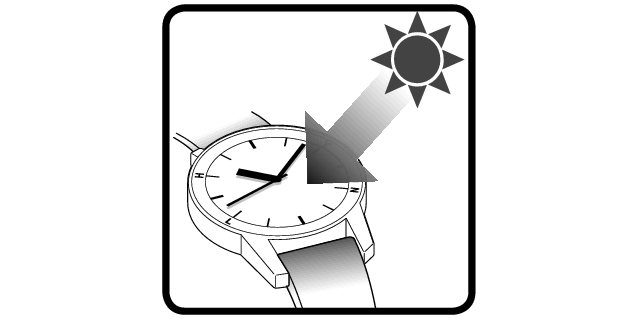
Most charging issues stem from poor light exposure, not hardware failure. Fix this before assuming the worst.
Use Direct Sunlight
Place the watch face-up outdoors in midday sun for 6–12 hours. Avoid placing it behind glass, like a car windshield, which blocks UV rays. Ideal conditions include a clear day, no clouds, and the watch on a reflective surface like white paper.
• Leave the watch in strong light for at least 6 hours.
• If you try to set it before it is properly charged, it will stop.
Try Bright Artificial Light
If outdoor sun isn’t available, use a 60W+ incandescent bulb or full-spectrum LED lamp. Hold the watch 6–12 inches from the light source and charge for 12–24 hours.
• Avoid fluorescent lights: They’re inefficient for solar charging (less than 10% output).
Water-Immersion Charging Method
This hack prevents overheating while maximizing UV penetration. Fill a clear bowl with water and submerge the watch face-up. Place it outside in direct sunlight all day. The water cools the case and allows deeper light transmission, making this one of the most effective DIY charging methods.
• It will fully charge them all.
Perform an IC Reset to Revive the Movement
After long dormancy, the internal circuit may need resetting even if the watch has power. This procedure reactivates the microprocessor and can bring a seemingly dead watch back to life.
For Chronograph Models (With Pushers)
- Pull the crown out to the first position (one click).
- Pull it further to the second position (two clicks), which stops the second hand.
- Press and hold the lower button (bottom-right) for 3–5 seconds.
- Release. The second hand should start moving normally.
- Push the crown back in.
For Non-Chronograph Models
- Pull the crown out to the time-setting position.
- Wait 2–3 minutes.
- Push the crown back in.
- Immediately expose to bright light.
Clean the Dial and Solar Panel
Dirt, oils, or moisture on the crystal reduce light absorption by up to 50%. This simple step can make a surprising difference in charging performance.
Safe Cleaning Steps
- Dampen a microfiber cloth with isopropyl alcohol.
- Gently wipe the watch face in circular motions.
- Dry with a clean section of the cloth.
- Inspect for scratches, cloudiness, or trapped moisture.
Avoid abrasive cleaners or paper towels, which can scratch anti-reflective coatings.
Test the Rechargeable Capacitor

The rechargeable cell lasts 5–10 years, but degrades faster if frequently depleted. Understanding capacitor health helps you decide whether repair or replacement is needed.
Signs of Capacitor Failure
• Watch dies within days of full charge.
• Needs constant recharging.
• Fails to enter power-save mode properly.
• Dies even after hours in sunlight.
Capacitor Replacement Cost
• Official Seiko service: $100–$150
• Local watchmaker: $40–$80 (if experienced with solar movements)
Check for Physical Damage
Internal issues can mimic low-power symptoms. Rule these out before pursuing more serious repairs.
What to Inspect
• Loose connections between solar cell and capacitor.
• Bent or corroded contacts.
• Misaligned rechargeable cell.
• Moisture inside the case.
These require opening the case, which is best left to professionals.
Avoid Overheating Damage
Leaving your watch on a car dashboard in summer can warp components. Signs include discolored dial, sticky crown, or melted gasket. Never leave your watch in sealed vehicles.
Model-Specific Fixes for Common Seiko Solar Watches

Some models have unique behaviors or known issues. Here’s how to handle specific watches that owners frequently report.
Seiko SSC777P1 (Macchina Sportiva)
Reports exist of new units not starting after 1.5 hours in sun or 36 hours under a lamp. The IC reset often fails on these units. If you have a new watch exhibiting this behavior, pursue a warranty claim or exchange—it’s likely defective out of the box.
Seiko SNE032
This low-cost model is reliable with consistent light. One user revived it after one week on a windowsill. Solution: patience and prolonged exposure.
Seiko 7B42 (Solar Radio-Controlled)
The second hand moves when the crown is pulled or pushed, then stops at 45 seconds. This indicates low charge, not a movement fault. Fix: full sunbath test (6–12 hours direct sun).
Prevent Future Charging Problems
Most failures are preventable with simple habits. These maintenance tips keep your watch running for years without issues.
Store Near Sunlight
Even when not worn, keep your watch near a bright window. South or west-facing windowsills are ideal. Filtered light (like a sheer curtain) prevents fading and overheating.
Avoid Deep Discharge
Letting the watch stop completely stresses the capacitor. Recharge every 3–6 months if stored. Don’t wait until it dies completely.
Clean Weekly
Wipe the face with a microfiber cloth to remove oils and dust that block light absorption.
When to Seek Professional Repair
Use this decision tree to determine your next steps.
| Symptom | Action |
|---|---|
| No movement after 12 hours sunlight | Try IC reset |
| Still dead after 24 hours optimal charge | Suspect capacitor |
| Dies within days of charging | Replace capacitor |
| Crown or buttons sticky | Check for moisture |
| Watch under warranty | Send to Seiko |
Warranty and Repair Options
• Seiko Service Center: Covers defects within 2–5 years (region-dependent).
• Third-Party Watchmakers: Often cheaper, but must specialize in solar movements.
Real User Success Stories
These examples show what works in real-world situations.
• RJMonterey owns multiple solar watches; the oldest Citizen is 11 years old with original cell. All are stored near windows with filtered light.
• DevilDog007 uses weekly water-immersion charging with no issues in years.
• Sticky revived a watch after a few days on the windowsill, and it still works perfectly several years later.
Key Takeaways for Fixing Your Seiko Solar Watch
Most Seiko solar watch not charging cases stem from lack of light, not hardware failure. Always rule out environmental causes before assuming the capacitor is dead. Use direct sunlight or full-spectrum lamps, not weak indoor lighting. An IC reset can revive a dormant movement, and the water-immersion method safely maximizes charging efficiency. Capacitors last 5–10 years but can fail early if deeply discharged. Proper storage and maintenance prevent 90% of charging issues.
Seiko solar watches are high-quality, long-lasting devices that do not require battery replacements. They need only periodic light.
Frequently Asked Questions About Seiko Solar Watch Not Charging
Why is my Seiko solar watch not holding a charge?
This is usually caused by insufficient light exposure or capacitor degradation. Try exposing your watch to direct sunlight for 6–12 hours. If the problem persists, the rechargeable capacitor may be failing and needs replacement.
How long does it take to charge a Seiko solar watch?
In direct outdoor sunlight, a full charge takes 3–6 hours. With bright indoor lighting (60W+ lamp), expect 12–24 hours. Fluorescent lights are very inefficient and can take 48+ hours or fail to charge adequately.
What does it mean when the second hand stops at 45 seconds?
This indicates power-save mode, which activates when battery charge is critically low. The watch is conserving energy. Expose it to strong light for 30+ minutes to resume normal ticking.
Can a Seiko solar watch be completely dead?
Yes, if the capacitor fully discharges. However, most Seiko solar watches recover after 6–12 hours in direct sunlight. If there’s no response after 24+ hours of optimal charging, the capacitor likely needs replacement.
How do I reset my Seiko solar watch?
For chronograph models, pull the crown to the second position, press and hold the lower button for 3–5 seconds, then release. For non-chronograph models, pull the crown out, wait 2–3 minutes, push it back in, then expose to light.
How long do Seiko solar watch capacitors last?
With proper care, Seiko solar capacitors last 5–10 years. Frequent deep discharging can shorten this lifespan. Regular light exposure and avoiding complete discharge help maximize capacitor life.



