

You grab your earbuds before a run, hit play, and realize the right side is silent. The Bose Sport Earbuds right not working issue catches many users off guard, especially when both buds worked perfectly yesterday. This problem can show up as no sound, low volume, or random cutouts during playback.
This guide walks you through every practical fix, starting with the simplest checks and moving toward advanced diagnostics. You’ll learn how to identify whether the issue lies in your device settings, the earbuds themselves, or something in between. By the end, you’ll have a clear path to restoring full stereo sound.
Confirm Charging and Power Status First

Many one-sided audio problems trace back to a weak or failing battery in the right earbud. Before anything else, make sure both buds are actually holding a charge.
Inspect the Charging Case and Contacts
Place both earbuds in the case and open the lid. Watch for the LED indicator on each bud. If the right earbud shows no light at all, the charging contacts may be dirty or the battery may be fully drained.
Use a dry, soft cloth to gently wipe the metal contacts on both the earbud and inside the case. Avoid liquids or abrasive materials. Try a different USB cable and wall adapter to rule out a power supply issue.
Allow a Full Charge Cycle
Leave the earbuds in the case for at least 30 minutes without interruption. If only the left earbud charges consistently, the right side may have a hardware defect that requires service.
Reset the Earbuds to Clear Connection Glitches
A factory reset resolves many Bluetooth pairing issues that cause one earbud to drop out. This step clears corrupted connection data and forces a fresh start.
Perform the Standard Reset
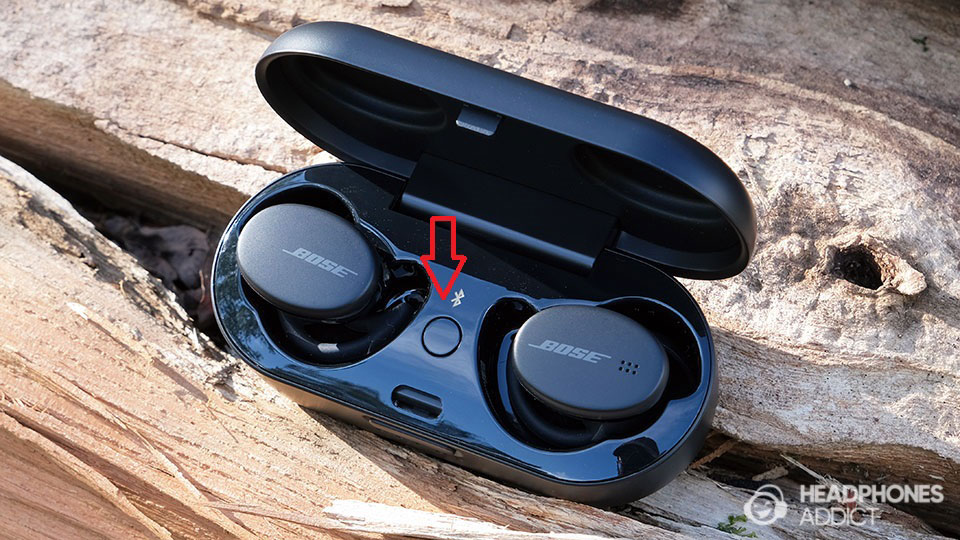
Start by placing both earbuds in the charging case. Press and hold the button on the case for 30 seconds. The LED will flash red, then go dark, confirming the reset is complete.
Remove the earbuds and pair them again with your phone. Test audio playback to see if both sides now produce sound.
Re-Pair from Scratch
On your phone, go to Bluetooth settings and forget the Bose Sport Earbuds. Then re-pair as if setting them up for the first time. This eliminates any saved settings that might be routing audio incorrectly.
Check Your Device Audio Balance Settings

Sometimes the earbuds work perfectly, but your phone is sending sound to only one channel. This is one of the most overlooked causes of the Bose Sport Earbuds right not working problem.
Adjust Stereo Balance on iPhone
Open Settings, then tap Accessibility, followed by Audio/Visual. Look for the balance slider that controls left and right channel volume. Make sure the slider sits exactly in the center.
If the slider has drifted to one side, audio will favor that channel and make the opposite earbud appear silent.
Adjust Balance on Android
Go to Settings, then Accessibility, and find Hearing Enhancements or Audio Balance. Some Android phones label this Mono Audio. Ensure the balance is centered and mono audio is turned off for normal stereo listening.
Test with Mono Audio
Temporarily enable mono audio on your device. If the right earbud suddenly produces sound in mono mode, the issue was channel routing, not a hardware fault. Disable mono audio afterward for proper stereo playback.
Clean the Right Earbud Thoroughly

Earwax, sweat, and debris clog the speaker mesh over time. A blocked mesh mimics the symptoms of a dead earbud, even when the driver still works.
Brush the Speaker Mesh Carefully
Use a dry, soft-bristled toothbrush to gently scrub the mesh on the right earbud. Work in small circular motions to dislodge trapped particles. Hold the earbud under a bright light to inspect the mesh afterward.
Never use water, sharp objects, or compressed air on the mesh. Moisture can damage internal components permanently.
Remove and Wash the Ear Tips
Pull off the silicone ear tip from the right earbud. Check inside the tip and the nozzle for packed debris. Wash the tip with mild soap and warm water, then let it air dry completely before reattaching.
A loose or improperly seated tip can also muffle sound. Press the tip firmly back onto the nozzle until it clicks into place.
Update Firmware Through the Bose Music App
Outdated firmware causes audio dropouts and connectivity bugs that affect one earbud more than the other. Bose releases updates that specifically address these issues.
Download the Correct App
Make sure you have the Bose Music app installed, not the older Bose Connect app, which no longer supports newer earbuds. Find it in the App Store or Google Play Store.
Open the app and pair your earbuds through it. The app automatically detects your device and checks for available updates.
Install Any Pending Updates
Inside the app, tap on your earbuds, then look for a Check for Updates option. If an update appears, download and install it while keeping the earbuds in the case and your phone nearby.
Updates can take several minutes. Do not close the app or interrupt the process. After completion, test both earbuds again.
Test the Earbuds with a Different Device
Isolating the problem helps you determine whether the earbuds or your phone is at fault. This step takes just a minute and provides valuable diagnostic information.
Pair with a Second Phone or Tablet
Connect the earbuds to another Bluetooth device, such as a tablet, laptop, or a friend’s phone. Play audio and listen carefully to the right earbud.
If the right side works on the second device, your original phone has a software or Bluetooth issue. If the right side still fails, the earbud itself has a problem.
Clear Bluetooth Cache on Android
On Android phones, corrupted Bluetooth data can cause pairing issues. Go to Settings, then Bluetooth, and tap the gear icon next to your earbuds. Select Forget or Unpair, then re-pair the earbuds as a new device.
This clears stored connection profiles that may be causing the imbalance.
Run Built-In Diagnostics in the Bose App
The Bose Music app includes diagnostic tools that test each earbud independently. These tests help confirm whether the hardware is functioning.
Access the Speaker Test
Open the Bose Music app and navigate to Settings, then Diagnostics. Play the test tone, which sends separate audio signals to the left and right earbuds. Listen for clear sound from each side.
If the right earbud produces no sound during the diagnostic, it points to an internal hardware failure that likely requires replacement.
Listen for Subtle Audio Cues
Even when music does not play, the right earbud may still emit connection chimes, voice assistant responses, or notification tones. Faint sounds suggest the driver works partially, which may indicate a loose internal connection rather than total failure.
Minimize Bluetooth Interference
Wireless congestion and physical obstructions can cause one earbud to lose signal more easily than the other. The right earbud typically connects to the phone independently.
Keep Your Phone on the Correct Side
Wear your phone in a chest pocket or armband on the same side as the earbud you use most. If the right earbud keeps dropping, placing the phone on your right side improves signal strength.
Keep the phone within 3 feet of your head during workouts. Back pockets and distant placements weaken the Bluetooth connection.
Disable Competing Bluetooth Devices
Turn off nearby Bluetooth devices such as smartwatches, fitness bands, or other headphones. Multiple active connections create interference that can knock out one earbud.
Test the earbuds with all other Bluetooth devices disabled. If the right side now works, interference was the culprit.
Explore Warranty and Replacement Options
When troubleshooting fails, the right earbud may have a genuine hardware defect. Bose offers solid warranty support for qualifying purchases.
Verify Your Warranty Coverage
Bose provides a 1-year limited warranty on the Sport Earbuds. This covers manufacturing defects but excludes physical damage, liquid exposure, and normal wear.
Visit the Bose warranty page and enter your serial number to check eligibility. The serial number is printed inside the charging case lid.
Contact Bose Support for a Replacement
If your earbuds are under warranty, reach out through the Bose Support app or website. Describe the problem and list the troubleshooting steps you have already tried. Bose frequently approves replacements at no cost for confirmed defects.
Consider Out-of-Warranty Alternatives
If your warranty has expired, Bose may still offer a paid replacement option. Compare that cost against the price of new earbuds. Third-party repair services exist but have limited availability for true wireless earbuds.
Prevent Future One-Sided Audio Problems
Simple maintenance habits extend the life of your earbuds and prevent the right side from failing again.
Clean After Every Workout
Sweat and earwax build up quickly during exercise. Wipe both earbuds and the ear tips with a dry cloth after each session. Store them in a dry environment to prevent moisture damage.
Always Use the Charging Case
Return the earbuds to the case whenever you are not using them. The case protects them from drops, dust, and accidental button presses. It also keeps the battery topped off so neither earbud dies mid-workout.
Frequently Asked Questions About Bose Sport Earbuds Right Not Working
Why is only my right Bose Sport Earbud silent during calls and music?
A silent right earbud usually results from a blocked speaker mesh, an unbalanced audio setting, or a failed Bluetooth connection. Start by cleaning the mesh and checking your device’s stereo balance slider. If those do not resolve it, perform a factory reset and update the firmware.
Can a firmware update fix the right earbud not working?
Yes. Bose has released firmware updates that specifically address one-sided audio issues and connectivity dropouts. Open the Bose Music app, pair your earbuds, and install any available updates. Many users report immediate improvement after updating.
How do I know if my right earbud has a hardware failure?
Run the diagnostic test in the Bose Music app. If the right earbud produces no sound during the dedicated test tone, the internal driver or circuit likely failed. Contact Bose support for warranty replacement if the earbuds are less than one year old.
Will resetting my Bose Sport Earbuds delete my paired devices?
Yes. A factory reset clears all saved Bluetooth pairings and returns the earbuds to their original settings. You will need to re-pair the earbuds with your phone and any other devices afterward.
Is it worth repairing one Bose Sport Earbud or buying new ones?
For out-of-warranty earbuds, replacement is usually more cost-effective than repair. True wireless earbuds have integrated batteries and drivers that are difficult to service. Check Bose’s trade-in or replacement program for discounted upgrade options.
Key Takeaways for Fixing Your Bose Sport Earbuds Right Side
Start every troubleshooting session with the basics: confirm charging, reset the earbuds, and check your device’s audio balance. These three steps resolve the majority of one-sided audio complaints.
Move on to physical cleaning and firmware updates if the problem persists. Bluetooth interference and device-specific issues account for many cases where the right earbud cuts out during workouts.
When software fixes fail, run the built-in diagnostics and contact Bose support. The 1-year warranty covers most hardware defects, and Bose typically ships replacements quickly. Keep your earbuds clean and stored properly to avoid repeating the issue in the future.



