
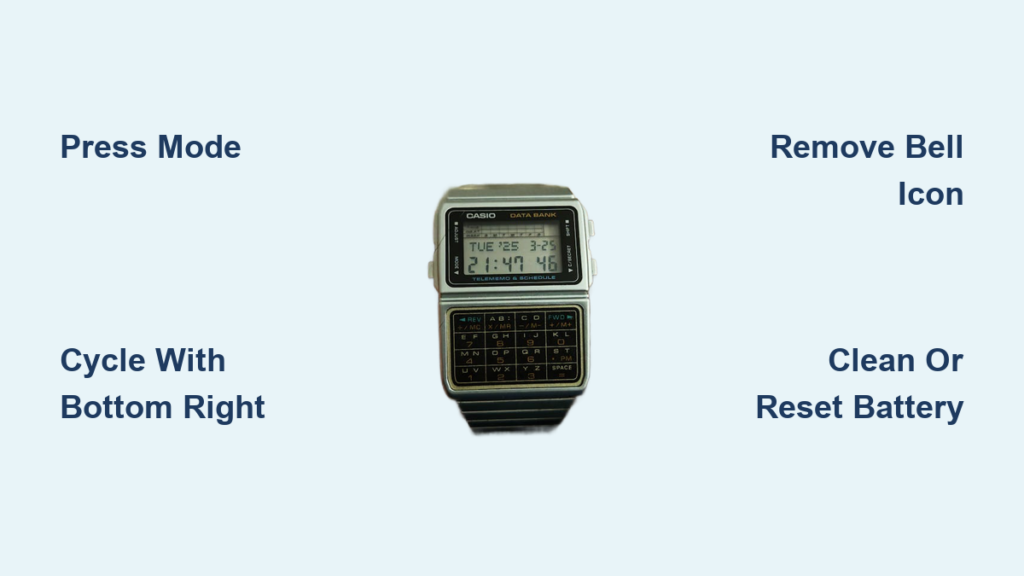
Is your Casio watch beeping at unexpected times? Many users experience sudden alarms or hourly chimes they did not set, especially on popular models like the F-91W or A168. The good news: turning off the alarm is quick and easy once you know the right button sequence. In this guide, you will learn the universal method to disable alarms and chimes, recognize key display symbols, troubleshoot unresponsive watches, and prevent future issues. Whether your watch is sounding every hour or just won’t stop beeping, these steps will silence it in seconds.
Access Alarm Mode Quickly
To stop the alarm, you must first enter the alarm configuration screen. This is done using the Mode button.
Press Mode Until Alarm Appears
Press the Mode button repeatedly until the display shows alarm indicators. Look for a bell icon, dashes, or the word “ALM” on your screen. On most Casio digital watches like the F-91W, A158, or 3426, this takes 3 to 4 presses from the normal time screen. If no symbols appear, cycle through all modes and return to the beginning, since some models reset the sequence after the stopwatch or timer.
Visual cue: When you see a small bell or three short lines at the top of the screen, you have reached Alarm Mode.
Toggle Alarm and Chime Off

Once in Alarm Mode, you can disable the alarm and hourly chime with one button.
Use Bottom Right Button to Cycle Settings
Press the bottom right button to toggle between alarm states. Each press changes the setting in this order: alarm ON with dashes visible, hourly chime ON with bell icon visible, both ON showing both symbols, and finally both OFF with no symbols displayed. Wait for both the bell and dash icons to disappear, which means the alarm and chime are fully disabled. Press Mode again to exit and return to the time display.
Time required: Less than 10 seconds. Success sign: No sound at the next hour or alarm time.
Identify Alarm Symbols Correctly
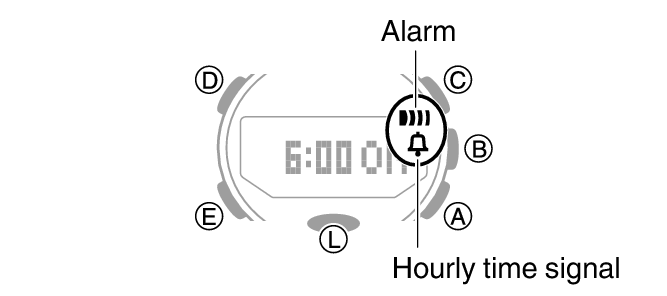
Misreading the display can lead to confusion. Knowing what each symbol means helps avoid accidental activation.
Bell Icon Equals Hourly Chime
The bell symbol means the hourly time signal is active. Your watch will beep once at the start of every hour. This is often mistaken for a malfunctioning alarm, but it is a separate feature.
Dash Lines Equal Active Alarm
A cluster of short lines or dashes indicates a daily alarm is set. This alarm goes off at a specific time unless turned off.
Pro tip: If both symbols are visible, both features are active. Disable both for complete silence.
Fix Unresponsive Alarms
Sometimes the alarm will not turn off, even after following the steps. Here is how to fix common issues.
Check for Stuck or Dirty Buttons
Dirt, sweat, or corrosion can cause buttons to stick, preventing proper input. Inspect the bottom right button; if it feels stiff or does not click, clean it. Use a cotton swab dipped in isopropyl alcohol to gently clean around the button. Let it dry completely before testing.
Advanced fix: One user resolved a frozen alarm by using pliers to gently release a jammed button, restoring function.
Reset with Battery Removal
If the alarm keeps sounding or the display will not respond, try this last resort method. Remove the watch back using a small screwdriver or case opener. Take out the battery for 10 to 15 seconds to reset the system. Reinsert the battery and close the case. The watch will reset to 12:00, so you will need to reconfigure the time and ensure alarms are off.
Warning: Only do this if you are comfortable handling small parts. Avoid static or moisture.
Model-Specific Steps for Casio 3426
The Casio 3426 follows the standard method but has unique labeling.
Navigate Using Correct Labels
Press Mode until “ALM” or alarm symbols appear. Press the lower right button, labeled “Alarm Reset” or “Set,” to cycle settings. Watch for the bell and dash symbols to vanish, which confirms both alarm and chime are off. Press Mode to exit.
If the alarm persists, confirm the hourly time signal is not mistaken for the alarm. Clean the buttons or perform a battery reset if unresponsive.
Prevent Future Alarm Issues
Avoid surprise beeps with simple maintenance and smart habits.
Clean Buttons Monthly
Wipe the watch face and buttons weekly with a dry cloth. Every month, clean button edges with a damp cotton swab and isopropyl alcohol. This prevents grime buildup that causes malfunctions.
Avoid Extreme Conditions
Exposure to moisture, heat, or cold can damage internal circuits. Water ingress may short button contacts, making them unresponsive. Remove the watch during swimming, showering, or intense workouts unless rated waterproof.
Replace Weak Batteries Promptly
A dying battery can cause erratic behavior, with alarms sounding randomly or failing to turn off. If your watch blinks slowly or resets time, replace the battery immediately. Standard CR2016 or CR2025 batteries last 1 to 2 years depending on usage.
When to Consult the Manual
Not all Casio watches use the same button layout. For less common models, the official manual is essential.
Find Your Model Number
Flip the watch over and read the model number engraved on the case back. Examples include F-91W, A168W, or WV-200. Search online for “Casio [model number] manual PDF” to download the official guide.
Manuals include exact button sequences, diagrams of display symbols, reset procedures, and feature explanations. This step is crucial for older or specialty models where alarm settings differ.
Frequently Asked Questions About Turning Off Casio Watch Alarms
How do I turn off the hourly chime on my Casio watch?
Press Mode until the bell icon appears in the display. Press the bottom right button to cycle through settings until the bell symbol disappears. This disables the hourly chime completely.
Why does my Casio watch beep every hour?
The hourly chime, indicated by a bell icon, is likely enabled. This feature makes the watch beep at the start of every hour. Follow the steps above to turn it off by removing the bell symbol from the display.
What do the symbols on my Casio watch mean?
A bell icon represents the hourly chime. Dashes or short lines indicate an active daily alarm. When both symbols appear, both features are enabled. No symbols mean both are disabled.
Can I turn off just the alarm without disabling the hourly chime?
Yes. Press Mode to enter Alarm Mode, then press the bottom right button to cycle settings. You can enable alarm only, chime only, both, or neither. Choose the setting that shows only the dash lines without the bell icon.
My Casio alarm will not turn off. What should I try first?
Clean the buttons first, especially the bottom right button, using isopropyl alcohol. If cleaning does not work, remove the battery for 10 to 15 seconds to perform a hard reset. Reconfigure the time and ensure alarms are turned off.
Where can I find the manual for my specific Casio model?
The model number is engraved on the back of the watch case. Search online using that number along with “manual PDF” to find the official Casio documentation for your specific model.
Key Takeaways for Silencing Your Casio Watch
Turning off the alarm on a Casio watch does not require tools or technical skills. Simply press Mode until alarm symbols appear, use the bottom right button to cycle settings until both symbols disappear, then press Mode again to exit. Remember that the bell icon means hourly chime while dash lines mean daily alarm. Disable both for complete silence.
If buttons become unresponsive, clean them with isopropyl alcohol or perform a battery reset. Regular cleaning and battery replacement keep your watch functioning properly. Always verify your model number since button layouts vary slightly across different Casio lines.
With these steps, you can confidently silence any Casio digital watch alarm and keep it quiet for good.



