

Is your Tissot watch showing the wrong time? Whether you just bought a new Tissot, returned from travel, or let it stop, knowing how to adjust the time properly is essential for accuracy and longevity. This guide covers model-specific instructions, step-by-step methods, and critical warnings to safely set the time on any Tissot watch. From classic Ballade models to advanced T-Touch Solar watches, you will learn exactly what to do and what to avoid.
Use Correct Crown Positions on Your Tissot
The crown is your main tool for adjusting time on mechanical and automatic Tissot watches. Most models use a three-position crown system that controls winding, date, and time.
Set Time in Position 2
Pull the crown fully out to Position 2 to adjust the hour and minute hands. Turn the crown clockwise to move the hands forward. Always advance the time forward rather than backward to prevent stress on internal gears. Once set, push the crown all the way in to restore water resistance.
Adjust Date in Position 1
Pull the crown halfway to Position 1 to change the date. Rotate the crown clockwise to advance the date wheel. On day-date models, this may cycle both day and date. Avoid this adjustment between 9:00 PM and 3:00 AM, when the date mechanism is engaged and most vulnerable.
Wind in Position 0
When the watch is stopped, turn the crown clockwise 20 to 30 times while fully pushed in. This manually winds the mainspring and restores power. You do not need to drain the power reserve before setting the time.
Pro Tip: If the crown does not pull out smoothly, do not force it. On screw-down models, unscrew the crown first by turning it counterclockwise until it pops out.
Set Time on Mechanical and Automatic Tissot Models
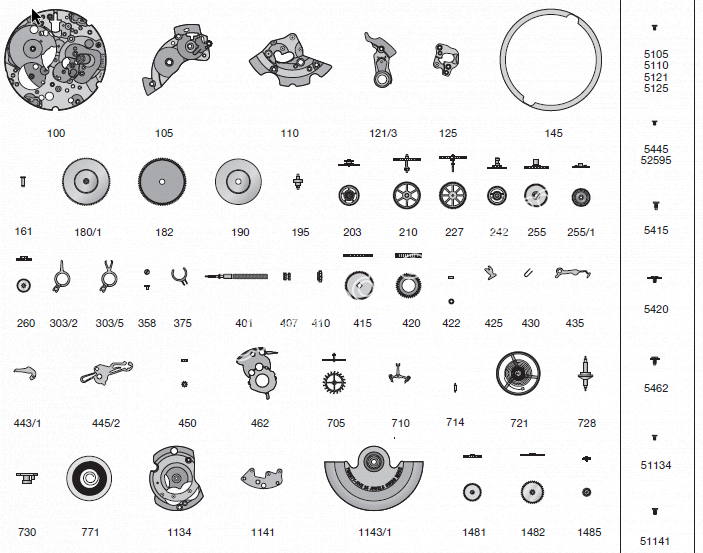
Tissot mechanical and automatic watches like the Ballade, PRX, or Le Locle use reliable Swiss movements such as the ETA 2824. These watches require a precise sequence to avoid errors in AM/PM or date function.
Verify AM/PM Before Setting
Setting the time without knowing if it is AM or PM can lead to a 12-hour mistake. Here is how to get it right:
- Pull the crown to Position 2.
- Rotate the hands forward until the date flips, which usually happens at midnight.
- The moment the date changes is 12:00 AM.
- Continue moving the hands another 12 hours to reach the correct time.
Why it matters: If you set the time without checking, your watch may think it is noon when it is midnight, causing the date to change at noon instead of midnight.
Set Date to Yesterday First
For best results, follow these steps:
1. Pull the crown to Position 1.
2. Set the date to yesterday.
3. Return to Position 2 and move hands forward through midnight to today.
This ensures the date changes at the correct time and reduces strain on the mechanism.
Avoid Midnight Adjustment Window
Never adjust the date between 9:00 PM and 3:00 AM. During this window, the date change gears are in motion. Forcing a change can bend or break internal parts.
User Warning: You can damage the movement if you change the date near midnight.
Follow Model-Specific Steps for Your Tissot

Different Tissot models have unique behaviors. Using the right method prevents errors and maintains accuracy.
Tissot Ballade Automatic Adjustment
The Tissot Ballade uses the ETA 2824-2 movement, a standard in Swiss watchmaking.
Crown positions for Ballade:
– Position 0: Wind clockwise
– Position 1: Set date
– Position 2: Set time
Steps to adjust Ballade time:
1. Wind the crown 20 to 30 times if the watch is stopped.
2. Pull to Position 1 and set date to yesterday.
3. Pull to Position 2 and advance hands until date flips, which establishes your AM reference.
4. Continue to current time.
5. Push crown fully in.
User Confirmed: Pull it out one click to change the date. Pull it out two clicks to change the time.
PRX and Other Date-Only Models
If your Tissot has only a date window with no day display, rotating the crown in Position 1 changes only the date. The process is the same: avoid 9 PM to 3 AM and set time in Position 2.
Note: Counterclockwise rotation is generally safe but not recommended. Stick to clockwise for reliability.
Adjust Time on T-Touch Models
Tissot T-Touch, T-Touch Expert, and T-Touch Solar watches use touchscreen technology with analog hands. Setting time on these models is digital, not mechanical.
Enter Time-Setting Mode on T-Touch
- Press and hold the center crown button for 2 to 3 seconds.
- Wait for the T logo to flash on the screen.
- Tap the T icon to enter time mode.
Adjust Hours and Minutes
- Press and hold the plus button to move hands forward.
- Press and hold the minus button to move backward if allowed.
- Stop when the correct time is displayed.
Technician Advice: After tapping T, press and hold the plus or minus button to adjust the hour or minute.
Save and Exit Properly
Once set, release the button. The watch saves automatically. The flashing T stops when the mode ends.
Do not skip: Always exit properly to lock in your settings.
Troubleshoot T-Touch Time Setting Issues
Even with correct steps, T-Touch models can fail to respond due to software or hardware problems.
Fix Unresponsive Touchscreen
If the T flashes but time does not change:
1. Enter calibration mode by holding the center button.
2. Tap the screen at the prompts to recalibrate touch sensitivity.
3. Retry time setting.
Reset Frozen Display
If buttons do not respond:
1. Press and hold all three buttons for 10 seconds.
2. Release when the watch resets.
3. Re-enter time-setting mode.
Warning: If the analog hands move correctly but the digital interface fails, a hardware malfunction is likely.
When to Visit a Tissot Service Center
Visit an authorized service center if:
– The watch resets to wrong time after reboot
– Buttons are unresponsive after reset
– Screen flickers or freezes
Final Advice: I recommend visiting a service center since it appears that the basic functionality of the watch is not operational.
Prevent Damage With Best Practices
Following the right habits protects your Tissot and ensures reliable performance.
Do This
These practices keep your watch safe:
– Set date between 6:00 AM and 8:00 PM
– Advance hands forward only
– Fully seat the crown after adjustment
– Wind automatic watches if stopped
– Use clockwise crown rotation
Avoid These Mistakes
These actions can damage your watch:
– Adjusting date between 9:00 PM and 3:00 AM
– Forcing a stuck crown
– Using a wet or damaged crown
– Skipping AM/PM verification
Pro Tip: Always double-check that the crown is fully pushed in. A loose crown compromises water resistance, even on 100m-rated models.
Maintain Accuracy and Long-Term Performance
Proper time setting is part of long-term care. A well-maintained Tissot can last decades.
Check Water Resistance After Adjustment
After every adjustment, ensure the crown is fully seated. On screw-down models, gently tighten it by turning clockwise until snug.
Warning: Never operate the crown underwater or with wet hands.
Service Your Watch Every 3 to 5 Years
Mechanical and automatic movements need regular servicing:
– Oil dried gears
– Replace worn parts
– Re-seal for water resistance
Skipping service leads to poor accuracy, date failure, or complete stoppage.
Clean the Crown Regularly
Use a soft, dry cloth to wipe the crown. Dirt and debris can block smooth operation or scratch the case.
Quick Steps to Adjust Time on Your Tissot Watch
For Mechanical and Automatic Tissot Watches
- Wind crown 20 to 30 turns if the watch is stopped.
- Pull to Position 1 and set date to yesterday. Avoid 9 PM to 3 AM.
- Pull to Position 2 and advance hands until date flips, which marks AM.
- Set the correct time.
- Push crown fully in.
For Tissot T-Touch Models
- Hold center button until T flashes.
- Tap T on screen.
- Hold plus or minus to adjust time.
- If unresponsive, recalibrate or reset with all three buttons.
- Visit a service center if issues persist.
Frequently Asked Questions About Adjusting Time on Tissot Watches
How do I know if my Tissot watch is AM or PM when setting the time?
Pull the crown to Position 2 and rotate the hands forward until the date changes. The moment the date flips is midnight, which is 12:00 AM. Continue moving the hands forward to reach your desired time.
Can I set the date on my Tissot at night?
You should avoid adjusting the date between 9:00 PM and 3:00 AM. During this window, the date change mechanism is engaged and forcing a change can damage internal gears.
What should I do if my Tissot crown is stuck?
Do not force the crown. On screw-down models, turn the crown counterclockwise until it unscrews and pops out. Forcing it may damage the crown stem or case.
How do I adjust time on a Tissot T-Touch Solar?
Press and hold the center crown button for 2 to 3 seconds until the T logo flashes. Tap the T icon on the screen, then press and hold the plus or minus buttons to adjust the time.
Why does my Tissot watch gain or lose time after setting?
This may indicate the movement needs servicing. Mechanical watches should be serviced every 3 to 5 years. If the issue persists, visit an authorized Tissot service center.
Can I damage my Tissot by changing the time incorrectly?
Yes, especially if you adjust the date near midnight or force the crown. Following the proper sequence and avoiding the 9 PM to 3 AM window prevents movement damage.
Key Takeaways for Adjusting Time on Your Tissot Watch
Adjusting time on a Tissot watch is straightforward when done correctly, but risky if rushed or performed at the wrong time. Always respect the 9 PM to 3 AM blackout window for date changes, verify your AM/PM reference by watching for the date flip, and push the crown fully in to maintain water resistance. For T-Touch models, software issues may require professional help from an authorized service center. When in doubt, consult a Tissot service center to protect your investment and ensure your watch continues keeping accurate time for years to come.



