

You placed your Bose Sport Earbuds in the case, plugged in the charger, and got nothing. Maybe only one light flashes, or charging stops at 80%. You are not alone. Bose Sport Earbuds not charging is a common frustration, especially with units left unused for months or years. The good news is that most charging issues stem from fixable causes like firmware glitches, dirty contacts, or deep battery discharge, not permanent hardware failure.
This guide breaks down exactly why your earbuds will not charge and how to fix it step by step. Whether you see a solid red light, a stuck 90% reading, or no response at all, you will learn how to diagnose the issue. You will also learn how to perform a 30-second hard reset, revive a dead battery, clean charging contacts safely, and know when to contact Bose support. Let us get your earbuds back to full power.
Decode Charging Light Patterns

Understanding what your earbuds’ LED lights mean is the first step to fixing charging problems. Each color and behavior signals a different state, from normal operation to deep discharge.
Orange to Solid Red: Deep Discharge State
When you plug in your earbuds and see flashing orange followed by a solid red light, the battery is likely deeply discharged. The earbuds are trying to wake up but have not received enough power yet. This is common in devices that sat unused for months. Do not panic. This does not always mean the battery is dead. With the right power source and patience, recovery is possible.
Stuck at 80 to 90%: Firmware Calibration Glitch
If your earbuds charge but stop at 80% or 90%, the battery may actually be full. The software just is not reporting it correctly. This is a firmware calibration error in the battery management system. The system thinks the battery is full when it is not, so it halts charging prematurely. A hard reset usually fixes this false-read issue.
No Lights or Inconsistent Response
No lights at all, even when plugging in, suggests a power delivery problem. Check your cable, charger, and charging port. If only one earbud lights up, the issue may be isolated to one side. Clean the contacts and test both earbuds individually.
Perform a 30-Second Hard Reset
The 30-second hard reset is the most effective fix for firmware-related charging issues, especially when your earbuds will not go past 80%. This resets the internal software and recalibrates the battery reporting system.
Enter Pairing Mode First
Before resetting, ensure both earbuds are in pairing mode:
1. Place both earbuds in the charging case.
2. Open the lid. White lights should blink on both earbuds.
3. If lights do not blink, press and hold the Bluetooth button on the case for 3 seconds until white lights appear.
Pro Tip: If the lights are blue, they are already paired. You need white blinking lights to proceed.
Execute the Reset
Once in pairing mode:
1. Close the case lid and wait 5 seconds.
2. Open the case and press and hold the Bluetooth button on the side.
3. Hold for a full 30 seconds. Do not release early.
4. After 30 seconds, release the button.
Watch for the light change. The earbuds will flash blue, then switch to white. This confirms the reset is complete.
Re-Pair Your Earbuds
After the reset, your earbuds are like new. They have forgotten all previous connections.
1. Go to your phone’s Bluetooth settings.
2. Tap “Bose Sport Earbuds” to reconnect.
3. Test charging by placing them back in the case and monitoring if they now reach 100%.
Common Mistake: Not holding the button long enough. If lights do not change, repeat the process and count slowly to 30.
Clean Charging Contacts Thoroughly
:max_bytes(150000):strip_icc()/Method-3B-clean-earbud-case-swab-alcohol-3bc13f686c29441db9f40a89a2506c7e.jpg)
Dirt, sweat, and oxidation on charging pins are silent killers of connectivity. Even a thin layer of grime can block power flow, making your earbuds appear dead when the issue is just poor contact.
Gather Cleaning Supplies
You will need:
• Dry microfiber cloth
• Cotton swabs
• Isopropyl alcohol (70% or higher)
• Soft-bristled brush (like a clean toothbrush)
Never use water or damp cloths directly on the earbuds or case.
Clean Earbud and Case Contacts
- Remove earbuds from the case.
- Inspect the metal charging pins on the inside of the case and the base of each earbud.
- Dip a cotton swab in isopropyl alcohol and gently wipe each pin.
- Use a dry swab to remove residue.
- For stubborn grime, use the soft brush with light strokes.
- Let all parts air dry for at least 5 minutes before reassembling.
Visual Cue: Look for greenish or white crust. This is oxidation from sweat exposure. Clean it off carefully.
Check Cable and Port Fit
Ensure the USB-C cable fits snugly:
• Wiggle test: plug in the cable. If it wobbles, the port may be damaged.
• Try a different cable or wall adapter to rule out power source issues.
Revive a Dead Battery

If your earbuds show no signs of life, they may be in a deep discharge state. Lithium-ion batteries can drop below the voltage needed to power on, especially after long storage.
Use a High-Power Wall Charger
Do not use a computer USB port or low-output charger. These often deliver less than 1A, which is not enough to wake a dead battery.
Use a wall adapter rated for at least 2A (2.0A or higher). Most modern phone chargers meet this standard.
Charge for 1 to 2 Hours Without Interruption
- Plug the earbuds into the wall charger using a known-good USB-C cable.
- Leave them connected for at least 1 to 2 hours, even if the light stays solid red or off.
- Do not open the case or remove them during this time.
After 2 hours:
• Open the case and look for any light activity.
• Try turning on the earbuds while still connected to power.
Why this works: Deeply discharged batteries need sustained voltage to jump-start the charging circuit. Patience is key.
Test Power Sources and Cables

A faulty cable or weak power source can mimic earbud failure. Rule these out before assuming the problem is internal.
Try Different Chargers and Ports
- Test with a phone wall charger (2A or higher) instead of a laptop USB port.
- Avoid car chargers or power banks unless they deliver stable 2A output.
- Use a different USB-C cable, preferably one you know works for fast charging.
Verify Charging Case Function
If the case itself will not charge, the issue may not be the earbuds:
• Check the case’s LED when plugging in.
• If the case does not charge, replace the cable or try a different outlet.
• A non-functional case means no power reaches the earbuds.
Quick Swap Test: If you have access to another Bose Sport Earbuds case, try charging your earbuds in it. If they charge, your original case is faulty.
Prevent Future Charging Issues
Once you have fixed the problem, take steps to keep it from coming back. A little maintenance goes a long way in extending the life of your earbuds.
Store at 50 to 80% Charge
Never store your earbuds with a fully drained or fully charged battery. For long-term storage:
• Charge to 50 to 80%.
• Turn them off.
• Store in a cool, dry place.
Charge Every 6 Months
If you are not using the earbuds regularly:
• Power them on every 6 months.
• Charge fully and discharge once to keep the battery active.
• This prevents deep discharge and maintains chemical health.
Avoid Sweat and Humidity
Sweat accelerates oxidation on metal contacts:
• Wipe earbuds with a dry cloth after workouts.
• Store in a dry environment. Avoid gym bags or humid bathrooms.
Know When to Contact Bose Support
If you have tried all the steps, including reset, clean, and deep charge, and your earbuds still will not charge, it may be time for professional help.
Signs of Permanent Failure
Contact Bose if:
• No lights appear after 2 or more hours on a 2A charger.
• The 30-second reset fails repeatedly.
• Only one earbud charges consistently.
• The battery dies immediately after unplugging.
Check Warranty and Service Options
• Warranty Status: Visit Bose’s warranty page and enter your serial number.
• Out-of-Warranty? Bose still offers repair or replacement options for older models.
• Aged Units (5+ years): Batteries degrade over time. If your earbuds are over 5 years old, replacement may be the only viable solution.
Good News: Bose provides free technical support even for discontinued products. They can diagnose whether your unit is repairable or needs replacing.
Frequently Asked Questions About Bose Sport Earbuds Not Charging
Why are my Bose Sport Earbuds not charging past 80%?
This is typically caused by a firmware calibration error in the battery management system. The software incorrectly reports the battery as full when it is only at 80 to 90%. Performing the 30-second hard reset usually recalibrates the system and resolves the issue.
What does a solid red light mean on Bose Sport Earbuds?
A solid red light after an initial orange flash indicates a deeply discharged battery. The earbuds are trying to wake up but have not received enough power. Connect them to a 2A wall charger and leave them for 1 to 2 hours without interruption.
Can I charge Bose Sport Earbuds with a laptop USB port?
It is not recommended for deeply discharged units. Laptop USB ports often deliver less than 1A, which may not be enough to revive a dormant battery. Use a wall adapter rated for at least 2A for best results.
How do I reset my Bose Sport Earbuds when they will not charge?
Place both earbuds in the case and ensure white blinking lights appear. Close the lid for 5 seconds, then open it and hold the Bluetooth button on the case for a full 30 seconds. The lights will change from blue to white when the reset is complete.
Why is only one Bose Sport Earbud charging?
This usually points to dirty charging contacts on one earbud or a case issue. Clean the metal pins on both the earbud and the case with isopropyl alcohol. If the problem persists, test the earbud in a different case to isolate the issue.
Are older Bose Sport Earbuds worth repairing?
Units over 5 years old may have permanently degraded batteries or obsolete components. Bose offers free technical support for all products, including older models, and can advise whether repair or replacement is the better option.
Key Takeaways for Fixing Bose Sport Earbuds Not Charging
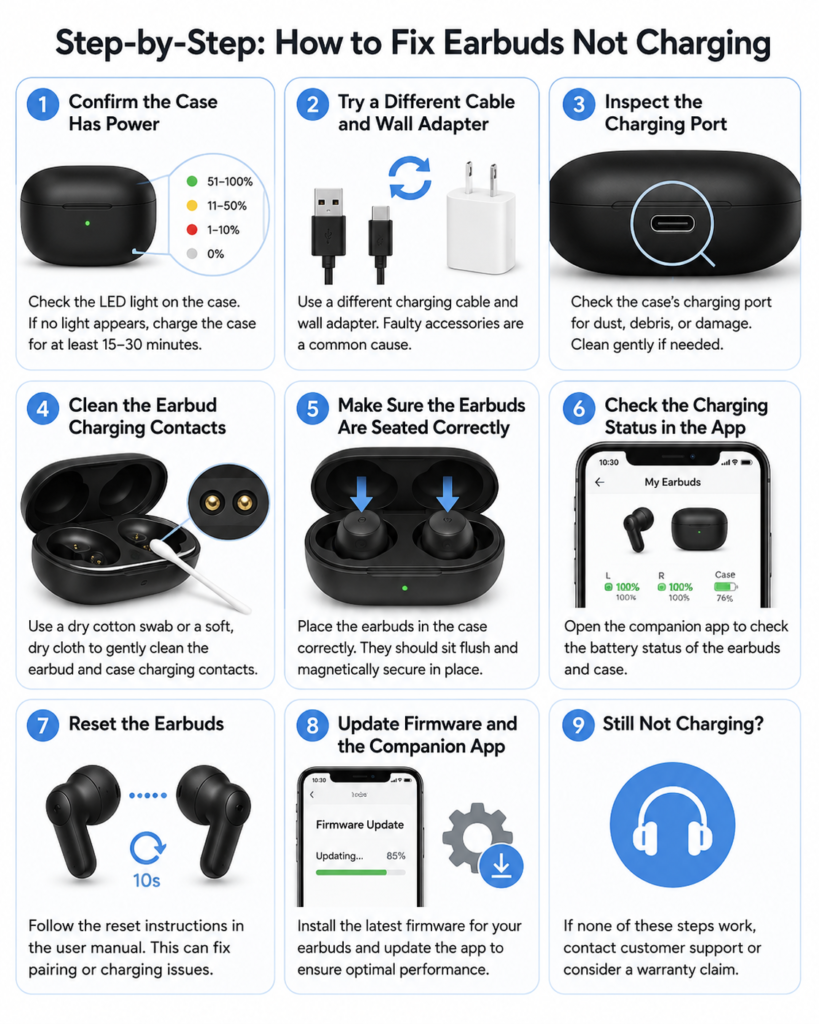
Most Bose Sport Earbuds not charging issues are fixable with simple, user-level steps. Start by checking the lights. Orange to red means try a 2A wall charger for 2 hours. Stuck at 80% means do the 30-second hard reset. No response means clean the contacts and test cables.
Most issues stem from software glitches, dirty pins, or deep discharge, not dead batteries. With proper care, your earbuds can last years. But if all else fails, reach out to Bose Support. They will help you decide whether repair or replacement is best.
Now that you know the fix, plug in, reset, and get back to your music, fully charged.



