

Losing a pair of wireless earbuds can be frustrating, especially when they slip out of a pocket during a run or vanish inside a gym bag. The Bose Sport Earbuds are compact, lightweight, and surprisingly easy to misplace. Fortunately, Bose offers built-in tools that make recovery possible if you act quickly. This guide explains exactly how to find Bose Sport Earbuds using digital tracking, acoustic alerts, and physical identification methods.
You will learn how to activate the Find My Buds feature, read the last known location on a map, trigger a locator alarm, locate the hidden serial number, and work within the system’s limitations. We will also cover troubleshooting tips and prevention habits so your earbuds stay safe in the future.
Activate Find My Buds in the Bose Connect App
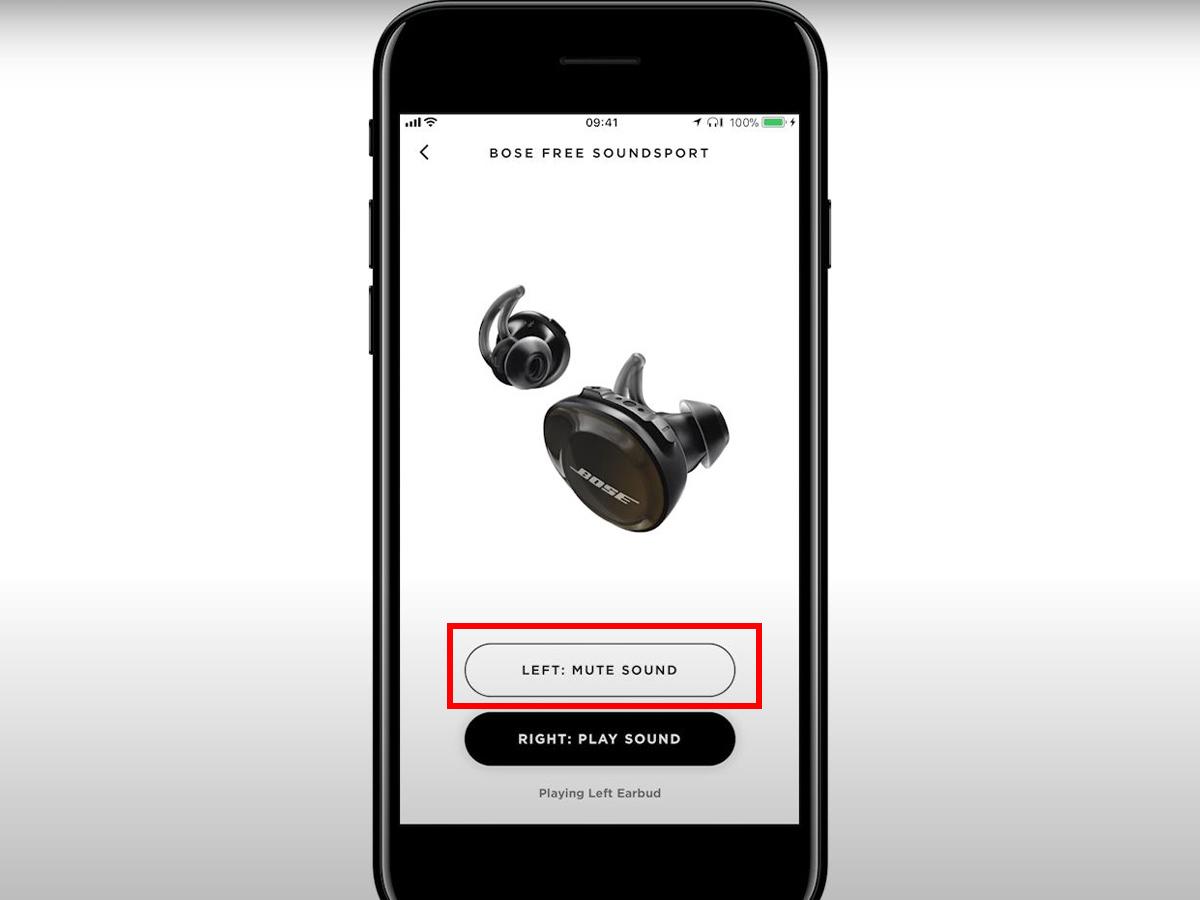
The Bose Connect app is the control center for locating your earbuds. Before any loss occurs, you must configure the tracking feature so the app can log location data the moment your earbuds disconnect.
Enable Location Tracking Before You Lose Them
Setting up tracking takes only a few minutes and pays off when you need it most:
- Download Bose Connect from the Apple App Store or Google Play Store.
- Pair your Bose Sport Earbuds with your smartphone via Bluetooth.
- Open the app and tap the menu icon (three horizontal lines).
- Select “Find My Buds” from the menu.
- Tap “Turn on Find My Buds” and grant Location Services when prompted.
Once enabled, the app records the last known location every time the earbuds lose connection with your phone. This data appears on a map the next time you search.
⚠️ Critical warning: No location data is saved if tracking was not turned on before the loss. Set this up today to avoid future headaches.
Check the Last Known Location on the Map
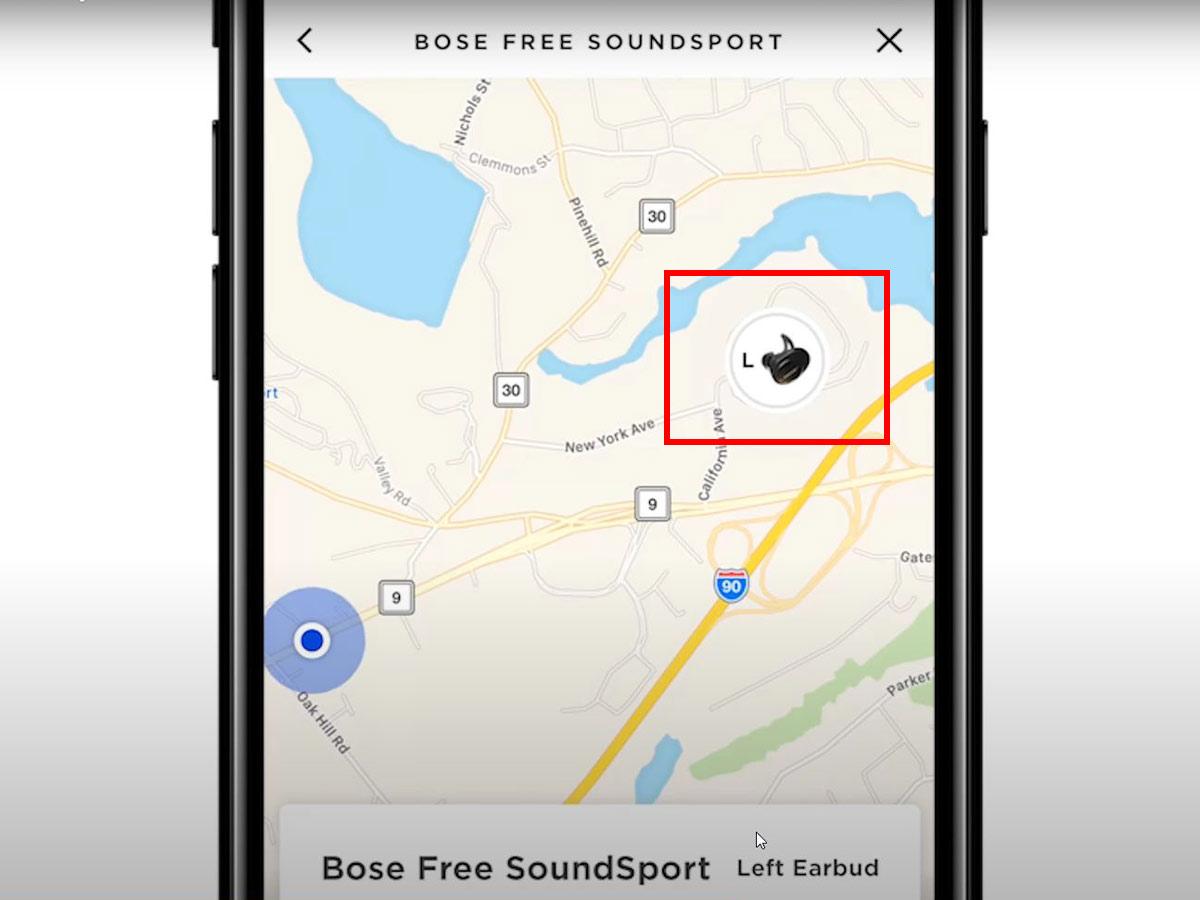
When you realize your earbuds are missing, the first step is checking where they were last connected to your phone.
Navigate Using Historical GPS Data
- Open the Bose Connect app.
- Navigate to “Find My Buds”.
- View the map showing your current position and the last known location of the earbuds.
This map point marks exactly where the earbuds disconnected from your phone. It could be your office desk, a coffee shop counter, or the seat of your car.
Understand the Tracking Limits
- The location does not update in real time.
- If someone moved the earbuds after disconnection, the map will not reflect the new position.
- Accuracy depends on GPS signal strength at the moment of disconnection.
✅ Best use: Return to the exact spot shown on the map. Search nearby surfaces, pockets, and underneath furniture.
🔍 Pro tip: Keep the app open while searching. Some users notice subtle connection status changes that hint at proximity.
Play Sound to Locate Nearby Earbuds

Once you are near the last known location, or if you suspect the earbuds are within Bluetooth range, use the acoustic alert to pinpoint them.
Trigger the Locator Alarm
If your phone is within Bluetooth range (up to 30 feet):
- Open Bose Connect.
- Tap “Play Sound” in the Find My Buds section.
- Wait for the earbuds to emit an audible alert.
Even if the earbuds are stored inside the charging case, they will play a sound, provided they have battery power remaining.
Listen for Progressive Beeping
The alert starts softly but increases in volume over time, making it harder to ignore. Before the alarm begins, you will hear a voice prompt:
“The earbud locator alarm is about to go off. Remove your earbuds now.”
This warning protects your hearing in case the earbuds are still in your ears.
Stop the Sound Once Found
After recovery:
- Tap “Stop Sound” in the app, or
- Place the earbuds back in the charging case to silence the alarm automatically.
❗ Note: The sound only works within Bluetooth range. If the earbuds are too far away or powered down, no sound will play.
Locate the Serial Number Inside the Charging Case

If digital tracking fails or you need to file a warranty claim, identifying your earbuds by serial number is essential.
Find the Hidden Serial Label
To access the serial number:
- Open the charging case fully.
- Remove the right earbud from its slot.
- Look just below the right charging contact inside the case.
- Locate the small printed label with alphanumeric characters.
This is the only place the serial number appears. It is not printed on the earbuds or outer packaging.
Record Your Serial Number
- Format: 10 to 12 uppercase letters and numbers.
- Often includes a barcode for scanning.
- Unique to your specific pair and used for warranty validation and support requests.
📝 Expert advice: Take a photo or write down the serial number and store it in cloud notes. If the label fades over time, you will still have proof of ownership.
Know the Limitations of Bose Tracking
While Bose’s system helps, it has important constraints that affect recovery success.
Battery Life Determines Success
If the earbuds are dead, they cannot:
- Emit sound
- Update location
- Respond to Bluetooth signals
The charging case holds multiple full charges, so stored earbuds may still have power available.
⏳ Time is critical: The longer the earbuds remain lost, the more likely the battery has drained completely.
Range and Movement Reduce Accuracy
- Last known location only reflects the disconnection point, not the current position.
- If someone picked up and moved the earbuds, the map will not show the new location until reconnection.
- Bluetooth range is limited, typically 20 to 30 feet indoors, and less through walls.
🧭 Strategy: Focus your search within a 10-foot radius of the map location. Check couch cushions, gym bags, jacket pockets, and under desks.
Troubleshoot Common Tracking Failures
Sometimes the system does not work as expected. Here is how to fix the most common issues.
“Find My Buds” Option Not Showing?
Check these prerequisites:
- Are your SoundSport Free earbuds paired to your phone?
- Is the Bose Connect app updated to the latest version?
- Did you grant Location Permissions to the app?
If not, go to your phone settings and enable location access for Bose Connect.
No Sound After Tapping “Play Sound”?
Possible causes include:
- Out of range: Move closer to the last known location.
- Dead battery: The earbuds or case may be fully drained.
- Case closed: Some users report delayed response when the case was closed during disconnection.
Try walking around the area with the app open. Sometimes a weak signal flickers back briefly.
Prevent Future Loss with Smart Habits
The best way to find Bose Sport Earbuds is to avoid losing them in the first place.
Use a Case Lanyard or Clip
Attach a keychain loop, carabiner, or wrist strap to the charging case. This makes it easier to spot and harder to leave behind.
Name Your Earbuds Clearly
In the Bose Connect app, rename your earbuds to something unique like “John’s Bose – Red Case”. If someone finds them and pairs them, they will see your identifier.
Charge Daily
Keep the case charged. A powered case means the earbuds stay charged and trackable for longer if misplaced.
Frequently Asked Questions About Finding Bose Sport Earbuds
Can I track Bose Sport Earbuds in real time?
No. Bose uses a last known location system that records the GPS point where the earbuds disconnected from your phone. The map does not update while the earbuds are offline or out of range.
How far away can I trigger the Play Sound feature?
The Play Sound feature only works within Bluetooth range, typically up to 30 feet in open spaces. Walls, furniture, and other obstacles reduce this range significantly.
Will the locator alarm work if the earbuds are in the charging case?
Yes, the alarm can play even when the earbuds are stored inside the case, as long as the case and earbuds have sufficient battery power.
Where is the serial number on Bose Sport Earbuds?
The serial number is printed on a small label inside the charging case, just below the charging contact for the right earbud. It is not visible on the earbuds themselves or the outer packaging.
What happens if the earbuds die before I find them?
If the battery is depleted, the earbuds cannot emit sound, update location, or respond to Bluetooth signals. You must rely on the last known map location and physical search of the area.
Can someone else see the location of my earbuds?
No. Bose stores the location data privately on your device and does not share it with third parties or other users.
Key Takeaways for Recovering Bose Sport Earbuds
Learning how to find Bose Sport Earbuds comes down to preparation and quick action. Enable Find My Buds in the Bose Connect app before any loss occurs, grant location permissions, and keep the app updated. When earbuds go missing, check the last known location on the map, return to that spot, and trigger the Play Sound feature if within Bluetooth range. Record your serial number from inside the charging case so you always have proof of ownership for warranty claims.
Your next step is simple: open the Bose Connect app right now, activate Find My Buds, and take a photo of your serial number. Doing this today ensures that if your earbuds ever go missing, you will have every tool needed to bring them back fast.



