If your Fitbit Versa won’t turn on, the screen is cracked, or it’s stuck in a reboot loop, you are not alone. Thousands of users face these exact issues with their Fitbit Versa 2, Versa 3, and Versa 4 models, and many of these problems are repairable without buying a replacement. This guide covers proven troubleshooting steps, professional repair options, and DIY solutions for every common Fitbit Versa failure.
You will learn how to diagnose a dead battery versus a software glitch, clean charging contacts properly, fix a cracked AMOLED screen, and know exactly when to send your device to a professional. Whether you own a Versa 2 (FB507), Versa 3 (FB51), or Versa 4 (FB523), this resource has model-specific details to get your smartwatch working like new.
Identify Your Fitbit Versa Model Before Repair
Repair procedures and parts vary between Fitbit Versa generations, so confirming your exact model number is the first critical step. Using the wrong component or procedure can cause permanent damage to your device.
Find Your Model Number in Settings
Open the Google Health app on your phone, tap Devices, select your watch, then navigate to Device Info. The model number will appear here. The Fitbit Versa 2 is FB507, the Versa 3 is FB51, and the Versa 4 is FB523. These numbers do not appear on the device body itself, so checking the app is essential.
Compare Physical Features by Model
The Versa 2 has a square face with an aluminum case and lacks built-in GPS. The Versa 3 features a slightly larger bezel and adds GPS along with a voice assistant. The Versa 4 has a thinner profile and supports Bluetooth calls, Google Maps, and Google Wallet. Knowing these differences helps you order correct replacement parts and follow the right troubleshooting steps.
Fix a Blank or Unresponsive Fitbit Versa Screen

A black or frozen screen is the most common Fitbit Versa complaint, but it does not always mean hardware failure. Try these non-invasive solutions before considering disassembly or professional repair.
Charge After Deep Discharge
If your device will not power on, the battery may be completely drained. Plug it into the official Fitbit magnetic charger and leave it for at least one hour, even if no charging icon appears. AMOLED screens often remain dark during deep recharge cycles.
Use only the official Fitbit magnetic charger and ensure all pins make solid contact with the back of the device. Third-party chargers may underpower or damage the battery. After one hour, press and hold the left button for 10 to 15 seconds to force a restart.
Clean Charging Contacts Properly
Dirty or corroded contacts prevent charging and can cause power issues. Inspect the gold or bronze-colored metal pads on the back of your watch. Dampen a soft toothbrush with clean water and gently scrub the contacts in circular motions. Dry thoroughly with a lint-free cloth, then clean the charger pins with a cotton swab and rubbing alcohol.
Never use metal tools on the charging contacts. Metal scratches the plating and accelerates corrosion, which can permanently damage the charging system.
Update Firmware Through the App
Outdated firmware causes display glitches, boot loops, and responsiveness issues. Ensure your phone has the latest Google Health app, then open the app and go to Connections, select your device, and tap Update. This process may take over an hour, so keep the watch charged and near your phone. Do not close the app during the update.
Perform a Factory Reset on Your Fitbit Versa
When software freezes persist despite charging and cleaning, a factory reset clears corrupted data. This erases all personal information, so back up your data first if possible.
Reset Through the App
If the screen responds but the device lags, open the Google Health app and go to Devices, select your watch, then tap Settings. Choose Factory Reset and confirm. Wait for the device to reboot fully before setting it up again.
Force Reset a Frozen Device
For completely unresponsive devices, plug the watch into the charger, then press and hold both side buttons for 15 or more seconds. Release when the Fitbit logo appears and follow the on-screen setup instructions. This hard reset often resolves flickering screens and endless reboot loops.
Repair a Cracked or Broken Fitbit Versa Screen
A cracked AMOLED screen affects visibility and touch sensitivity. While DIY repair kits exist, the process requires precision due to adhesive sealing and fragile ribbon cables inside the device.
Professional Screen Replacement Options
Professional repair services like Joe’s GE and Fix Fitbit offer screen replacements starting at approximately £45 (around $55) for the Versa 2. The process includes a pre-paid shipping label sent to your email, a technician diagnosis with a quote you approve before work begins, and an OEM or high-quality replacement AMOLED screen. Most services include a 100-day limited warranty on parts and labor.
Turnaround time is typically 1 to 2 weeks including shipping. Fast-track services can complete repairs in 2 to 5 days once the device arrives at the lab, though adhesive curing may require an overnight wait before dispatch.
DIY Screen Replacement Risks
Replacement screens and tools are available online, and the repair is technically possible for experienced users. However, the process requires heat application to soften adhesive, and internal cables tear easily during disassembly. The new screen must be sealed properly to maintain water resistance. For non-experts, professional repair is significantly safer and more reliable.
Replace a Failing Fitbit Versa Battery
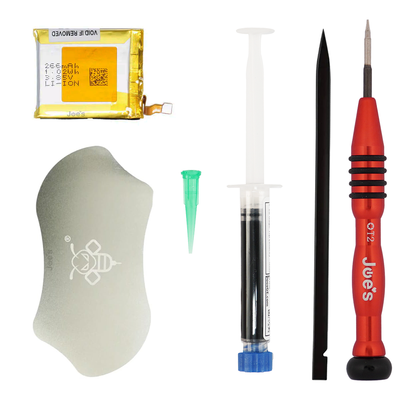
Short battery life or sudden shutdowns usually indicate battery degradation, which is common after two or more years of heavy use.
Confirm Battery Failure First
Rule out software causes before replacing the battery. Disable Always-On Display, turn off frequent notifications, reduce screen brightness, and uninstall unused apps. If the battery still drains in under two days despite these adjustments, hardware replacement is likely necessary.
Professional Battery Replacement
Battery replacement is a standard service for Versa 2, 3, and 4 models. The process involves full disassembly, disconnecting the old battery, installing a new OEM-grade cell, and re-sealing with waterproof adhesive. This service is often included in screen replacement quotes or offered as a standalone option.
DIY battery replacement is not recommended. Lithium-ion cells pose fire risks if punctured or improperly handled, and improper sealing compromises water resistance.
Fix Stuck on “Repair Screen” or Pairing Loop
Some users, especially those reactivating old devices, get stuck on a “Repair Screen” or infinite pairing loop. This indicates a failed connection handshake between the device and the Google Health app.
Step-by-Step Fix for Pairing Issues
Force restart the device by holding both side buttons for 15 seconds. On your phone, uninstall and reinstall the Google Health app, then forget the device in your Bluetooth settings. Open the app and attempt to pair as a new device. If prompted, perform a factory reset on the watch.
If the loop continues after these steps, the Bluetooth module may be faulty and require motherboard-level repair.
Fix Touchscreen Unresponsiveness
An unresponsive touchscreen is often mistaken for hardware failure when the actual cause is simple interference from residue or moisture.
Clean the Screen Surface
Sweat, oil, or residue blocks touch sensitivity. Power off the device and wipe the screen with a soft, slightly damp microfiber cloth. Avoid window cleaners or abrasive materials. Dry completely before turning the device back on. Try restarting after cleaning to restore responsiveness.
Test for Hardware Failure
After cleaning and resetting, try selecting items on-screen and swiping through menus. If the touchscreen remains unresponsive, the digitizer or motherboard may be damaged and professional diagnosis is required.
Handle Water Damage and Moisture
The Fitbit Versa is water-resistant up to 50 meters, but exposure to saltwater, soap, or prolonged submersion can cause internal corrosion.
Immediate Actions After Submersion
Rinse the device with fresh water if exposed to salt or chlorine. Dry immediately with a soft towel and do not charge while wet. Let the device air dry for 24 to 48 hours before attempting to power it on.
Never use rice to dry electronics. Silica gel packets are more effective and do not leave residue inside the device.
Protect the Altimeter Sensor
A small hole on the back houses the altimeter sensor used for floor counting. Never insert anything into this hole, not even a paperclip. Doing so destroys the sensor and voids any repair warranty.
When to Use Professional Fitbit Versa Repair

Some issues require expert tools, OEM components, and specialized knowledge. Here is exactly when to ship your device for professional repair.
Send for Repair If Your Device Has
A cracked or flickering screen that persists after a reset, a battery that dies in under eight hours despite calibration attempts, a device that will not charge after thorough contact cleaning, a persistent “Repair Screen” loop following all troubleshooting steps, or visible internal corrosion. These symptoms indicate hardware failure that cannot be fixed with software solutions.
What Professional Repair Services Include
Professional repair services support Versa 2 (FB507), Versa 3 (FB51), Versa 4 (FB523), Sense, and Sense 2 models. Common fixes include screen replacement, battery replacement, motherboard repair, and strap replacement. Turnaround time is typically 1 to 2 weeks, with a 100-day limited warranty on repaired parts. Technicians do not access user data, but you should always back up your data before shipping.
Service Fees and Policies
A $40 diagnostic fee applies if you decline repair or if the device is found to be functional. A $25 return fee applies for counterfeit or unsupported models. There is no charge if the device is repairable but deemed technically impossible to fix. Abandoned devices are disposed of after 30 days.
Prevent Future Fitbit Versa Problems
Extend your device lifespan with these simple maintenance habits.
Weekly and Monthly Maintenance
Wipe the screen and back with a dry microfiber cloth weekly. Clean charging contacts monthly with a soft brush. Update firmware when prompted and remove the device during high-heat activities like saunas or hot yoga.
Battery Longevity Tips
Avoid full discharges by recharging before battery drops below 10%. Do not leave the device on the charger past 100%. Store in a cool, dry place when not in use for extended periods.
Use Genuine Accessories
Only use official Fitbit chargers to prevent power damage. Replace worn bands early to prevent latch damage. Avoid third-party screen protectors that interfere with touch sensitivity.
Frequently Asked Questions About Fitbit Versa Repair
Can I fix a cracked Fitbit Versa screen myself?
DIY screen replacement kits are available, but the process is complex and risky. Internal cables are fragile, adhesive removal requires heat, and improper sealing loses water resistance. Most users save money and stress by using professional repair services that offer warranties.
Why won’t my Fitbit Versa turn on even when charging?
The battery may be completely drained. Leave the device on the charger for at least one hour even if the screen stays dark. If it still will not turn on, the charging contacts may be dirty or corroded. Clean them gently with a soft brush and rubbing alcohol.
How do I fix my Fitbit Versa stuck on the “Repair Screen”?
Force restart by holding both side buttons for 15 seconds. Uninstall and reinstall the Google Health app on your phone, forget the device in Bluetooth settings, then attempt to pair as a new device. A factory reset may be necessary if the loop continues.
Is the Fitbit Versa battery replaceable?
Yes, professional repair services replace batteries for Versa 2, 3, and 4 models. The process requires full disassembly and proper sealing to maintain water resistance. DIY replacement is not recommended due to fire risks with lithium-ion cells.
How much does professional Fitbit Versa screen repair cost?
Screen replacement for a Fitbit Versa 2 starts at approximately £45 (around $55). Costs vary by model and damage severity. Professional repairs include a 100-day warranty, while DIY parts typically come with no guarantee.
Key Takeaways for Repairing Your Fitbit Versa
Most Fitbit Versa issues, whether a black screen, charging failure, or software loop, can be resolved without replacing the device entirely. Start with simple solutions like cleaning charging contacts, updating firmware, and performing factory resets before considering hardware repair. If physical damage is evident, professional repair offers a cost-effective alternative to buying a new smartwatch, with warranty protection and OEM parts. Always back up your data before attempting any reset or repair, confirm your exact model number before ordering parts, and avoid risky DIY attempts on sealed components like batteries. With the right approach, your Fitbit Versa can continue serving you for years.