

Is your watch ticking slower than usual or stopped entirely? A dying battery is usually the culprit, and replacing it yourself saves both time and money. This guide walks you through exactly how to replace a watch battery, from identifying failure signs to sealing the case back securely. You’ll learn which tools you need, how to handle different case back types, and when to call a professional.
By the end of this article, you’ll know how to open any watch case, choose the correct replacement battery, avoid common mistakes, and test your watch properly. Whether you own a classic Swatch, a rugged Casio, or a sleek dress watch, this step-by-step guide has you covered.
Recognize Battery Failure Symptoms
Before grabbing tools, confirm the battery is actually dead. Misdiagnosing leads to unnecessary disassembly and wasted effort.
Watch Stops Completely
If your analog watch hands freeze or your digital display goes blank, the battery may be fully drained. This is the most obvious sign that replacement is needed.
Second Hand Jumps Every Few Seconds
Quartz watches often enter end-of-life mode. Instead of ticking once per second, the second hand jumps in two to five second intervals. This built-in warning signal means the battery is running low.
Dim or Flickering Display
Digital watches may show a faint screen, missing segments, or intermittent backlight. These symptoms indicate insufficient power to run the display properly.
Intermittent Functions
If alarms, chronographs, or other features work sporadically or fail to activate, the battery likely lacks enough power to run all functions reliably.
Critical: Replace the battery as soon as symptoms appear. A dead battery can leak potassium hydroxide, which corrodes the movement and causes expensive damage.
Confirm It’s a Quartz Watch
Not all watches use replaceable batteries. Attempting to open the wrong type wastes time and risks damage.
Quartz vs. Mechanical vs. Smartwatch
Quartz watches run on batteries and keep precise time. They’re clearly marked “Quartz” on the dial or case back. Mechanical watches are powered by a wound spring and need winding or servicing, not battery replacement. Smartwatches like Apple Watch use sealed rechargeable lithium-ion batteries that are not user-replaceable.
If your watch doesn’t say “Quartz,” it likely doesn’t take a standard coin cell. Don’t open it without confirmation.
Identify Your Case Back Type
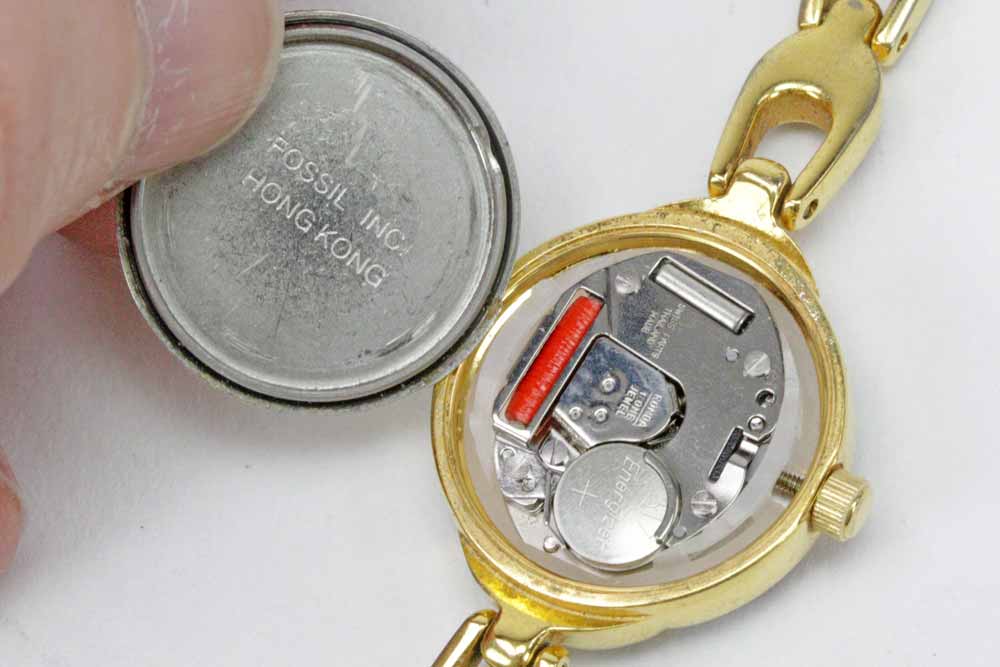
The opening method depends entirely on your watch’s case back design. There are three main types, each requiring different tools and techniques.
Snap-Off Press-On Case Backs
These feature a smooth edge with a small notch or indentation. They’re held by friction seal and found on Timex, Swatch, and dress watches. You open them by inserting a flat tool and gently prying.
Screw-Down Threaded Case Backs
These have notches or grooves around the edge and are used in water-resistant watches. You open them by turning counter-clockwise with a spanner wrench. Some use tiny Phillips screws that must be removed individually.
Coin-Cell Twist-On Case Backs
These have a side notch for a coin or flat tool. Common on Casio F91W and fitness trackers, they open by turning counter-clockwise with a quarter or butter knife.
Pro Tip: Photograph the case back before opening. It helps with reassembly and orientation.
Gather Essential Tools
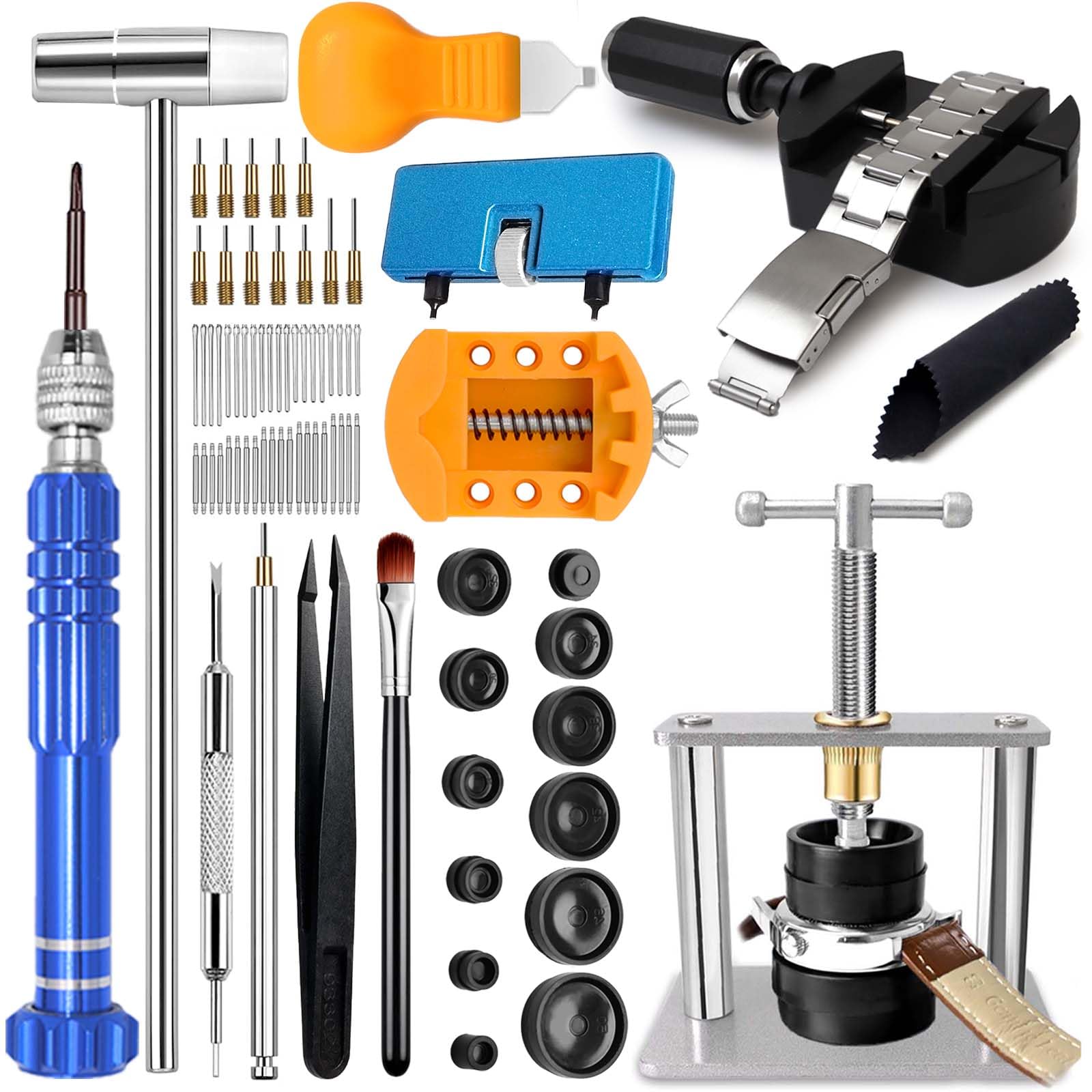
Using improper tools risks scratching the case or damaging internal components. Here’s what you need.
Must-Have Tools
A flat thin tool like a case knife or small flathead screwdriver works for snap backs. A spanner wrench opens notched screw-down backs. Precision screwdrivers handle tiny screws. Non-metallic tweezers safely handle batteries without causing short circuits. A magnifying glass reads tiny battery codes.
Helpful Extras
A watch holder keeps the watch steady during work. An air blower removes dust from the battery compartment. A watch back press tool ensures even pressure when closing snap backs. A lint-free cloth protects the crystal during handling.
Never use metal tweezers or pliers near the movement. They can cause short circuits or scratches.
Find the Correct Battery
Installing the wrong battery damages your watch. Always match the exact model.
Read the Old Battery Code
Flip the old battery. It displays a code like CR2032 (lithium, 3V, 20mm diameter), SR626SW (silver oxide, 1.55V), or 373 (Swiss watch battery). Save the old battery as your reference when buying a replacement.
Common Battery Types by Watch
Slim dress watches typically use SR626SW. Digital watches commonly take CR2016 or CR2032. Water-resistant quartz models often use 373 or 399. Search “[Your Watch Model] battery type” online for exact matches.
Where to Buy
Amazon and eBay offer fast shipping and bulk packs. WatchBattery.com specializes in accurate models. Swatch stores sell branded batteries. Local jewelers can verify compatibility.
Open the Case Back Safely
Now access the battery using the correct method for your case type.
Opening Snap Backs
Place the watch in a holder or grip it gently. Locate the notch on the case edge. Insert a flat tool and twist slightly to break the seal. Lift the back off without forcing it. Never pry near the crystal.
Opening Screw-Down Backs
Attach a three-point spanner to the notches. Turn counter-clockwise to loosen. Once free, unscrew by hand. No wrench? Try a rubber ball pressed over the back to twist. It provides grip without scratches.
Opening Screwed Case Backs
Use a #000 Phillips screwdriver. Remove each screw and place it on a magnetic mat. Lift the back straight off. Never discard tiny screws.
Opening Twist-On Backs
Insert a quarter or flat tool into the side notch. Turn counter-clockwise until the back releases. Some models like the Casio F91W unscrew completely.
Remove the Old Battery
With the case open, carefully extract the battery.
Check for Battery Covers
Some watches have a silicone pad, plastic shield, or metal cap held by a screw. Remove this cover first using tweezers or a precision tool.
Release the Retention Mechanism
Tension springs require gentle lifting with a screwdriver. Small screws must be removed and kept safe. Swatch models use push-to-eject: insert tweezers into the side hole and push the battery out.
Extract Using Tweezers
Use non-metallic tweezers to lift the battery out. Avoid touching terminals with your fingers. Oil from skin reduces battery lifespan.
Critical: If the battery is stuck or corroded, don’t force it. Clean the contacts first.
Clean the Battery Compartment
Dirt or corrosion prevents proper contact even with a new battery.
Inspect for Corrosion
Look for white or green crust around contacts, sticky residue, or pitting on metal surfaces. Leaked potassium hydroxide is corrosive. Wear gloves if handling a leaking battery.
Clean Contact Points
Dip a cotton swab in isopropyl alcohol. Gently wipe the contact springs and housing. Let it dry completely before proceeding. Never use water or liquid cleaners directly in the case.
Remove Dust
Use an air blower or soft brush. Never blow with your mouth. Moisture can enter and cause damage.
Install the New Battery Correctly
Orientation and seating are critical. One mistake kills the watch.
Check Battery Orientation
The positive (+) side usually faces up toward the case back. Match the old battery’s position exactly. On Swatch models, flat side up equals positive.
Never install backwards. It can damage the circuit.
Insert the Battery
Use tweezers to place it gently. Ensure it’s fully seated with no tilting. Re-engage the tension spring or cover. Reinstall any retention screw.
Pro Tip: Hold the watch close to your ear. When the second hand starts moving, you know it’s working.
Reassemble the Case Back
Proper closing ensures water resistance and prevents dust entry.
Closing Snap Backs
Align the back with the notch or brand at 12:00. Use a watch back press tool with the correct mold size. Place a cloth over the watch. Apply firm even pressure clockwise until it pops into place. No press tool? Press firmly with thumbs around the edges. The back should be flush and gap-free.
Closing Screw-Down Backs
Place the back on the case. Hand-tighten first. Use the spanner wrench to finish. Do not overtighten. Hand-tight plus a quarter turn is enough.
Closing Screwed Case Backs
Insert all screws. Tighten gradually in a crisscross pattern like lug nuts. This ensures even pressure and prevents warping.
Closing Twist-On Backs
Align the notch. Turn clockwise until it clicks or resists. Do not force beyond snug.
Test the Watch Immediately
Don’t assume it works. Verify before wearing.
Check All Functions
Analog watches should have the second hand ticking every second. Digital displays should light up fully. Set the time and date if needed.
Inspect the Seal
The case back must be flush and secure with no wobbling or gaps.
Water Resistance Warning
Even if sealed, repeated opening degrades gaskets. For swimming or diving, get a professional pressure test.
If the watch doesn’t power on: reopen and check battery orientation, reseat the battery, try a new battery. Still not working? The movement may be damaged. Seek professional help.
Maintain Battery Longevity
A new battery lasts two to five years. Maximize its life.
Replace Proactively
Change the battery every three to four years even if working. This prevents leakage and internal damage.
Minimize Drain
Avoid frequent backlight use on digital watches. Limit chronograph or alarm functions if not needed.
Store Spare Batteries Properly
Keep them in a dry cool place. Original packaging prevents short circuits.
Recycle Old Batteries Responsibly
Watch batteries contain hazardous materials. Never throw them in the trash.
Where to Recycle
Electronics stores like Best Buy accept batteries. Jewelers and battery retailers often have collection points. Local recycling centers take them as well.
Troubleshoot Common Problems
Even careful work can go wrong. Here’s how to fix it.
Watch Won’t Turn On
Cause: Battery not seated or wrong polarity. Fix: Reopen, check orientation, reseat.
Case Back Won’t Close Flush
Cause: Misalignment or debris. Fix: Clean edges, realign, press evenly.
Water Inside the Watch
Cause: Poor seal after reassembly. Fix: Replace gasket or get professional service.
Second Hand Stuck
Cause: Low power or motor issue. Fix: If new battery fails, movement may need repair.
When in doubt, stop. Further disassembly risks permanent damage.
When to See a Professional
DIY works for many watches, but some demand expert care.
Seek Help If Your Watch Is
A luxury brand like Rolex, Omega, or Cartier. A water-resistant or dive watch that needs pressure testing. Has visible corrosion or moisture inside. Battery replacement fails to fix the issue. A proprietary design like G-Shock or high-end Citizen.
Cost: Jewelers charge five to twenty dollars for battery service, often including gasket check and cleaning.
Frequently Asked Questions About Replacing Watch Batteries
How Do I Know What Battery My Watch Needs?
Check the old battery for its code printed on the surface. Common codes include CR2032, CR2016, SR626SW, and 373. Save the old battery when removing it and take it to the store as a reference. You can also search online for your specific watch model plus “battery type.”
Can I Replace My Watch Battery Myself?
Yes, most quartz watches are user-serviceable. You need basic tools like tweezers, a small screwdriver, and sometimes a case back opener. The process takes 10 to 20 minutes for beginners. Avoid opening luxury watches, dive watches, or those with visible damage.
What Happens If I Use the Wrong Battery Size?
Using the wrong battery can damage the movement, cause leakage, or prevent the watch from working. Even if a battery fits physically, voltage differences matter. Silver oxide batteries are 1.55V while lithium batteries are 3V. Always match the exact code.
How Long Does a Watch Battery Last?
Most watch batteries last two to five years. Digital watches with backlights may need replacement sooner. Some models like the Casio F91W can last up to seven years. Factors include temperature, humidity, and how often you use extra functions.
Why Is My Watch Still Not Working After Battery Replacement?
First, check battery orientation. The positive side must face the correct direction. Reopen and reseat the battery firmly. Try a fresh battery. If it still doesn’t work, the movement may be damaged and needs professional service.
Should I Replace the Gasket When Changing the Battery?
It’s not always necessary, but replacing the gasket is smart for water-resistant watches. Gaskets degrade over time and affect water resistance. Professional services often include gasket replacement. For casual watches, inspect the existing gasket for cracks or hardening.
Key Takeaways for Replacing Your Watch Battery
Replacing a watch battery is a simple, cost-effective skill that keeps your timepieces running for years. The process involves confirming your watch is quartz, identifying the case back type, gathering the right tools, and following proper safety steps. Always match the exact battery code, handle components with non-metallic tools, and ensure the case back seals flush. Clean the compartment if needed, test functionality immediately, and recycle old batteries responsibly.
Remember these critical points: replace batteries proactively every three to four years to prevent leakage, don’t attempt luxury or dive watches without professional help, and when in doubt, consult a jeweler. Your watch is waiting to tick again. Now you have the knowledge to do it right.



