

If your Casio watch stops responding, displays strange symbols, or won’t adjust the time properly, a reset can often fix the issue. Whether you’re dealing with a classic F-91W, a rugged G-Shock, or a WR100M-style digital model, knowing how to reset a Casio watch properly is essential for restoring normal function. This guide covers every proven reset method, from simple button combinations to advanced internal resets, based on verified procedures and user-tested solutions. You’ll learn exactly when to use each technique, how to avoid damaging your watch, and what to do if standard fixes fail.
Full Reset via Battery Removal

When your Casio watch is completely unresponsive or shows corrupted display segments, a full hardware reset by removing the battery is the most effective solution. This method clears firmware glitches, fixes garbled displays, and restores functionality when buttons do not respond.
Remove Battery for Hard Reset
- Use a precision screwdriver to open the case back carefully.
- Take out the battery using non-conductive tweezers.
- Leave the battery out for 5 to 10 minutes to drain residual power and clear memory errors.
- Reinsert the battery and close the case.
After reinsertion, the watch will reboot with factory default settings. This means time, alarms, and format preferences must be reconfigured manually. Always work on a clean, static-free surface and ground yourself before handling internal parts to prevent electrostatic damage.
Perform AC Reset (Internal Reset)

For watches that remain stuck after battery replacement, an AC reset bypasses software locks using an internal contact point. This technique mimics a factory reset without fully removing power, making it ideal for watches that will not exit test mode or respond to buttons.
Locate and Trigger AC Reset Pin
- Open the case back and identify the AC reset pin, which is a small metal dot near the circuit board or battery holder.
- Use a conductive tool like a bent paperclip or metal tweezers to briefly short the reset point.
- The display will flicker or go blank, indicating a successful reset.
This method works best on WR100M, G-Shock, and other digital models prone to firmware freezes.
Exit LCD Test Mode
Some Casio watches enter diagnostic or LCD test mode accidentally, showing all segments lit or cycling through patterns. This mode is often triggered by pressing multiple buttons during startup, so avoid doing this unless troubleshooting display issues.
Stop Test Mode with Button Combo
• Press and hold three buttons at once for 5 to 10 seconds.
• Alternatively, try holding the upper-right and lower-right buttons simultaneously.
If this fails, perform an AC reset or battery removal reset to force exit.
Reset Time and Format Settings
Even without major glitches, you may need to reset the time or switch between 12-hour and 24-hour format. This is common when adjusting for different time zones or personal preferences.
Enter Time-Setting Mode
- Press and hold the lower-left button until digits begin flashing.
- Use the right-side buttons to navigate. The upper-right button advances values, and the lower-right button moves to the next field.
- Adjust hours, minutes, date, and alarms as needed.
Switch 12-Hour to 24-Hour Format
- While in setting mode, navigate to the hour field.
- Press the upper-right button to toggle format. The AM/PM indicator visible means 12-hour mode. No AM/PM indicator and hours going to 23 means 24-hour mode.
If the format will not change, perform a battery reset first, as some models lock settings during glitches.
Fix Unresponsive Buttons
Sticky or non-working buttons are a common reason resets fail. Forcing buttons can damage internal switches or break plastic actuators, so proper cleaning is essential.
Clean Button Contacts
- Open the case back.
- Apply a small amount of isopropyl alcohol to a cotton swab.
- Gently clean around each button stem and contact pad.
- Let dry completely before reassembling.
As an alternative, use compressed air to blow out dust and debris without disassembly.
Model-Specific Reset Tips
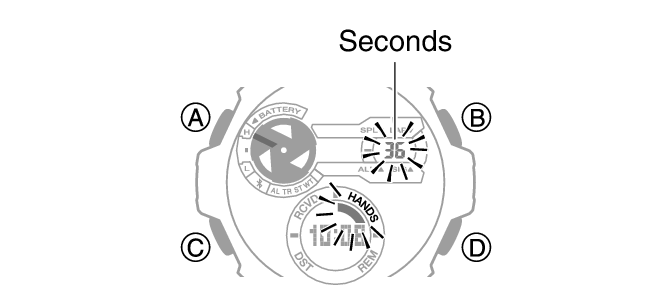
Different Casio models require unique approaches. Always check your exact model number, which is engraved on the case back, before proceeding.
Casio F-91W Reset
• Enter setting mode by holding the lower-left button until seconds flash.
• Reset to default requires battery removal only, as there is no AC reset pin.
• Some clones lack proper reset functions, so verify authenticity if issues persist.
G-Shock and WR100M Series
• AC reset is available. Look for the reset pin near the battery.
• Water resistance caution applies. Replacing the battery or opening the case may compromise seals, so replace gaskets if needed.
• Button combo trick: Hold ALARM and LIGHT for 5 seconds to force reboot on select models.
The WR100M designation refers to water resistance, not a model. Find the full model number for precise instructions.
Troubleshoot Common Reset Failures
Even after attempting a reset, problems may persist. Use this decision tree to diagnose and fix ongoing issues.
Watch Shows Weird Symbols After Reset
• Cause: Corrupted display due to low battery or static discharge.
• Fix: Replace the battery with a fresh one, perform AC reset immediately after, and if the display remains broken, the LCD may be damaged and repair is needed.
Cannot Change Time Format
• Cause: Software lock or incomplete reset.
• Fix: Remove the battery for 10 minutes, reinsert it, and immediately enter time-setting mode. Then try toggling the format again.
Buttons Work but Watch Will Not Save Settings
• Likely cause: Weak battery or poor contact.
• Solution: Remove the battery and clean the battery terminals with alcohol. Inspect for corrosion or residue, and replace the battery with an OEM-rated cell.
Prevent Future Reset Needs
Regular maintenance reduces the need for emergency resets and extends the life of your watch.
Maintain Button and Battery Health
• Clean buttons every 6 months with compressed air.
• Replace the battery every 2 to 3 years, even if the watch still runs.
• Avoid moisture exposure, especially after opening the case.
After any disassembly, check the rubber gasket for tears to maintain water resistance.
Avoid Accidental Mode Activation
• Do not press multiple buttons at once unless instructed.
• Keep the watch away from strong magnetic fields or static sources.
When to Seek Professional Help
Not all issues can be fixed at home. Attempting complex fixes without proper tools can lead to permanent damage.
Signs You Need Expert Service
• Display remains blank after battery and AC reset.
• Internal corrosion is visible on the circuit board.
• Case back threads are stripped.
• Water has entered the watch.
Visit an authorized Casio service center for safe, warranty-compliant repairs.
Summary of Casio Watch Reset Methods
| Method | Best For | Difficulty | Tools Needed |
|---|---|---|---|
| Battery Removal | Full factory reset, frozen display | Medium | Screwdriver, tweezers |
| AC Reset | Unresponsive controls, stuck modes | Medium | Paperclip, screwdriver |
| Button Hold Combo | Exiting test mode | Easy | None |
| Time-Set Reset | Adjusting time or format | Easy | None |
Choose the method based on your symptoms and comfort level with disassembly.
Frequently Asked Questions About Resetting Casio Watches
How do I reset my Casio watch to default settings?
Remove the battery for 5 to 10 minutes to perform a full hardware reset. Reinsert the battery and reconfigure time, alarms, and format preferences manually. This clears all memory errors and restores factory defaults.
Why does my Casio watch show weird symbols?
Garbled or corrupted display usually indicates a memory error, low battery, or accidental entry into test mode. Replace the battery and perform an AC reset or full battery removal to resolve this issue.
Can I reset my Casio watch without opening it?
Yes. Some models can exit test mode by pressing and holding three buttons simultaneously for 5 to 10 seconds. For minor setting issues, entering time-setting mode and adjusting preferences may also help without disassembly.
What is an AC reset on a Casio watch?
An AC reset is an internal reset performed by shorting a small metal contact point near the battery or circuit board with a conductive tool. This clears firmware locks without fully removing the battery.
Why won’t my Casio watch buttons work?
Dirt buildup, moisture ingress, or stuck contacts typically cause unresponsive buttons. Clean the button mechanisms with isopropyl alcohol or use compressed air to remove debris. If cleaning does not help, the internal switches may be damaged.
How often should I replace my Casio watch battery?
Replace the battery every 2 to 3 years, or immediately upon signs of a dimming display or erratic behavior. Regular replacement prevents memory errors and display issues that may require resets.
Key Takeaways for Resetting Your Casio Watch
Always identify your exact Casio model number before starting any reset procedure. A simple search like AC reset Casio WR100M or Casio digital watch reset can provide visual guidance specific to your watch. For most reset issues, start with battery replacement combined with an AC reset, as this addresses both power and firmware problems simultaneously. If issues persist after trying all reset methods, consult official Casio support or seek professional servicing to avoid permanent damage. With the right approach, most reset issues can be resolved in under 15 minutes, restoring your reliable Casio to full function.



