

You just finished a workout, pulled out your Bose Sport Earbuds, and now you are staring at them wondering how to actually power them down. Unlike older electronics with obvious switches, these earbuds skip the traditional off button entirely. The good news is that learning how to turn off Bose Sport Earbuds takes only seconds once you know the right methods. These earbuds rely on smart auto-shutdown features, manual button controls, and the charging case as your three main shutdown tools.
In this guide, you will learn the exact steps to power down your earbuds using each method. You will also pick up troubleshooting fixes for stubborn earbuds that refuse to shut off, plus battery-saving habits that keep your earbuds ready for every workout.
Why Bose Sport Earbuds Power Down Automatically

Bose built automatic shutdown into these earbuds to protect battery life between sessions.
Built-In Auto Shutdown Triggers
Your Bose Sport Earbuds will power off on their own in these situations:
– After about 20 minutes of inactivity when disconnected from any device
– Immediately when placed back inside the charging case
– When the connected device turns off Bluetooth or moves out of range
This smart behavior means you rarely need to manually shut them down. Simply returning them to the case handles everything.
The Charging Case as Your Main Power Switch
Placing the earbuds in the charging case is the most reliable shutdown method available. The moment both earbuds seat properly and the lid closes, they disconnect from your device and power down completely. The LED indicator inside the case will glow to confirm charging has begun.
Pro Tip: Make the charging case your default storage spot. It powers off the earbuds, charges them, and protects them from damage all at once.
Manual Shutdown Using the Right Earbud Button
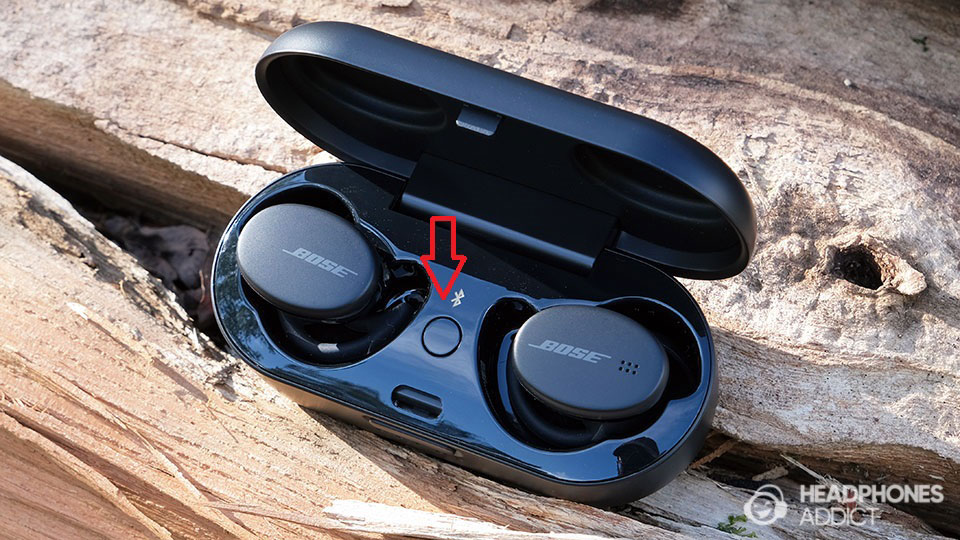
If the case is not nearby, you can still power down the earbuds manually.
The Right Earbud Multifunction Button
The right earbud features a single button that handles playback, calls, and power functions. This button is your go-to control when you want to turn off Bose Sport Earbuds without the case.
Press and Hold to Power Off
Follow these steps to manually shut down the earbuds:
- Remove both earbuds from your ears
- Locate the button on the right earbud
- Press and hold it for about 5 to 7 seconds
- Listen for the shutdown tone or voice prompt
- Watch for the LED to flash briefly before going dark
⚠️ Note: This method works best when the earbuds are still connected or recently used. If they are already idle and disconnected, the case method works better.
Shutting Off Through Your Device’s Bluetooth Menu
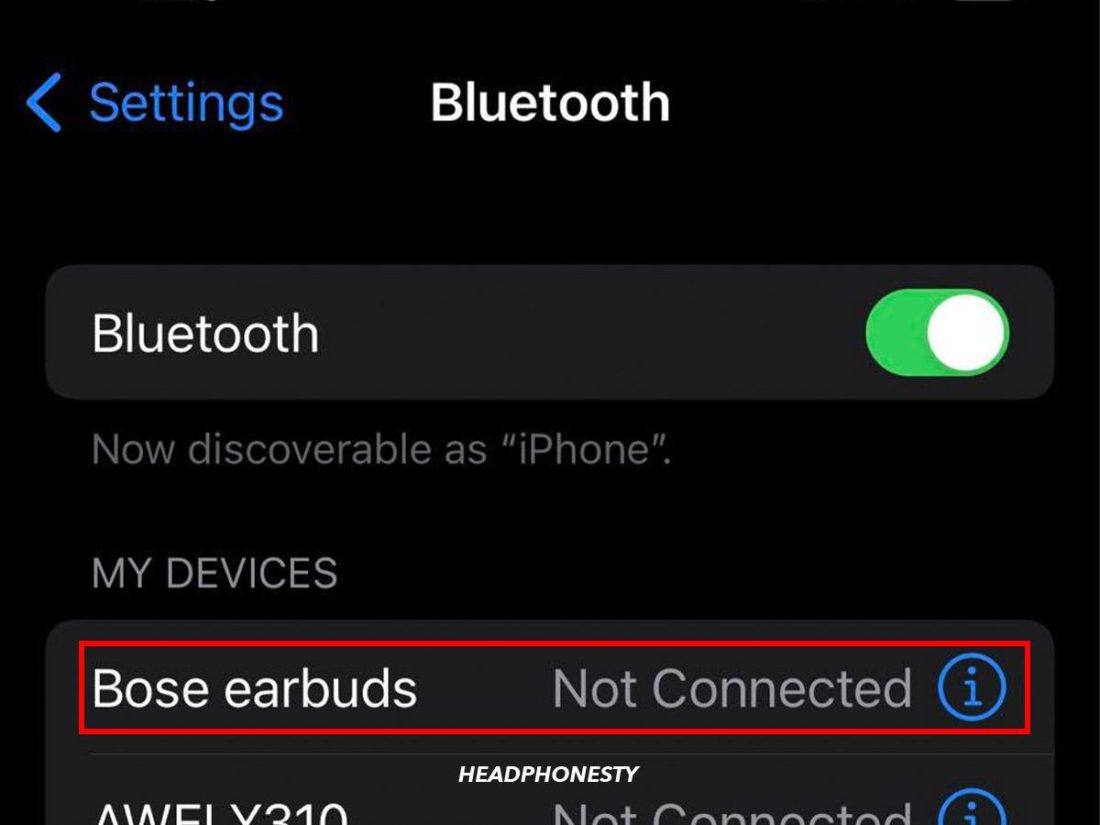
Your phone or tablet offers another simple way to power down the earbuds.
Disconnect to Trigger Automatic Shutdown
When you disconnect the earbuds through Bluetooth settings, they will power off automatically after a few minutes of inactivity. Here is how to do it:
- Open Settings on your phone or tablet
- Tap Bluetooth to view paired devices
- Find Bose Sport Earbuds in the device list
- Tap the info icon next to the earbuds name
- Select Disconnect or Forget Device
✅ Best for: Quick shutdowns when the charging case is not within reach or stored away.
Troubleshooting Earbuds That Won’t Turn Off
Sometimes the earbuds stay powered on or become unresponsive. These fixes solve the most common issues.
Force Restart Using a Reset
When the earbuds ignore button presses or stay connected unexpectedly, a reset clears the problem.
Step-by-Step Reset Process
- Place both earbuds inside the charging case
- Make sure the case is plugged in or fully charged
- Locate the small button on the back of the case
- Press and hold this case button for 30 seconds
- Remove the earbuds and pair them again
🔄 A reset fixes ghost power issues where earbuds seem on but produce no sound or fail to respond.
Check for Stuck Bluetooth Connections
Active connections keep your earbuds powered on longer than necessary. Check these spots:
– Listen for voice prompts announcing the connected device
– Open Bluetooth settings on nearby phones, tablets, or laptops
– Disconnect from any device still paired with the earbuds
Once fully disconnected, the earbuds will power down within minutes.
Battery-Saving Habits After Powering Off
Even when off, small battery drains can shorten the life of your earbuds over time.
Always Close the Case Lid
An open case lid can prevent proper shutdown or cause accidental activation. Always snap the lid shut after placing the earbuds inside.
Keep Earbuds Away from Extreme Temperatures
Heat and cold damage lithium batteries, even when the earbuds are powered off. Avoid leaving them in hot cars, freezing garages, or direct sunlight for extended periods.
Charge the Case on a Regular Schedule
A dead case cannot power down or charge your earbuds. Recharge the case every few days using the included USB-C cable to keep everything ready.
Common Myths About Powering Off Bose Sport Earbuds
Several misconceptions confuse new owners. Here is the truth behind each one.
“There Is No Way to Turn Them Off”
False. While there is no dedicated power switch, the press-and-hold method on the right earbud and the charging case both work as effective shutdown tools.
“They Drain Battery Even When Off”
Minimal drain occurs in any wireless earbuds. When stored properly in the case, the earbuds consume almost no power at all.
“You Must Use the Bose Music App to Shut Them Off”
Not true. The app lets you customize settings, but it is not required for basic shutdown. Physical buttons and the case handle power functions independently.
Customize Your Shutdown Controls in the Bose Music App
Want faster or more personalized shutdown options? The Bose Music app lets you adjust button behavior.
Adjusting the Press-and-Hold Function
- Open the Bose Music app on your phone
- Select your Sport Earbuds from the device list
- Tap the Controls option
- Find the Press and Hold setting
- Assign it to Power Off or Voice Assistant
💡 Pro Tip: Setting the hold function to power off makes the button do exactly what you need with a simple long press.
Frequently Asked Questions About Turning Off Bose Sport Earbuds
Do Bose Sport Earbuds Turn Off Automatically?
Yes. They shut down after 20 minutes of inactivity when not in the case, or instantly when placed inside the case for charging.
How Long Does It Take to Power Off the Earbuds?
Shutdown speed depends on the method you use. The case provides instant shutdown. Manual disconnection takes 2 to 5 minutes. The button hold method takes about 5 to 7 seconds.
Can I Overcharge the Earbuds in the Case?
No. The charging case and earbuds include built-in protection circuits. Once fully charged, they stop drawing power automatically.
Why Do My Earbuds Stay On After I Put Them Away?
Common causes include an active Bluetooth connection, a dead case battery, or a firmware glitch. Disconnect all devices, charge the case, or perform a reset to fix the issue.
Is There a Dedicated Power Button on the Earbuds?
There is no single-purpose power button. The right earbud button handles multiple functions, including powering off when you press and hold it.
Key Takeaways for Turning Off Your Bose Sport Earbuds
Learning how to turn off Bose Sport Earbuds comes down to three reliable methods. The charging case delivers instant shutdown and charges your earbuds at the same time. The right earbud button offers manual control through a 5 to 7 second press and hold. Your device’s Bluetooth menu provides a quick disconnect that triggers automatic shutdown within minutes.
For best results, store your earbuds in the closed case after every use. This single habit handles power, charging, and protection without any extra effort. If your earbuds ever become unresponsive, a 30 second reset using the case button solves nearly every problem.
Keep this guide bookmarked so you always have the answer ready. Your Bose Sport Earbuds will stay powered down, fully charged, and ready for your next workout whenever you need them.



