
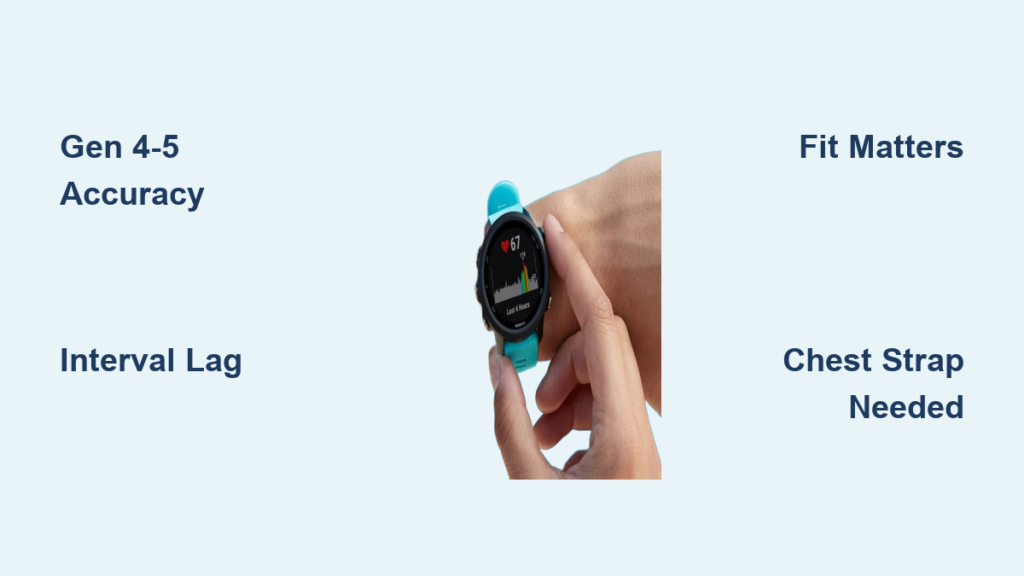
If you’ve ever glanced at your Garmin watch during a run and wondered, “Is this heart rate number actually correct?” you are not alone. Millions of athletes and fitness enthusiasts rely on Garmin optical heart rate monitoring to guide training, track recovery, and estimate calorie burn. But how accurate is Garmin watch heart rate, really?
Based on scientific studies, real-world testing, and user experiences across generations of devices, the answer is nuanced. Modern Garmin watches with Gen 4 and Gen 5 sensors are highly accurate during steady-state activities, often within 1 to 5 beats per minute of chest strap readings. However, during rapid heart rate changes like sprints or HIIT, wrist-based sensors lag significantly and can miss peaks entirely.
How Garmin Optical Heart Rate Technology Works
Garmin watches use photoplethysmography, a method that shines green and red LEDs into the skin to detect blood flow changes with each heartbeat. The sensor measures how much light is absorbed or reflected by pulsing blood, then converts that into a heart rate estimate. Unlike chest straps that read electrical signals, optical sensors are indirect and motion-sensitive, which explains both their convenience and their limitations.
Why Garmin HR Is Not Medical-Grade
Despite marketing claims suggesting accuracy, Garmin’s optical heart rate is not designed for clinical use. Customer support has stated that even premium models like the Venu series are not meant to be used for anything requiring accurate data. This creates a stark contrast with how these features are promoted, raising concerns about misleading messaging. Use Garmin HR for fitness trends and general guidance, not for health diagnostics.
Garmin Heart Rate Accuracy by Sensor Generation
Garmin has improved its Elevate sensor across five unofficial generations. Here is how each generation performs compared to chest strap readings.
Gen 1 Sensors: Poor Motion Response
Early models like the Forerunner 235 and Fenix 3 HR used dual LEDs with basic algorithms. Errors ranged from 10 to 20 beats per minute during activity. These watches struggled with arm movement and often failed to keep up during runs, making them unreliable for any dynamic workout.
Gen 2 Sensors: Marginal Improvements
Models like the Fenix 5 and Forerunner 735XT added a third LED and improved firmware. Errors dropped to 6 to 15 beats per minute, but motion artifacts remained common during interval training. Slight improvement was noticeable, but consistency was still lacking.
Gen 3 Sensors: Steady-State Reliability
The Fenix 6, Forerunner 245, and Forerunner 945 introduced green and red LEDs plus PulseOx support. During steady efforts, error rates fell to 2 to 6 beats per minute. This generation proved trustworthy for long runs and endurance cycling, though it still lagged during rapid heart rate shifts.
Gen 4 Sensors: Near Chest Strap Performance
The Forerunner 255, Forerunner 955, Venu 2, and Fenix 7 refined optics and improved motion filtering. Error rates dropped to 1 to 4 beats per minute, making this generation suitable for serious athletes as long as effort remained consistent. This marked a significant leap forward in optical sensor capability.
Gen 5 Sensors: Best Wrist-Based HR Available
The Fenix 7 Pro, Venu 3, and Forerunner 965 feature Elevate v5 technology with multi-band LEDs and advanced algorithms. Error rates of 1 to 3 beats per minute represent the closest wrist-based heart rate has come to matching chest strap precision. These models are the top-tier choice for athletes who rely on optical sensors.
Real-World Accuracy by Activity Type

Your workout type dramatically impacts how trustworthy your Garmin heart rate reading is. Understanding these differences helps you know when to trust the data and when to double-check with other methods.
Resting Heart Rate and Sleep Tracking
During rest and sleep, modern Garmin watches (Gen 4 and Gen 5) deliver nearly spot-on accuracy with errors under 2 beats per minute. Minimal motion and stable blood flow create ideal conditions for optical sensors. This makes the data excellent for tracking resting heart rate trends, sleep stages, and heart rate variability over time.
Zone 2 and Steady-State Cardio
For long runs, easy rides, and endurance efforts lasting 10 minutes or more, Garmin heart rate is highly reliable. Gen 5 sensors typically show errors of only 1 to 4 beats per minute with minimal latency. If you are doing a 10-mile jog or longer cycling session, your Garmin heart rate is accurate enough to guide pacing and training zones.
Tempo and Threshold Efforts
During moderate-intensity training, expect errors of 3 to 6 beats per minute with latency of 2 to 5 seconds. Readings stay close to actual heart rate, but slight delays occur when accelerating or climbing. Use this data as a general guide rather than precise feedback during these efforts.
Intervals, Sprints, and HIIT
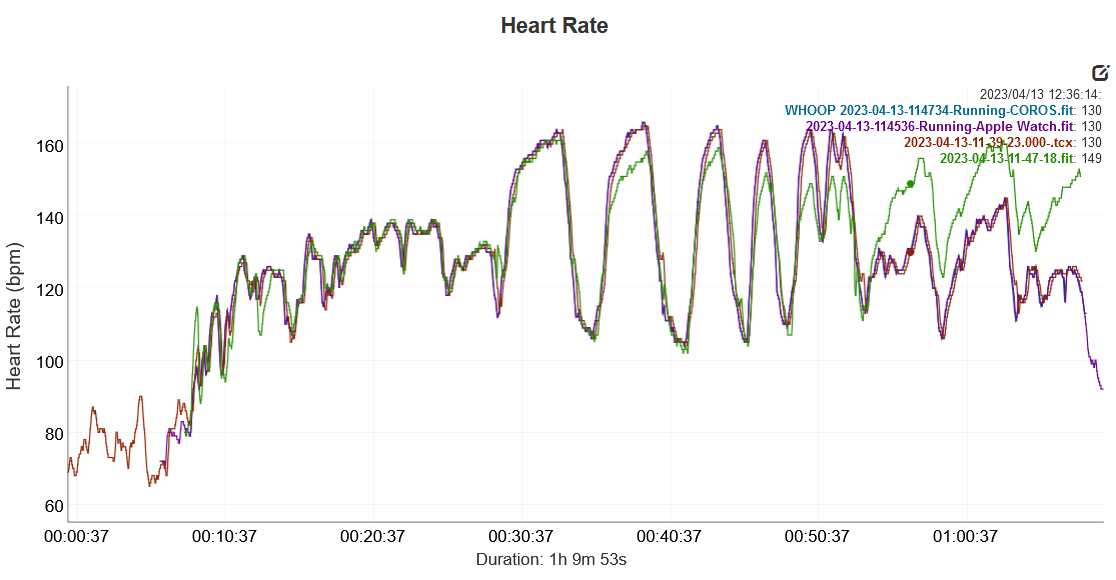
During 30-second sprints or VO2 max efforts, wrist-based heart rate cannot keep up. Errors often exceed 5 to 10 beats per minute with latency of 5 to 10 seconds. Peaks may register late or be smoothed over entirely, making optical heart rate unsuitable for precise interval training or race pacing by heart rate.
Scientific Validation: Labfront Study Findings
A 24-hour study by Labfront compared the Garmin Vivosmart 4 (optical sensor) to the Polar H10 chest strap (ECG-based gold standard). The study examined multiple activities and found that 95 percent of data points fell within 10 beats per minute of the Polar H10. Mean absolute percentage error stayed below 10 percent across all activities, which is considered acceptable for consumer devices.
Sleep tracking showed nearly identical readings between devices. During physical activity like walking, the optical sensor produced noisier data with greater variability. The conclusion: Garmin optical heart rate is reliable for daily monitoring and trend analysis, but not for capturing fast heart rate dynamics.
Environmental Factors That Affect Accuracy
Even the best sensor fails when conditions are not ideal. Understanding these factors helps you interpret data correctly and troubleshoot problems.
Cold Weather Impact
Reduced blood flow to extremities delays heart rate detection. Users commonly report heart rate 15 to 20 beats per minute low for the first mile of winter runs. Warm up indoors before heading out, and expect initial lag until blood flow improves after 5 to 10 minutes.
Sweat and Moisture Interference
Sweat scatters LED light, causing dropouts or erratic spikes. Rain or wet skin worsens the issue significantly. Wipe the sensor after workouts and ensure a tight seal to minimize moisture problems.
Sunlight Exposure
Bright sunlight can flood the sensor, especially if light gets under the band. This leads to erratic readings or temporary signal loss. Wear the watch higher on the wrist and consider using a darker band to reduce optical interference.
Fit and Wear: Make or Break Accuracy
Proper fit determines whether your Garmin delivers accurate data or frustrating inconsistencies. Small adjustments in wear position make a massive difference.
Too Loose: Signal Problems
Gaps between sensor and skin cause inconsistent readings, spikes, and dropouts. This is the most common mistake users make, particularly when wearing the watch over clothing or with a loose metal band. The watch should move with your skin, not slide independently.
Too Tight: Restricted Blood Flow
Over-tightening restricts blood flow, leading to artificially low heart rate readings. This can also cause discomfort or numbness in your hand. Find the balance: tight enough for continuous skin contact, loose enough for circulation.
Optimal Placement and Band Choice
Wear the watch 1 to 2 inches above the wrist bone on the outside of your wrist for best artery access. Avoid bony areas or locations where veins sit too close to the surface. Silicone or nylon bands conform better and reduce gaps compared to metal or leather options.
Individual Physiology: Why Results Vary
Not everyone gets the same accuracy from the same watch. Individual factors significantly influence optical sensor performance.
Skin Tone, Hair, and Tattoos
Darker skin, wrist hair, or tattoos can absorb or scatter light, reducing signal quality. Some users experience chronic inaccuracy due to dense hair or dark ink in the sensor area. This is a physical limitation of PPG technology, not a device defect.
Vein Size and Position
Large surface veins under the sensor can create false high readings. One user reported seeing 197 beats per minute on an easy run (Garmin) versus 125 beats per minute (chest strap) due to a prominent vein directly under the sensor location.
Cadence Lock Issue
During running, muscle contractions can mimic pulse patterns, causing the sensor to lock onto cadence instead of actual heart rate. This problem is more common in older models or when the watch fits loosely, especially during uphill running.
Comparison: Wrist vs Chest Strap vs Armband
Different technologies offer different trade-offs between accuracy and convenience. Understanding these differences helps you choose the right tool for each workout.
Chest Strap: The Gold Standard
Chest straps use ECG technology to read electrical signals directly from the heart. Accuracy within 1 to 2 beats per minute matches medical equipment. The tradeoff is discomfort, additional gear to carry, and battery maintenance requirements. For lactate threshold tests and precision training, nothing beats a chest strap.
Forearm Armband: The Best Alternative
Placed on the bicep rather than the wrist, armbands avoid hand swing issues that cause wrist sensor problems. Models like the COROS HR Armband and Polar Verity Sense deliver accuracy within 1 to 3 beats per minute. The tradeoff is an extra device and limited compatibility with some watches.
Wrist-Based Garmin: Convenience Over Precision
Built-in sensors require no extra gear, making wrist-based reading the most convenient option. However, motion artifacts, latency, and environmental sensitivity limit precision. For daily tracking and general effort guidance, wrist-based HR works well. For precision training, supplement with a chest strap.
When to Trust Your Garmin Heart Rate
Knowing when to rely on wrist-based data and when to switch to a chest strap prevents training mistakes and frustration.
Trust Wrist HR For
Use wrist heart rate for daily activity tracking, sleep and recovery monitoring, long steady cardio sessions lasting more than 10 minutes, trend analysis over weeks and months, and general effort feedback when combined with pace and perceived exertion.
Use a Chest Strap For
Switch to a chest strap for interval training, VO2 max and threshold efforts, race pacing by heart rate, lactate threshold testing, and any medical or clinical assessment. The real-time responsiveness and accuracy make chest straps essential for serious training.
Common Complaints and Known Limitations
Despite improvements, users still report persistent issues that limit optical heart rate reliability.
Random Heart Rate Spikes
Approximately 30 percent of users report random spikes, often caused by sweat, light interference, or sensor noise. These typically appear during rest or low-effort periods and can skew recovery metrics.
Signal Lag During High Intensity
Delays of 5 to 10 seconds during sprints prevent accurate heart rate tracking during fast changes. This latency makes it impossible to pace intervals accurately using wrist-based data alone.
Firmware Update Problems
Some users experience sudden accuracy drops after firmware updates. One user reported heart rate off by 30 to 50 beats per minute after a software upgrade, with tracking becoming unreliable. Garmin has acknowledged some update-related issues.
Best Practices for Accurate Heart Rate Data
Maximize your Garmin’s heart rate accuracy by following these proven strategies.
Wear It Correctly
Position the watch 1 to 2 inches above the wrist bone on the outside of your wrist. Ensure a snug but not tight fit. Use silicone or nylon bands rather than metal or leather for better conformability.
Keep the Sensor Clean
Wipe the sensor with lukewarm water and a soft cloth after each workout. Remove sweat, sunscreen, lotions, and bug spray that can accumulate and interfere with LED light transmission.
Warm Up in Cold Weather
Start workouts indoors or warm your hands before going outside in winter. Expect initial heart rate lag until blood flow normalizes, usually after 5 to 10 minutes of movement.
Pair With a Chest Strap When It Matters
Use Garmin HRM-Pro, Wahoo TICKR, or Polar H10 for lactate threshold tests and advanced metrics. Bluetooth pairing is seamless and provides chest-strap accuracy for critical workouts.
Set Custom Heart Rate Zones
Do not rely on Garmin’s default zones (220 minus age). Use a 20-minute field test, lactate threshold test, or real-world race data to establish accurate personal zones.
Validate With Effort and Feeling
Cross-check heart rate with breathing rate, perceived exertion, and pace. Review data after workouts rather than relying on live readings during intense efforts.
Final Verdict: How Accurate Is Garmin Watch Heart Rate?
For steady efforts and daily tracking, modern Garmin watches (Gen 4 and Gen 5) are very accurate, typically within 1 to 5 beats per minute of chest strap readings. For rapid heart rate changes during intervals and sprints, wrist-based optical sensors remain unreliable due to latency and signal smoothing. For medical use, optical heart rate is simply not suitable.
Garmin optical heart rate is perfectly adequate for most recreational users and outstanding for tracking long-term fitness trends. However, if you train at threshold, do intervals, or race by heart rate, a chest strap remains the only way to ensure precision. Run by effort, pace, and feel, and review heart rate data afterward rather than relying on it in real-time.
Frequently Asked Questions About Garmin Watch Heart Rate
Does Garmin heart rate match chest strap accuracy?
Modern Garmin watches with Gen 4 and Gen 5 sensors match chest strap readings within 1 to 5 beats per minute during steady-state activities. During rapid heart rate changes like intervals, optical sensors lag significantly and cannot match chest strap precision.
Which Garmin has the most accurate heart rate?
The Fenix 7 Pro, Forerunner 965, and Venu 3 feature the latest Elevate v5 sensor, which offers the best optical heart rate accuracy Garmin has produced. Error rates of 1 to 3 beats per minute are typical during steady efforts.
Why is my Garmin heart rate wrong during running?
Common causes include loose watch fit, cold weather reducing blood flow, sweat interfering with sensor optics, or the sensor misreading cadence as heart rate. Ensure a snug fit 1 to 2 inches above the wrist bone and consider using a chest strap for interval workouts.
Should I use a chest strap instead of my Garmin watch?
Use a chest strap for interval training, threshold efforts, lactate testing, and race pacing by heart rate. For daily tracking, sleep monitoring, and steady-state cardio, your Garmin watch provides sufficient accuracy without extra gear.
Can Garmin heart rate be used for medical purposes?
No. Garmin optical heart rate is not medical-grade and is not intended for clinical diagnosis or critical health monitoring. Customer support has explicitly stated that even premium models are not meant for uses requiring accurate data.
How do I improve my Garmin heart rate accuracy?
Wear the watch snugly 1 to 2 inches above the wrist bone on the outside of your wrist. Keep the sensor clean and free of sweat, sunscreen, and lotions. Warm up before cold weather workouts. Use custom heart rate zones rather than default settings.
Key Takeaways for Understanding Garmin Heart Rate Accuracy
Modern Garmin watches deliver highly accurate heart rate data during steady-state activities, making them excellent for daily tracking, recovery monitoring, and endurance training. However, optical sensor limitations mean wrist-based readings lag during high-intensity intervals and sprints, where chest straps remain essential. Fit, wear position, environmental conditions, and individual physiology all significantly impact accuracy. For the best results, pair your Garmin with a chest strap for critical workouts, validate data with effort and pace, and use wrist-based heart rate for trends rather than real-time precision.



