
If you’re an iPhone user searching for a fitness-focused smartwatch, you likely want to know: is a Garmin watch compatible with iPhone? The answer is yes—all modern Garmin watches work seamlessly with iPhones, offering robust health tracking, notification support, and integration with Apple Health. However, due to Apple’s restrictive iOS policies, there are some limitations you’ll want to understand before buying.
In this guide, you’ll learn exactly what features work (and what doesn’t) when pairing a Garmin watch with your iPhone, from notifications and Apple Health syncing to music playback and battery life comparisons.
Which Garmin Watches Work with iPhone?

Every current Garmin smartwatch is designed to work with iPhones running iOS 13 or later, including full support for iOS 18.2+. No matter your budget or activity type, recent Garmin models will pair with your iPhone via Bluetooth.
Top Series Compatible with iPhone
Garmin offers multiple product lines, each catering to different user needs:
• Forerunner (55, 165, 945, 955, 965): Ideal for runners and triathletes seeking advanced training metrics
• Fenix (6, 7, 8): Premium multisport GPS watches with rugged, outdoor-ready designs
• Venu (3, 3S): Wellness-focused models featuring AMOLED displays and sleek aesthetics
• Instinct (2, 2X, Crossover): Rugged, military-grade watches with exceptional battery life
• vívoactive (3, 4, 5): Mid-tier daily fitness trackers balancing features and price
• Enduro / MARQ / Lily / Approach: Niche models for endurance sports, luxury styling, golf, and fashion
Regardless of which series you choose, pairing follows the same process through the free Garmin Connect app.
What Notifications Work on Garmin with iPhone?
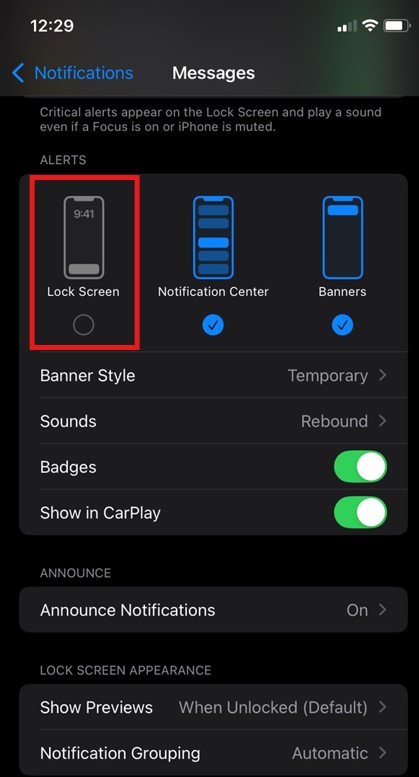
Garmin watches mirror most iPhone alerts directly to your wrist, keeping you connected during workouts or when your phone is out of reach.
Supported Alert Types
Your Garmin will display notifications for:
• Incoming calls (you can see who’s calling)
• SMS and iMessage texts
• Email alerts
• Calendar events and reminders
• Third-party app notifications (WhatsApp, Slack, social media)
Key Limitations to Know
While you’ll receive alerts, you cannot reply to messages or answer calls directly from your Garmin watch. This is an iOS restriction, not a Garmin hardware limitation. Even watches with built-in microphones and speakers (like the Venu 3 or Fenix 8) cannot answer calls when paired with iPhone.
The watch mirrors your iPhone’s Do Not Disturb settings. If your phone is silenced, the watch won’t vibrate. Some users report 5-10 second notification delays compared to Apple Watch.
High-end models like the Fenix 8 and Venu 3 offer granular app filtering, letting you choose which notifications come through. Basic models like the Forerunner 55 only offer an all-or-nothing toggle.
Can You Answer Calls on a Garmin with iPhone?
No. Even if your Garmin watch has a microphone and speaker, you cannot answer calls directly from the wrist when paired with an iPhone.
What You Can Do
• See incoming call information on your watch screen
• Decline or ignore calls from your wrist
• Audio routes through your iPhone or connected Bluetooth headset
Why This Limitation Exists
Apple restricts third-party access to core telephony APIs. This means no non-Apple wearable can answer calls on iOS, regardless of hardware capability. The same restriction applies to message replies.
On Android, models like the Venu 2 Plus do support wrist-based calling, proving the hardware is capable—but iOS blocks this functionality.
Apple Health Integration: What Data Syncs?
.png)
Garmin offers one-way sync to Apple Health, meaning your fitness data flows from Garmin to Apple Health, but not in reverse.
How to Enable Apple Health Sync
- Open the Garmin Connect app
- Tap More → Settings → Connected Apps
- Select Apple Health and grant permissions
- All historical data from your Garmin begins syncing automatically
What Data Transfers to Apple Health
| Data Type | Syncs to Apple Health? |
|---|---|
| Steps | Yes (risk of double-counting) |
| Heart Rate | Yes |
| Sleep Analysis | Yes |
| Calories Burned | Yes |
| Workouts | Yes |
| GPS Routes/Maps | No |
| Body Battery | No |
| Stress Score | No |
| HRV | No |
Avoid using third-party sync tools like RunGap alongside native Garmin sync, as this may cause double-counting of steps or calories.
Do Garmin Watches Close Apple Activity Rings?
No. Simply wearing a Garmin will not close your Apple Move, Exercise, or Stand rings.
Why This Happens
Apple requires an Apple Watch to officially credit ring progress. The Exercise Ring only fills when Apple Watch detects a workout. The Stand Ring needs motion data from Apple Watch. The Move Ring may partially reflect calorie burn from Garmin, but often underreports.
Many users prefer Garmin’s Body Battery and recovery insights over Apple’s ring-based motivation system.
Can You Use Apple Music on a Garmin Watch?
No. Garmin watches do not support Apple Music streaming or offline playback.
Available Music Options
• Spotify (Premium): Store up to 500 songs offline
• Amazon Music: Full offline sync
• Deezer: Limited support
• Local MP3s: Transfer via USB cable
To listen without your phone during workouts, you’ll need to switch to Spotify or Amazon Music.
Battery Life: Garmin vs. Apple Watch
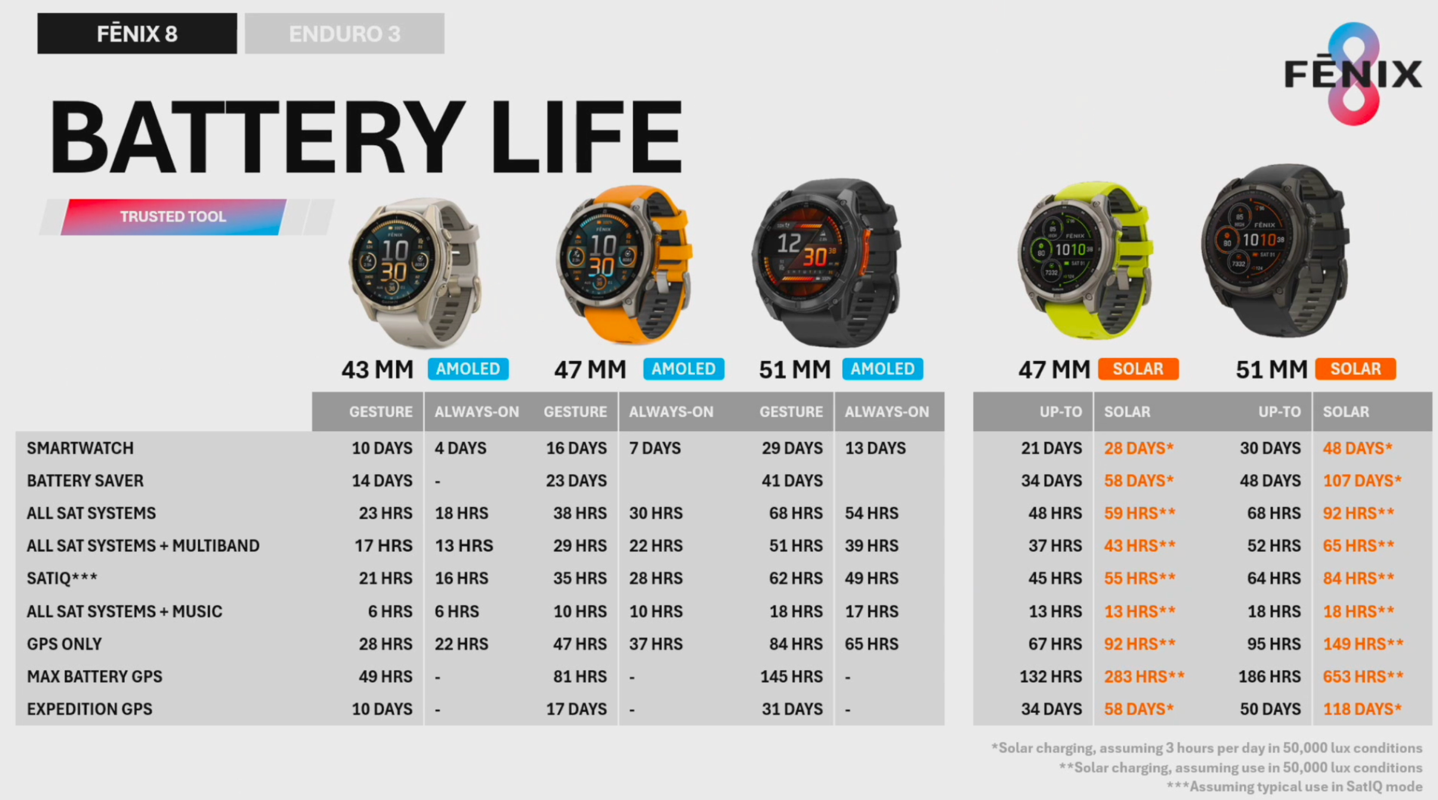
This is where Garmin dramatically outperforms Apple Watch.
| Device | Smartwatch Mode | GPS Use |
|---|---|---|
| Apple Watch Series 9 | 18-24 hours | Up to 8 hours |
| Apple Watch Ultra 2 | 36-48 hours | Up to 24 hours |
| Garmin Forerunner 55 | Up to 14 days | 20 hours |
| Garmin Venu 3 | Up to 11 days | 8 hours |
| Garmin Fenix 8 | Up to 36 days | 47 hours |
| Garmin Instinct 2X Solar | Up to 54 days | 40 hours |
| Garmin Enduro 3 Solar | Weeks to months | 120 hours |
Battery life is often the deciding factor for iPhone users switching to Garmin.
Siri Support: Does It Work?
Select high-end Garmin models support Siri through a customizable button:
• Fenix 8
• Venu 3
• Forerunner 965
Pressing the button launches Siri on your iPhone, sending voice commands via Bluetooth. This enables hands-free queries like “What’s the weather?” or “Set a timer for 10 minutes.”
Note: This is not Siri running on the watch itself—it’s a remote trigger for your iPhone’s assistant.
Common Syncing Issues to Know
Garmin relies on the Garmin Connect app running in the background. Unlike Apple Watch (which uses native iOS integration), closing the app can break connection and cause delayed notifications or failed syncing.
Best Practices
• Keep Garmin Connect in your iPhone’s background
• Disable battery optimization for the app
• Ensure location and notifications are enabled
• Some users report needing to restart the app every 1-2 days
The Garmin Connect app can also drain battery—some users report 29% overnight drain.
Safety Features That Work
Garmin excels in outdoor safety features when paired with iPhone:
• LiveTrack: Share real-time location during runs or rides. Loved ones see your position, heart rate, distance, and estimated finish time.
• Find Your Phone: Trigger your iPhone to ring—even in silent mode.
• Incident Detection: Auto-detects falls or crashes and sends emergency alerts with GPS coordinates (requires connected iPhone with cellular).
Setup Requirements and Process
What You Need
• iPhone running iOS 13 or later
• Bluetooth 4.0+ (standard on iPhone 6 and newer)
• Garmin Connect app (free from App Store)
• Free Garmin account
Pairing Steps
- Install Garmin Connect from the App Store
- Create or log in to your Garmin account
- Turn on Bluetooth on your iPhone
- Power on your watch and select “New User” or “Pair Device”
- Follow in-app prompts to complete pairing
- Grant permissions for notifications, location, and health data
- Sync initial data and customize settings
All activity is stored in Garmin’s cloud, keeping your data safe even if you lose your phone.
Features Missing from Apple Watch
Switching to Garmin means giving up some Apple-exclusive conveniences:
| Feature | Available on Garmin + iPhone? |
|---|---|
| Reply to Messages | No |
| Answer Calls | No |
| Unlock iPhone/Mac | No |
| 2FA TOTP Codes | No |
| Find My iPhone | No |
| ECG/SpO₂ | Partial (on select models) |
| Fall Detection | Yes |
| Emergency SOS | Yes |
Which Garmin Model Should You Choose?
| User Type | Recommended Model | Why |
|---|---|---|
| Casual User | Forerunner 55, Lily 2 | Affordable, simple health tracking |
| Runner/Triathlete | Forerunner 965, 165 | Training metrics, GPS accuracy |
| Outdoor Adventurer | Fenix 8, Instinct 2X Solar | Navigation, durability, battery |
| Style-Focused | Venu 3, Lily 2, MARQ | Sleek design, wellness features |
| Budget Buyer | Forerunner 55, vívoactive 5 | Entry-level access |
| Luxury Seeker | MARQ Adventurer | Premium materials, elite tools |
Key Takeaways for iPhone Users
Garmin watches are fully compatible with iPhones and offer a powerful alternative to Apple Watch, especially for athletes, outdoor enthusiasts, and health-focused users. You’ll gain superior fitness tracking, multi-week battery life, and rugged durability—but you’ll lose deep smartphone integration due to Apple’s closed ecosystem.
The trade-offs are clear: Garmin excels in fitness analytics, training load insights, and battery performance, while Apple Watch wins on smart features like message replies, call answering, and Apple Music support.
If your priority is performance over convenience, a Garmin is an excellent choice for your iPhone. But if you rely heavily on seamless messaging or Apple ecosystem features, you may want to keep your Apple Watch—or consider using both devices together.
Frequently Asked Questions About Garmin Watches with iPhone
Can I reply to text messages on my Garmin watch with iPhone?
No. Due to iOS restrictions, you cannot reply to text messages, iMessage, or third-party messaging apps (WhatsApp, Telegram) directly from your Garmin watch when paired with iPhone. You can only view incoming messages.
Why can’t I answer calls on my Garmin with iPhone?
Apple blocks third-party access to telephony APIs in iOS. This prevents any non-Apple wearable from answering calls, regardless of whether the watch has a microphone and speaker. The same limitation applies to all Android smartwatch brands on iOS.
Does Garmin work with Apple Health?
Yes. Garmin can sync one-way to Apple Health, transferring steps, heart rate, sleep data, calories, and workouts. However, GPS routes, Body Battery, stress scores, and HRV do not transfer to Apple Health.
Can I use Apple Music on a Garmin watch?
No. Garmin watches do not support Apple Music. You can use Spotify (Premium), Amazon Music, or Deezer for offline music playback, or transfer local MP3 files via USB.
Do Garmin watches close Apple Activity Rings?
No. Apple Activity Rings (Move, Exercise, Stand) only track data from Apple Watch. Wearing a Garmin will not close these rings, though some calorie data may partially transfer.
How long does Garmin battery last compared to Apple Watch?
Garmin batteries last significantly longer. Apple Watch typically needs daily charging (18-48 hours), while Garmin watches last 11 days to several weeks on a single charge, depending on the model and usage.
Final Thoughts on Garmin Compatibility with iPhone
Garmin watches are highly compatible with iPhones for health, fitness, and notification purposes. They offer superior tracking depth and battery life compared to Apple Watch, making them ideal for athletes and outdoor enthusiasts. However, they lack full smartwatch parity due to Apple’s restrictive iOS policies around messaging, calling, and third-party app access.
If you prioritize fitness analytics, multi-day battery life, and durable outdoor-ready designs, Garmin + iPhone is a winning combination. Just go in with clear expectations about the limitations around call handling and message replies.



