
You glance at your wrist, and your Garmin watch displays “High stress.” But how does a smartwatch know you’re stressed? Unlike humans who rely on emotions or intuition, Garmin watches measure stress objectively using heart rate variability (HRV)—a real-time biomarker of your body’s physiological state. This isn’t guesswork; it’s rooted in science and backed by sophisticated algorithms.
Garmin’s stress tracking uses continuous optical heart rate monitoring combined with Firstbeat Analytics, a sophisticated algorithm that interprets HRV data to deliver a 0–100 stress score updated every minute. The system tracks your autonomic nervous system balance, revealing when your body is in “fight-or-flight” mode versus “rest-and-digest” recovery. Whether it’s a tough workout, work pressure, poor sleep, or even one drink, your Garmin detects the cumulative toll on your body.
In this guide, you’ll learn exactly how Garmin measures stress, what affects your score, how to interpret the data, and how to use it for better recovery, performance, and well-being.
Core Metric: Heart Rate Variability (HRV)

What HRV Reveals About Stress
Heart rate variability (HRV) is the key to Garmin’s stress measurement. It refers to the tiny, millisecond-level changes between heartbeats. A healthy heart doesn’t beat like a metronome—its rhythm naturally fluctuates. Higher HRV means your body is resilient and relaxed; lower HRV signals stress, fatigue, or exertion.
Garmin uses HRV as a window into your autonomic nervous system (ANS):
– Sympathetic nervous system (SNS): Activated during stress or activity → lowers HRV
– Parasympathetic nervous system (PNS): Active during rest → increases HRV
When your Garmin detects low HRV, it interprets this as high physiological stress, even if you’re sitting still. This is why you might see a high stress score after a workout or during a busy workday.
How Optical Sensors Capture HRV
Garmin watches use green LED optical sensors on the back of the watch to measure blood flow changes with each heartbeat—a method called photoplethysmography (PPG). From this signal, the device calculates:
– Heart rate (BPM)
– Interbeat intervals (IBIs) → used to compute HRV
The sensor works 24/7, capturing data during rest, activity, and sleep. While not as precise as medical ECG, modern Garmin devices filter motion noise and use high-frequency sampling to deliver clinically relevant HRV trends for daily wellness tracking.
Pro Tip: For best accuracy, wear the watch snug but comfortable, and avoid excessive arm movement during rest periods.
Stress Score: From HRV to Real-Time Readout
How the 0–100 Stress Score Is Calculated
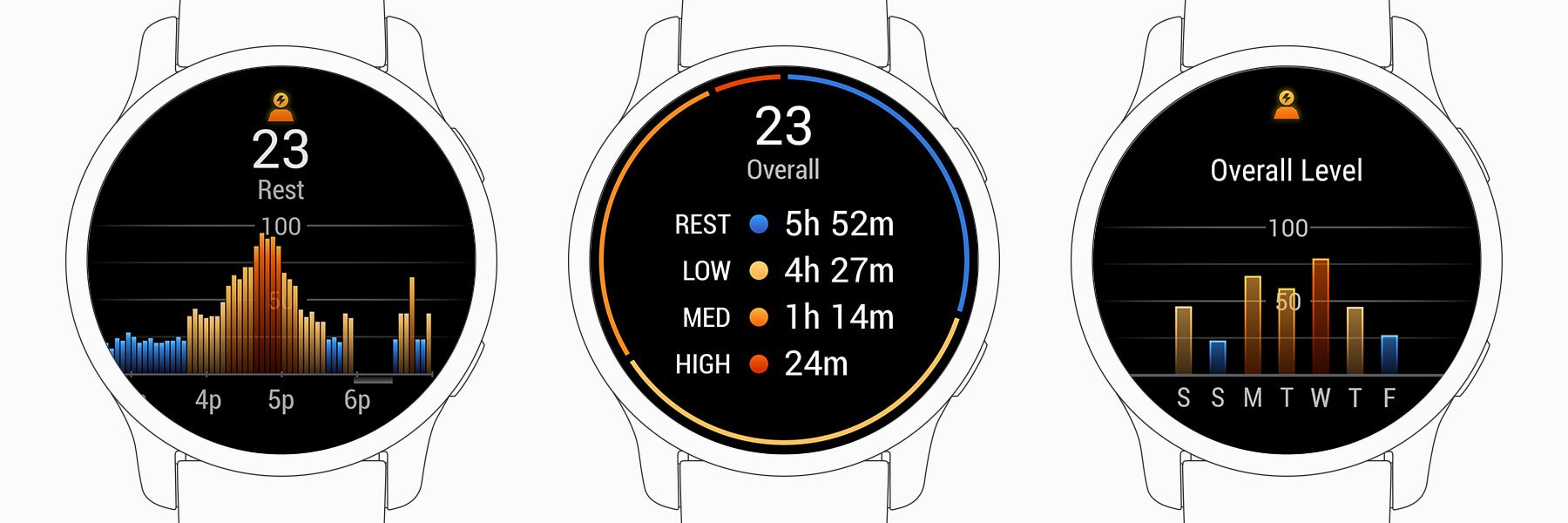
Garmin converts short-term HRV data into a minute-by-minute stress score from 0 to 100 (or 1–100 on some models). The algorithm, powered by Firstbeat Analytics, analyzes how your ANS responds to stimuli throughout the day.
The score is updated every 1–3 minutes during waking hours, based on recent HRV trends. It reflects total physiological load, not just emotional stress. This means exercise, illness, caffeine, and even travel can elevate your score.
Interpreting the Four Stress Levels
Garmin categorizes your stress score into four levels:
| Level | Score Range | What It Means |
|---|---|---|
| Rest / Very Low | 0–25 | Deep relaxation, meditation, or sleep. High PNS activity. |
| Low Stress | 26–50 | Balanced state. Ideal for routine tasks and recovery. |
| Medium Stress | 51–75 | Normal daily strain—work, light activity, mental load. |
| High Stress | 76–100 | Strong SNS activation. Physical or emotional intensity. |
Note: A high score isn’t always bad. A hard workout causes high stress—but it’s productive. The key is recovery afterward.
Total Physiological Stress, Not Just Mental
What Garmin Actually Measures
Garmin doesn’t measure “mental stress” alone—it tracks total physiological stress, the sum of all strain on your body. This includes:
– Physical stress: Exercise, standing, manual labor
– Mental stress: Work pressure, anxiety, emotional events
– Lifestyle factors: Alcohol, caffeine, dehydration
– Environmental stress: Heat, altitude, travel
– Illness: Infections, even before symptoms appear
One user noted: “I get ‘You had a very stressful day’ after an active day—even though I slept well.” This confirms: Garmin counts physical activity as stress, because it lowers HRV just like anxiety does.
Why Positive Stress Also Raises the Score
A rewarding workout or exciting event can spike your stress score. Why? Because both positive and negative stressors activate the sympathetic nervous system. Your body doesn’t distinguish between “good” and “bad” stress—it only sees physiological load.
This is crucial: Garmin reflects net strain, not emotional state. A high score after a race isn’t a problem—it’s expected. The real insight comes from seeing how quickly you recover.
Accessing and Using Stress Data
Where to View Your Stress Score
You can check your stress level in three places:
– On your watch: Tap the stress widget for real-time score
– Garmin Connect app: See hourly trends and daily summaries
– Garmin Connect website: Analyze long-term patterns and correlations
The timeline graph shows how your stress fluctuates throughout the day, helping you spot patterns.
Key Insights From Stress Reports
In Garmin Connect, you’ll see:
– Time spent in each stress category (Rest, Low, Medium, High)
– Peak stress times
– Correlations with sleep, activity, and Body Battery
– Daily summary notifications
Athletes use this to adjust training loads. Office workers track mental fatigue. Parents notice higher stress on chaotic days.
Integrated Wellness Metrics That Enhance Accuracy
Body Battery: Energy Reserve Tracking
Garmin’s Body Battery metric combines:
– HRV trends
– Stress levels
– Sleep quality
– Physical activity
It estimates your energy reserves from 0 (drained) to 100 (fully charged). High stress depletes it; deep sleep and relaxation recharge it. Example: Even with 8 hours of sleep, one drink of alcohol can prevent a full recharge.
Respiration Rate and Sleep Insights
- Resting respiration rate: Elevated breathing (>20 bpm at rest) signals stress or illness.
- Sleep Score: Combines duration, restlessness, and stages. Low HRV + poor sleep = high stress and low readiness.
- Overnight HRV: Used as a morning readiness indicator—low values suggest incomplete recovery.
Factors That Affect Your Stress Score
1. Physical Activity and Recovery
- Exercise lowers HRV → increases stress score
- Post-workout recovery should show rising HRV
- Chronic low HRV may indicate overtraining
Tip: If your stress score stays high for days, you may need more rest.
2. Alcohol and Caffeine
- One drink can reduce overnight HRV and block full Body Battery recharge
- Caffeine, especially late in the day, elevates heart rate and delays recovery
Users report higher stress and lower sleep scores after drinking—even socially.
3. Sleep Quality and Duration
- Deep and REM sleep restore parasympathetic tone
- Fragmented or short sleep impairs HRV recovery
- Morning HRV is a key recovery marker
4. Illness and Immune Response
Garmin can detect illness before symptoms appear. Users report sudden HRV drops, elevated resting heart rate, and high stress scores even before feeling sick.
5. Mental Load and Emotional Events
Work deadlines, arguments, or anxiety trigger sympathetic activation, lowering HRV. Many users see spikes during meetings or high-pressure tasks.
Built-In Tools to Reduce Stress
On-Watch Breathing Exercises
When stress is high, Garmin offers guided breathwork sessions:
1. Open the stress widget
2. Tap the screen → select green checkmark
3. Choose a session:
– Relax and Focus Short (2 min)
– Calm and Clear (3–4 min)
– Energize and Focus (5 min)
4. Follow the on-screen inhale/hold/exhale animation
These sessions activate the parasympathetic nervous system, helping you calm down in minutes.
Device Compatibility and Availability
Which Garmin Watches Track Stress?
Most modern Garmin devices support stress tracking:
| Device | Stress Tracking? | Notes |
|---|---|---|
| Fenix 7, Epix, Forerunner 955/965 | ✅ Yes | Full analytics, Body Battery, recovery insights |
| Forerunner 255/265, Venu 3 | ✅ Yes | Advanced HRV and stress trends |
| Vivosmart 4/5 | ✅ Yes | Basic stress scoring and Body Battery |
| Forerunner 235, vivosmart 3 | ❌ No | No continuous HRV or Firstbeat support |
Always check specs before buying—not all Garmins offer this feature.
Limitations and Realistic Expectations
Not a Medical Diagnostic Tool
Garmin cannot diagnose anxiety, depression, or heart conditions. It provides trend-based wellness insights, not clinical diagnoses.
Motion Artifacts and Accuracy
- Arm movement can disrupt optical sensor readings
- Loose fit reduces accuracy
- Wrist-based HRV is less precise than chest straps or ECG
Focus on long-term trends, not single data points.
Individual Variability
Baseline HRV varies by age, fitness level, genetics, and health status. Don’t compare your score to others—track your own patterns.
How to Improve HRV and Lower Stress
Actionable Steps to Boost Recovery
- Prioritize Sleep: 7–9 hours, consistent schedule
- Practice Daily Breathing: 5–10 minutes of guided breathwork
- Limit Alcohol and Caffeine: Especially after noon
- Stay Hydrated: Dehydration stresses the body
- Eat a Balanced Diet: Nutrient-rich foods support ANS function
- Use Garmin’s Breathing Exercises: Quick, effective, on-demand
- Adjust Training: Let Body Battery and stress trends guide intensity
Key Insight: Small lifestyle changes—like skipping a drink or adding a breathing session—can improve HRV within days.
Practical Use Cases and User Experiences
For Athletes: Optimize Training and Recovery
- Monitor post-race recovery via HRV trends
- Avoid overtraining by spotting chronic high stress
- Adjust intensity based on morning readiness scores
Many elite athletes use Garmin data to time peak performance.
For Professionals: Manage Mental Load
- Identify high-stress work hours
- Test effectiveness of breaks, meditation, or walks
- Track impact of work-life changes
One user reported: “My stress drops 30% after a 10-minute walk—now I schedule them daily.”
For General Wellness: Live Smarter
- See how lifestyle choices affect your body
- Share exportable reports with doctors or coaches
- Build data-driven habits for long-term health
Frequently Asked Questions About How Garmin Watches Measure Stress
How does Garmin actually measure stress on its watches?
Garmin measures stress using heart rate variability (HRV) collected through optical sensors on the back of the watch. The device uses green LED light to detect blood flow changes with each heartbeat, then calculates interbeat intervals to determine HRV. This data is analyzed by Firstbeat Analytics algorithms to produce a stress score from 0–100.
What is a normal stress score on Garmin?
A normal stress score typically falls between 26–50 (Low Stress) for balanced daily functioning. Scores of 0–25 indicate rest or very low stress, 51–75 indicate medium stress from normal daily activities, and 76–100 indicate high stress from significant physical or mental strain.
Why does my Garmin show high stress when I feel fine?
This happens because Garmin measures total physiological stress, not just emotional stress. Exercise, caffeine, dehydration, recent alcohol consumption, or even minor illness can elevate your stress score by lowering HRV. Your body is experiencing physiological strain even if your mind doesn’t feel stressed.
Can Garmin detect anxiety or mental stress?
Garmin cannot specifically diagnose anxiety or separate mental stress from physical stress. It measures the combined physiological load on your body. However, during high-pressure situations like work deadlines or emotional events, you may see elevated scores due to sympathetic nervous system activation.
Does Garmin stress tracking work during sleep?
Yes, Garmin continues monitoring HRV during sleep to assess recovery. Overnight HRV is actually one of the most valuable metrics—higher overnight HRV generally indicates better recovery. The stress score isn’t actively displayed during sleep, but the data contributes to your morning readiness and Body Battery readings.
Key Takeaways for Understanding Garmin Stress Tracking
Garmin watches measure total physiological stress through heart rate variability (HRV) analysis, using optical sensors and Firstbeat Analytics algorithms to produce a real-time 0–100 stress score. The system tracks your autonomic nervous system balance, detecting when your body is in sympathetic “fight-or-flight” mode versus parasympathetic “rest-and-digest” recovery. This means your watch captures not just emotional stress, but also physical exertion, illness, alcohol consumption, poor sleep, and environmental factors—all contributing to your daily stress score.
The true value of Garmin’s stress tracking lies in long-term trend analysis rather than individual readings. By monitoring how your stress score responds to workouts, sleep, alcohol, and daily activities, you can make data-driven decisions about when to push hard and when to recover. The integration with Body Battery, sleep tracking, and guided breathing exercises makes this a practical tool for optimizing both athletic performance and general well-being. Focus on your patterns over time, and let your watch help you build true resilience.



