
You’re on vacation, mid-run, or prepping for a long trip only to realize your Garmin watch is dead and the magnetic charger is lost, forgotten, or damaged. Panic sets in. Without the official charger, most assume the watch is unusable until a replacement arrives. But there is hope.
Thanks to user ingenuity and third-party innovations, you can charge a Garmin watch without the original charger safely and effectively. This guide reveals proven methods to get your Garmin back up and running, including building a makeshift charger, using USB-C adapters, and identifying which models support alternative charging.
Build a DIY Garmin Charging Cable
One of the most reliable emergency solutions is creating a custom charging cable using basic household items. This method, known as the “Gable” (Garmin Cable), has been tested by hundreds of users across forums and Reddit.
Gather Required Materials
You do not need advanced tools. Just gather these common items:
- Old USB cable (Micro-USB or USB-C)
- Wire cutters or scissors
- Knife or stripping tool
- Rubber band, tape, or clothespin
- Optional: multimeter for voltage verification
Use any USB cable you are no longer using. The key is accessing the internal red (+5V) and black (ground) wires without damaging them during stripping.
Prepare the USB Cable
Cut off the device-end connector (Micro-USB or USB-C). Strip back the outer insulation to expose four inner wires: red (power), black (ground), white, and green (data). Trim and insulate the white and green wires with electrical tape because they are not needed and can cause interference.
Leave the red and black wires exposed and separated. Do not plug the USB end into a power source yet.
Connect Wires to Watch Pins
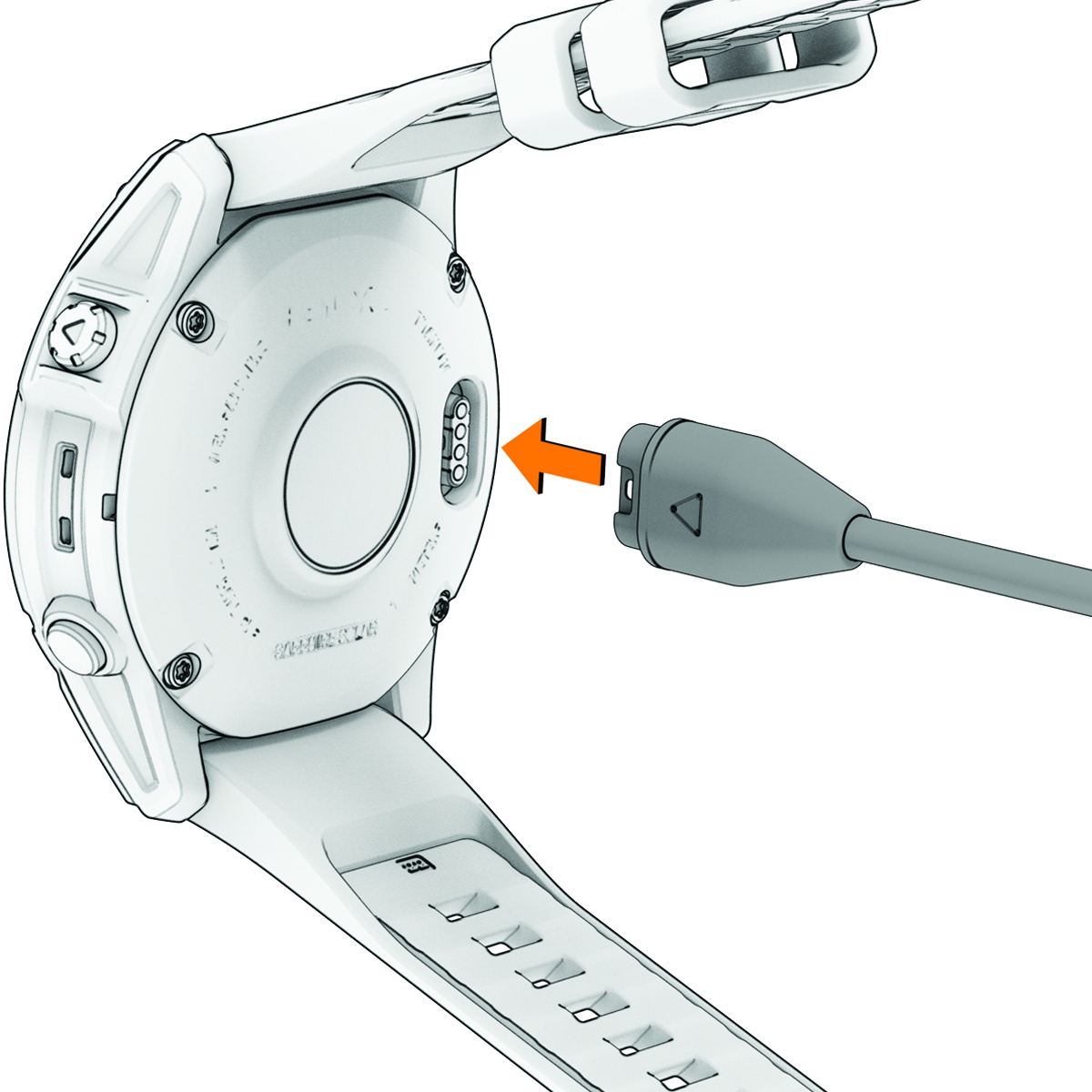
Remove the watch band for better access. Flip the watch over to reveal the 4-pin magnetic charging port. The outer two pins (left and right) carry power and ground. The inner two handle data and must be avoided.
Touch the red wire to one outer pin and the black wire to the other. Polarity varies by model. Some require red on left, others on right. If nothing happens, reverse the wires.
Secure and Power Up
Hold the wires in place with a rubber band, tape, or clothespin. A small piece of cardboard can act as a backing plate to apply even pressure.
Once secured, plug the USB end into a wall adapter, power bank, or laptop USB port. Within seconds, the watch should vibrate or display a battery icon. Charging has begun.
Warning: Keep exposed wires from touching each other. A short circuit could damage the power source or watch.
Compatible Garmin Models for DIY Charging
Not all Garmin watches behave the same when charged externally. Most support DIY methods, but exceptions exist due to built-in circuit protections.
Works: Most Popular Models
| Model | Success Confirmed | Notes |
|---|---|---|
| Forerunner 245/255 | Yes | Reliable with correct polarity |
| Venu / Venu 2 / Venu 3 | Yes | Tape works better than rubber bands |
| Instinct (including Solar 2) | Yes | Red wire on left pin |
| Fenix 5 Plus / 6 / 7 | Yes | Long-term user testing |
| Vivoactive 4/5 | Yes | Red on right pin (reversed polarity) |
| Forerunner 956 | Yes | Used abroad with power bank |
These models respond well to stable contact and regulated 5V input. Users report full charges achieved without issues.
Fails: Protected Models
| Model | Works | Reason |
|---|---|---|
| Forerunner 165 | No | Charging circuit disabled without magnetic dock |
| Forerunner 55 | Limited | Some users report partial success |
| Newer Solar Models | Varies | Firmware may block non-OEM charging |
The Forerunner 165 is confirmed non-functional with DIY methods. According to user tests, the charging pins are electronically isolated unless the official dock is attached. No amount of manual contact will bypass this protection.
Use a USB-C to Garmin Adapter

For a safer, reusable alternative, consider a third-party USB-C magnetic adapter. These small, L-shaped devices plug into any USB-C power source and magnetically attach to your Garmin.
How It Works
- Plug the USB-C end into a power bank, laptop, phone with reverse charging, or wall charger.
- Attach the magnetic tip to the back of the watch.
- Charging starts automatically.
No wires to strip, no polarity guessing. Just plug and play.
Why It Is Better Than DIY
- Built-in safety features regulate voltage and prevent overcharging.
- PTC protection stops overheating.
- Portable design fits on a keyring.
- No setup time required for instant use during travel.
Unlike DIY cables, these adapters maintain consistent contact and eliminate the risk of short circuits.
Best Power Sources
- Samsung Galaxy phones with Wireless PowerShare
- MacBooks and USB-C laptops
- Anker or Baseus power banks
- Travel wall chargers with USB-C PD
Even if you are off-grid, a solar power bank with USB-C output can keep your watch alive.
Check Polarity Before Connecting
Garmin watches do not use a universal pin layout. Connecting power incorrectly will not usually damage the device thanks to reverse polarity protection, but it will not charge either.
Model-Specific Polarity
| Model | Left Pin | Right Pin |
|---|---|---|
| Forerunner 35 | Ground (Black) | Power (Red) |
| Vivoactive 4 | Power (Red) | Ground (Black) |
| Instinct | Power | Ground |
| Venu 2 | Varies | Test first |
| Forerunner 255 | Usually left = power | Confirm with test |
Use a Multimeter to Verify
Set your multimeter to continuity mode. Touch one probe to the metal backplate of the watch and the other to each outer pin. The pin that beeps is ground (black wire). The opposite is power (red wire).
This simple test prevents guesswork and ensures correct wiring.
Avoid Common Charging Mistakes
Even with the right method, mistakes can prevent charging or cause damage.
Touching Data Pins
Never let the red or black wires contact the middle two pins. These are for firmware updates and diagnostics. Powering them can corrupt data or fry circuits.
Using High-Voltage Sources
Only use 5V USB power sources. Avoid car jump starters, 12V adapters, and fast chargers without regulation. Higher voltages destroy internal components instantly.
Poor Contact Technique
If the watch does not charge, re-seat the wires, clean the pins with isopropyl alcohol, and increase pressure with tape or clip. Intermittent contact tricks the watch into thinking the charger was removed.
Buy a Replacement Charger (Fast Options)
If DIY feels risky or your model blocks alternative charging, get an official replacement fast.
Where to Buy Today
- Amazon ships same-day for $7 to $15
- Best Buy offers in-store pickup
- Walmart has online and physical store options
- Target carries select Garmin cables
- Garmin.com sells direct from manufacturer
Search for “Garmin 4-pin magnetic charger” or your model number (like “Forerunner 255 charger”).
OEM vs. Third-Party Cables
| Type | Pros | Cons |
|---|---|---|
| Official Garmin Charger | Guaranteed compatibility, safe, durable | More expensive, bulky |
| Certified Third-Party | Cheaper, compact | Quality varies |
| Uncertified Clones | Very cheap | Risk of failure or damage |
Stick to brands like Duracell, Anker, or Belkin if avoiding OEM.
Compare Charging Methods Side-by-Side
Choosing the right option depends on urgency, tools, and safety.
| Method | Cost | Reliability | Safety | Ease |
|---|---|---|---|---|
| DIY Cable | $0 | Medium | Medium | Hard |
| USB-C Adapter | $10–$20 | High | High | Easy |
| Official Charger | $15–$25 | Very High | Very High | Very Easy |
For emergencies, DIY works. For regular use, invest in a USB-C adapter or spare OEM cable.
Real User Success Stories
Actual experiences prove these methods work under pressure.
- jagor34 charged his Venu 2 on a cruise using a cut USB cable and rubber band. It worked perfectly.
- wcleadham lost his charger in Europe and made a Gable cable with scissors and tape. It saved his trip.
- Anomard charged a Forerunner 956 via DIY in Morocco where no stores had replacements.
- 5nnn modified a TomTom charger that fit perfectly and charged fast.
One user wrote: “Holy shit the internet is a beautiful thing. Thank you for posting this! I had very little faith I could pull this off but worked like a charm.”
Final Tips for Charging Success
Emergency Checklist (No Charger)
- Find an old USB cable
- Strip red and black wires
- Attach to outer pins
- Secure with tape or clip
- Plug into 5V source
- Wait for vibration or battery icon
Long-Term Prevention
- Carry a USB-C Garmin adapter on your keyring
- Keep a spare OEM charger in your travel bag
- Label cables with model names
- Test DIY method at home before relying on it
Last Resort Options
- Ask hotels or gyms for spare chargers
- Visit electronics stores for same-day pickup
- Use a friend is compatible Garmin charger
Frequently Asked Questions About Charging a Garmin Watch Without a Charger
Can I use any USB cable to charge my Garmin watch?
You can use an old USB cable, but it must be modified. Cut off the device end and expose the red (power) and black (ground) wires. The white and green data wires should be insulated and not used. This DIY method works for most Garmin models.
Will charging my Garmin watch without the official charger void the warranty?
Garmin does not endorse DIY charging methods. However, properly executed alternative charging has not been shown to void warranties through user reports. Physical damage to the charging port from improper technique may not be covered.
Why will my Forerunner 165 not charge with DIY methods?
The Forerunner 165 has circuit protection that disables the charging pins unless the official magnetic dock is attached. User tests confirm no continuity between pins when unconnected, meaning the circuit is electronically isolated.
How do I know which pin is positive on my Garmin watch?
Use a multimeter set to continuity mode. Touch one probe to the metal backplate of the watch and the other to each outer pin. The pin that beeps is ground (negative). The opposite pin is power (positive).
Is it safe to use a power bank to charge my Garmin watch?
Yes, using a 5V power bank is safe and effective. Most power banks deliver regulated 5V output, which is the correct voltage for Garmin watches. Avoid using power banks that deliver higher voltages or unregulated power.
What is the fastest way to get a replacement Garmin charger?
Amazon offers same-day shipping for most Garmin chargers, typically delivering within 24 hours. Best Buy and Walmart also offer in-store pickup for immediate access.
Key Takeaways for Charging Your Garmin Watch Without a Charger
While Garmin does not endorse DIY charging, thousands of users have safely powered their watches without the original cable. With proper care, correct polarity, and a regulated 5V source, alternative charging is a viable lifeline when you are stuck without your charger.
The DIY “Gable” method works on most popular models including Forerunner, Venu, Instinct, and Fenix series. However, newer models like the Forerunner 165 have circuit protection that blocks non-OEM charging. For those models, only the official Garmin charger will work.
Third-party USB-C adapters offer the best balance of safety and convenience. They are portable, built with voltage regulation, and work across multiple Garmin models. Keep one on your keyring as a backup.
Prioritize safety in all charging attempts. Verify voltage before connecting, avoid high-voltage sources, and never touch the data pins. Test your DIY method at home before relying on it during travel. Your next run, flight, or adventure should not be canceled over a missing charger.



