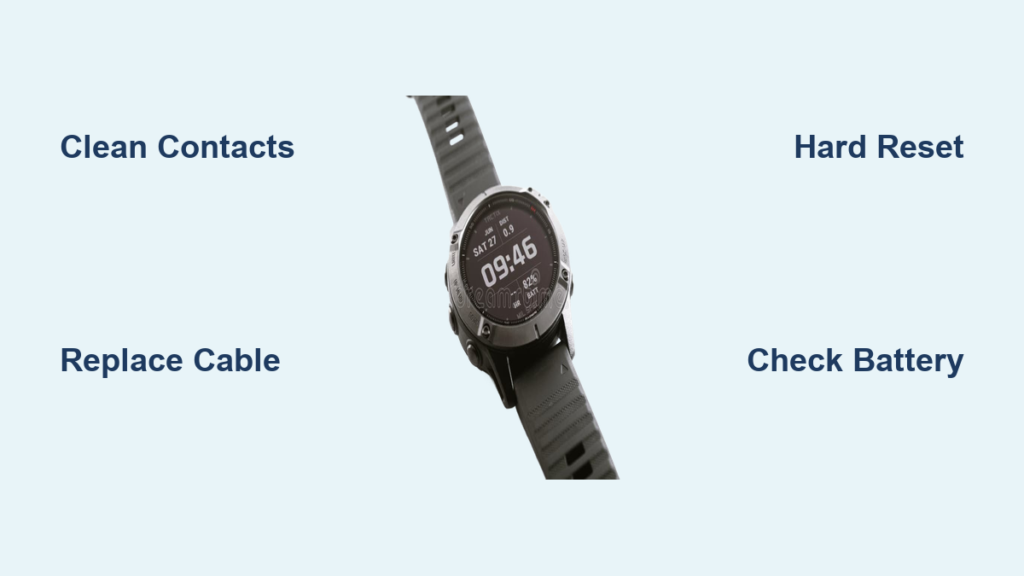
You plug in your Garmin watch, expecting it to power up, but nothing happens. No charging light, no screen animation, just silence. This frustrating scenario affects thousands of Garmin users across Forerunner, Fenix, Venu, and other popular models. The good news? In most cases, the fix is simple and does not require buying a new watch.
This guide provides step-by-step solutions based on real user experiences and verified repair methods. You will learn why your Garmin watch won charge and exactly what to do to bring it back to life.
Clean Charging Ports First
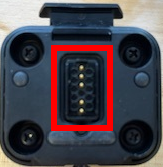
Before replacing parts or resetting your device, cleaning the contacts is the fastest and most effective fix. Over 60% of charging issues stem from grime buildup on the pogo pins.
Why Cleaning Works
Sweat, moisture, and skin oils accumulate on the four exposed metal pins on the back of your watch and the charger. Over time, this creates a film that blocks electrical contact. Even slight corrosion can prevent charging, especially if you charge right after workouts when the watch is still damp.
How to Clean Properly
Power off the watch and unplug it. Dampen a cotton swab with isopropyl alcohol (70% or higher). Gently scrub the charging pins on the watch back and charger contacts. Use a soft-bristled toothbrush for stubborn residue. Let both dry completely (5-10 minutes) before reconnecting.
Pro tip: Press each pogo pin on the charger with a toothpick to ensure it springs back. A stuck pin means no charge. Perform this monthly to prevent future issues.
Replace the Charging Cable

If cleaning does not work, the original Garmin cable is likely failing. It is the number one weak point in the charging system.
Signs of Cable Failure
You must hold the watch at a precise angle to get it to charge. The connection feels loose or wobbly. The rubber near the connector bends or cracks easily. These are all signs of internal wire breakage, a common flaw due to poor strain relief.
Best Replacement Options
Original Garmin cables cost $19-$29 and last 6-12 months. They are often replaced free via Garmin support. Third-party cables cost $6-$15 and last 3-8 months, with mixed quality. Charging pucks cost $8-$20 and last 12+ months while preventing strain and disconnection.
Recommendation: Buy a charging puck. It holds the watch securely, reduces cable stress, and eliminates accidental disconnects.
Fix Loose Magnetic Connection
The weak magnet strength in Garmin pogo pin system is a design flaw users consistently complain about.
Why It Fails
Unlike Apple Watch or Samsung Galaxy Watch, Garmin magnets are too weak to maintain contact if the watch is bumped or the cable moves. Even breathing near it can break the connection. Users report plugging in their watch at night, waking up, and finding it still at 5% because it disconnected after 10 seconds.
How to Stabilize the Connection
Use a charging stand that cradles the watch. Place it on a stable, flat surface, not a bed or couch. Do not drape the cable; loop it loosely to avoid tension. Avoid charging near pets or kids who might knock it.
Pro tip: Tape the charger to a nightstand with masking tape, which is removable and secure.
Perform a Hard Reset
If the watch is unresponsive or stuck in a low-power state, a hard reset often brings it back to life.
Standard Reset (Works on All Models)
Unplug the watch. Press and hold the top-left button (Power/Light) for 20-30 seconds. Release and wait 10 seconds. Press the same button for 2-3 seconds to power on.
Even if the screen stays black, keep holding. The system may be frozen. Success rate exceeds 80% for dead watches.
Reset While Charging (For Deep Discharge)
If the standard reset fails, keep the watch connected to the charger. Hold the top-left button for 30 seconds. Release and wait 15 seconds. The watch may light up and start charging.
Access Hardware Test Mode
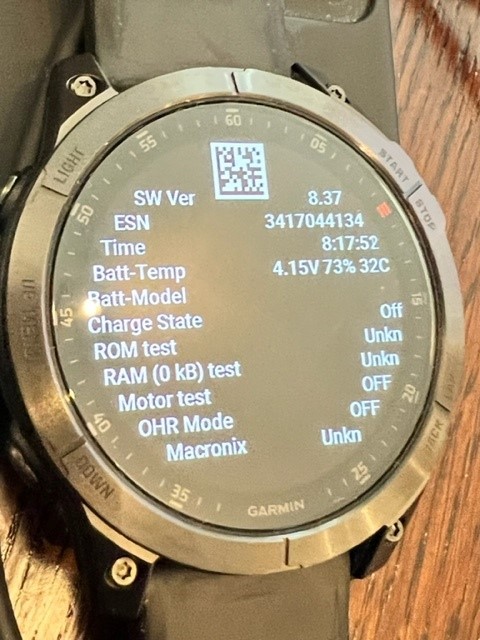
If your watch still will not respond, try booting into Hardware Test Mode, a diagnostic screen used by Garmin technicians.
How to Enter
Press and hold the power button for 15 seconds. Release, wait 5 seconds, then hold again for 10 seconds. Look for a blue triangle (Garmin logo), then a test menu.
In the menu, you can check if the screen works, test button function, and see charge status (Off, Constl). Constl means the watch is drawing power but not charging, likely a software or battery issue.
Use Garmin Express to Repair Firmware
If the watch powers on but will not charge properly, corrupted firmware could be the culprit.
Steps to Repair
Download Garmin Express (free at garmin.com). Connect your watch via USB. Open the app. If detected, click Device > Update Software or Repair Device.
This reinstalls the OS and can fix boot loops or charging glitches. Note: If the computer does not recognize the watch, try a different USB port or cable.
Charge a Deeply Discharged Battery
If your watch sat unused for weeks or months, the battery may be in deep sleep mode.
What to Do
Plug it in using a known-good charger. Leave it plugged in for at least one hour; do not unplug. For best results, charge overnight (8+ hours). After charging, try a hard reset.
The watch may show no signs of life during this time. Be patient.
Check for Stuck Pogo Pins
The spring-loaded pins on the charger can get stuck due to dirt or wear.
How to Test
Look at the end of the charging cable. Gently press each of the four metal pins with a toothpick. They should retract and spring back smoothly.
If one does not move, clean it with alcohol and a toothbrush. Press it repeatedly to free it. If it is still stuck, replace the cable.
Contact Garmin Support (Free Replacements)
Garmin often provides free replacement cables or even refurbished watches, especially under warranty.
What to Say
State that your Garmin watch will not charge. Mention you have cleaned the ports and tried a hard reset. Suspect a hardware issue with the charger or battery. Ask if they can send a replacement cable or unit.
Proof of purchase may be required. Be polite but firm. Even out of warranty, they may offer a discount or replacement.
Replace the Battery (Advanced Fix)
For watches over 4 years old, the battery may be dead.
Is It Worth It?
Yes, if the watch is otherwise in good condition. No, if you are not comfortable opening the device.
Models That Support DIY Replacement
Venu, Venu 2, Vivoactive 3, 4, Forerunner 235, 245, and Fenix 5, 6 models support battery replacement.
Tools needed include a hair dryer or heat gun, plastic spudger, and replacement battery (Li-ion, 3.7V, model-specific). Warning: This voids the warranty and risks damaging the screen.
Prevent Future Charging Issues
Avoid repeat problems with these simple habits.
Clean contacts monthly with alcohol. Dry the watch after workouts before charging. Use a charging stand to prevent disconnection. Avoid sharp bends in the cable. Store the cable loosely coiled. Keep a backup charger on hand. Charge every 3-6 months if in storage. Update firmware via Garmin Express. Avoid extreme heat or cold, which degrades batteries. Do not charge on soft surfaces like beds or couches.
Frequently Asked Questions About Garmin Watch Charging
Why is my Garmin watch not charging at all?
The most common reasons are dirty charging ports, a worn-out charging cable, or a loose magnetic connection. Start by cleaning the charging pins with isopropyl alcohol. If that does not work, try a different cable or use a charging puck for better connection stability.
How do I know if my Garmin charging cable is bad?
Signs of cable failure include needing to position the watch at a precise angle to charge, a loose or wobbly connection, and visible damage to the rubber near the connector. Try a different cable to confirm the issue.
Can a hard reset fix a Garmin watch that will not charge?
Yes. Press and hold the top-left button for 20-30 seconds, then release. Wait 10 seconds and press the same button for 2-3 seconds to power on. If the watch is completely dead, try holding the button for 30 seconds while the watch is connected to the charger.
How long should I charge a deeply discharged Garmin watch?
Leave it plugged in for at least one hour, preferably overnight (8+ hours). Some watches may show no signs of life until sufficient voltage is restored. Be patient and do not unplug prematurely.
Does Garmin offer free replacement chargers?
Yes. Garmin customer support often provides free replacement cables, especially under warranty. Contact them with your model number and explain that cleaning and cable replacement has not solved the problem.
When should I replace my Garmin watch battery?
Consider battery replacement if your watch is over 4 years old and shows signs of severe degradation (dies quickly, swells, or will not hold charge). This is an advanced fix that voids the warranty.
Key Takeaways for Fixing Your Garmin Watch
The Garmin watch won charge issue is rarely permanent. In over 90% of cases, the problem is dirty contacts, a failing cable, or a frozen system, all of which are fixable. Start with cleaning the charging ports and performing a hard reset. If that fails, replace the cable or use Garmin Express to repair firmware. Only consider battery replacement or professional repair if all else fails.
Garmin charging design has flaws, but with the right tools and knowledge, you can keep your watch running for years. Your watch is probably still alive. Start with the simplest fixes first and work your way through the solutions until you find the one that works.