
You’ve noticed your Casio watch has stopped working or the battery is dying. Maybe you want to replace the band or check for moisture inside. Whatever the reason, opening a Casio watch can seem intimidating, especially when you are staring at a tiny metal back with no obvious way in. But with the right method and tools, you can safely access the internals without damage.
The key is knowing which type of case back your model uses. Casio watches come with four-screw, snap-back, screw-down, or battery cage-only designs, each requiring a different approach. Some models, like G-Shock and Baby-G, are built for toughness and do not open fully. Others, like the classic A158W, have removable backs for full internal access.
Identify Your Casio Watch Case Back Type
Before applying any tool, determine how your Casio watch opens. Using the wrong method can strip screws, crack seals, or break latches. This identification step is critical before you attempt to open any Casio watch.
Check for Screws or Seams
Turn the watch over and inspect the back carefully. If you see four visible screws at the corners, you have a four-screw back common on vintage digital models like the A158W and A500W. If you see no screws but feel a slight seam when running your fingernail around the edge, it is likely a snap-back case. If the edge is smooth and rotates, it is a screw-down back designed for water resistance. If you see no opening option at all, you likely have a G-Shock-style battery cage model that only allows partial access.
Pro Tip: Run your fingernail around the edge. If you feel a gap, it is likely a snap-back. No gap could mean threaded or sealed design.
Open a Four-Screw Case Back (A158W, A500W)

This design is common on retro Casio digital watches like the A158W and A500W. It allows full access to the circuit and battery when you need to open a Casio watch for servicing.
Tools You Will Need
- Phillips #00 or #000 screwdriver
- Non-marring tweezers or plastic pry tool
- Small container for screws
Remove the Screws
Place the watch face-down on a soft cloth to protect the crystal and face. Use the correct-sized screwdriver to remove all four screws by turning counterclockwise. Avoid wobbling to prevent stripping the screws. Store screws in a safe container since loss is common during this type of Casio watch repair.
Lift the Back Cover
Gently insert a plastic tool or non-marring tweezers under the edge of the back cover. Apply even pressure to lift the cover away from the case. Remove the white protective sticker if present. Unclip the metal battery shield using a fingernail or plastic probe to access the battery compartment.
Replace the Battery
The battery type for these models is CR2016, a 3V lithium coin cell. Always ensure the positive side faces up when you install the battery. Use non-metallic tweezers to remove the old battery and insert the new one, ensuring it clicks securely into place.
Reassemble the Watch
Reattach the metal shield by snapping all clips into position. Align the rubber gasket on the case back carefully before placing the cover. Reinstall the four screws, tightening in a crisscross pattern to ensure even pressure. Do not over-tighten as this can damage threads or compress the gasket improperly.
Warning: A damaged gasket compromises water resistance. Replace if cracked or flattened.
Open a Snap-Back Case Back
Snap-backs are common on mid-tier digital and analog Casio watches. They are held by tension and a rubber seal, requiring a different technique when you need to open a Casio watch with this design.
Tools Required
- Case knife or watch opener tool
- Micro screwdriver for narrow gaps
Locate the Gap
Feel around the edge with your fingernail to find the seam. Look near the lugs where the band attaches since many snap-back models have a small notch in this area that provides an entry point.
Pry Open the Back
Insert the tip of the case knife into the gap you have identified. Gently twist to lift one edge of the back cover. Work around the perimeter gradually until the back pops off completely.
User Insight: “Usually, somewhere around the lugs there is a little notch that will allow you to put the tip of a case knife opener.” – Leo Dantes, Casio Vintage Club
Reinstall the Back
Align the gasket properly before pressing the back into place. Apply firm pressure around the edge until it snaps shut. Avoid misalignment as this can pinch the gasket and cause leaks.
Unscrew a Screw-Down Case Back
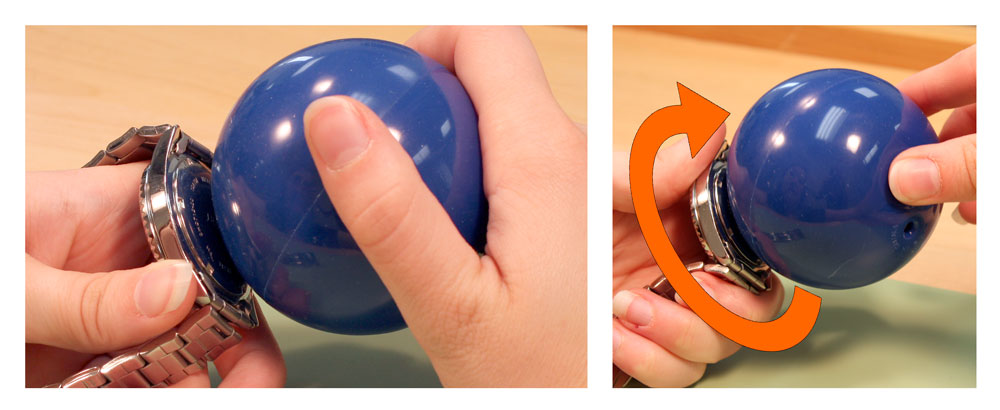
Used on water-resistant or dive-style Casios, this back threads into the case like a jar lid. This requires a completely different approach when you need to open a Casio watch with a screw-down design.
Tools Needed
- Rubber ball such as a stress ball
- Soft cloth
- Coin or bezel wrench as optional backup
Open the Back
Press the rubber ball firmly against the back to create grip. Rotate counterclockwise while maintaining pressure. The rubber grips better than fingers and provides the traction needed to break the seal. Once loose, finish unscrewing by hand or use covered pliers for additional leverage.
User Tip: “Rubber ball helps putting pressure on it to twist it off.” – Brandon Webster
Close the Back
Screw clockwise until snug. Do not over-tighten as this can damage the threads or seals. Hand tightness is usually sufficient for proper sealing.
Access the Battery Cage on G-Shock and Baby-G
You cannot open the entire case on G-Shock or Baby-G models. Instead, only the internal battery cage is accessible, which is essential to understand before you attempt to open a Casio watch from these lines.
Why This Design
This design maintains shock resistance and preserves water resistance by preventing full exposure of the circuitry. The battery cage provides just enough access for battery replacement without compromising the watch is rugged construction.
Tools Required
| Tool | Purpose |
|---|---|
| Fine-tipped metallic tweezers | Release the plastic latch |
| Non-metallic tweezers | Handle battery safely |
| Small brush | Clean debris (optional) |
Critical: Only metallic tweezers are rigid enough to push the latch. Plastic or rubber-coated tools will not work.
Open the Battery Cage
Locate the battery compartment on the back of the watch. Find the small plastic tab on the side of the cage. Insert one tip of metallic tweezers into the gap between the tab and the case. Gently push the tab outward. You will hear a soft click when the latch is released. Lift the cage to expose the battery.
Replace the Battery
G-Shock models typically use CR2016, CR2025, or CR2032 batteries. Baby-G models commonly use CR2016 or CR2025. Always check the label inside your specific model. Use non-metallic tweezers to remove the old battery. Insert the new one with the positive side up. Press down until you hear a distinct click that confirms the cage is locked.
Always verify the battery type: Mismatched voltage can damage the watch.
Close the Battery Cage
Ensure the battery is fully seated in the compartment. Align the plastic tab with its housing. Gently push it back into place. Listen for the click that confirms a secure seal.
Warning: A broken tab means the battery could loosen, risking short circuits and water ingress.
Perform an AC Reset After Battery Replacement
After battery replacement, many Casio digital watches need a reset to restore time and date functions. This step is often overlooked but critical for proper operation.
General AC Reset Steps
Press and hold Mode plus Adjust buttons simultaneously. The exact combination varies by model, so consult your specific manual. Wait for the display to reset. Re-set the time and date manually after the reset completes.
Note: Solar models may require exposure to bright light to reactivate after battery replacement.
Essential Safety Practices
Prevent Damage During Service
Work on a clean, soft surface to avoid scratches on the case or crystal. Use anti-static tools if possible since static can fry sensitive circuits. Keep all screws organized using a magnetic tray or labeled dish to prevent loss during reassembly.
Tool Selection Tips
Use #00 or #000 Phillips screwdrivers for small screws. Never substitute with larger tools. Use metallic tweezers only for latches and battery cage mechanisms. Use non-metallic tweezers for battery handling to prevent short circuits. Avoid household tools like butter knives since they can slip and damage the case.
Preserve Water Resistance
Inspect the gasket every time you open the watch. Replace the gasket if it appears cracked, flattened, or missing. Never reassemble with a compromised seal. Watch for fogging under the crystal after reassembly as this indicates moisture entry.
Troubleshoot Common Problems
Back Will Not Open
If the back will not open, you may be using the wrong method. Re-identify the case back type using the fingernail test. Using excessive force on a screw-back will strip the screws.
Stripped Screws
Stripped screws result from incorrect screwdriver size or over-tightening. Try a precision bit. If the screw is already stripped, seek professional help rather than risking further damage.
Watch Does Not Power On
If the watch does not power on, the battery may be installed upside down or have poor contact. Reinstall with the positive side facing up. Clean contacts with isopropyl alcohol to remove residue.
No Click When Closing Cage
If you do not hear a click when closing the cage, the tab may be misaligned or the latch could be broken. Realign gently and try again. If broken, repair may be needed.
Watch Resets or Loses Time
If the watch resets or loses time, the battery may be loose or there could be circuit disruption. Ensure the battery is fully seated. Check for visible damage to internal components.
Moisture Inside
If you notice moisture inside the watch, the gasket may be damaged or improperly seated. Replace the gasket. Avoid water exposure until the repair is complete.
When to Seek Professional Help
Some watches should not be opened at home. If you cannot detect any screws or gap, the watch may be a sealed model. Water-resistant or dive-rated watches require special tools and replacement seals. Vintage, collectible, or expensive models risk irreversible damage from amateur attempts. If you have failed a previous attempt, the mechanism may be damaged. If you lack precision tools, professional service is safer.
Expert Advice: “I take care of the easy ones with 4 screws back but most of my watches go to my watch shop…” – Lazarus Valvis, Casio Vintage Club
Why Pros Are Safer
Professionals have proper tools and gaskets for correct reassembly. They can handle hidden mechanisms without causing damage. They avoid irreversible damage to rare or valuable models.
Final Thoughts on Opening Your Casio Watch
Opening a Casio watch does not have to be risky. With the right knowledge, you can confidently replace a battery, adjust a clasp, or inspect for damage. Remember the three key principles: identify the case back type first, use the correct tools for your specific model, and never force anything during the process. When in doubt, trust a professional, especially for water-resistant or valuable models.
Now you are ready to open your Casio watch the right way, safely, correctly, and with confidence.
Frequently Asked Questions About Opening a Casio Watch
How do I know which type of case back my Casio watch has?
Turn the watch over and inspect the back. Four visible screws indicate a four-screw back. A smooth edge that rotates indicates a screw-down back. A slight seam detectable by fingernail indicates a snap-back. No visible opening means it is likely a G-Shock style with battery cage only access.
Can I open a G-Shock watch at home?
No, you cannot fully open a G-Shock watch. Only the internal battery cage is accessible. The outer case is sealed to maintain shock resistance and water resistance. You can replace the battery through the battery cage without opening the main case.
What tools do I need to open a Casio watch?
You need a Phillips #00 or #000 screwdriver for screw-back models. You need a case knife or watch opener for snap-back models. You need a rubber ball for screw-down models. You need fine-tipped metallic tweezers for G-Shock battery cages. You need non-metallic tweezers for battery handling.
How do I replace the battery in my Casio watch?
Identify your case back type first. Remove the back using the appropriate method. Use non-metallic tweezers to remove the old battery. Insert the new battery with the positive side facing up. Reassemble the watch, ensuring the gasket is properly aligned. Perform an AC reset if needed.
Why is my Casio watch not working after battery replacement?
The battery may be installed upside down. Remove and reinstall with the positive side facing up. The battery may have poor contact. Clean the contacts with isopropyl alcohol. The watch may need an AC reset. Press and hold Mode plus Adjust to reset the internal clock.
Should I attempt to open a water-resistant Casio watch myself?
No, water-resistant watches require special care. The gasket must be replaced properly to maintain water resistance. Improper reassembly can allow moisture entry. If the watch is dive-rated or expensive, seek professional help with proper tools and replacement seals.



