
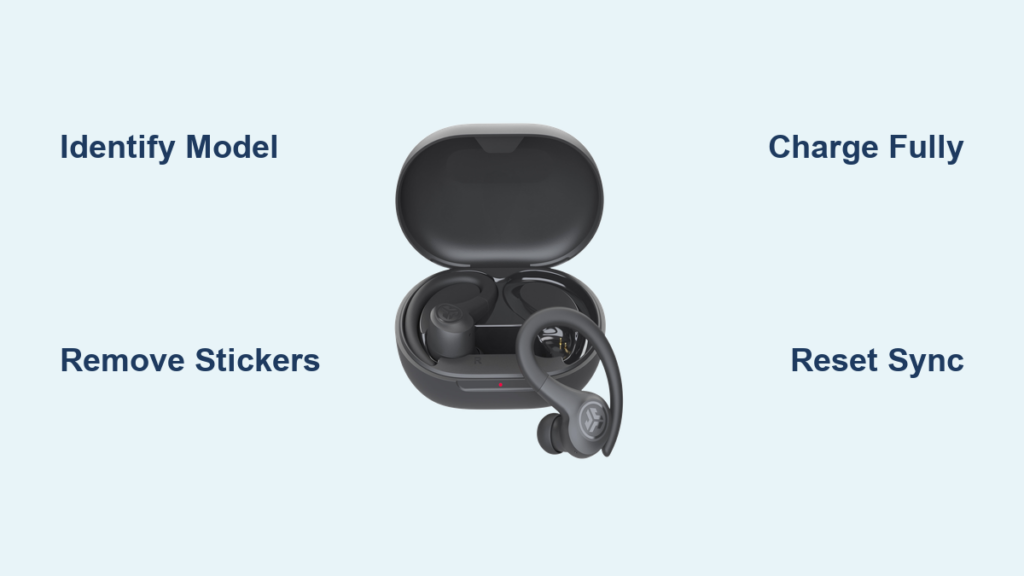
Struggling to connect your JLab Air Sport earbuds? You’re definitely not the only one facing this setup hurdle. Many users hit a wall during the first pairing attempt, especially when they don’t know which model they own or skip a critical prep step. The good news is that learning how to pair JLab Air Sport earbuds correctly takes less than two minutes once you have the right sequence.
This guide walks you through identifying your exact model, completing first-time pairing, switching to new devices, and fixing common sync issues. Whether you have the JBuds Air Sport or the GO Air Sport, you’ll find precise steps here, no fluff, just verified procedures that actually work.
Identify Your JLab Model First

Before learning how to pair JLab Air Sport earbuds, you need to know which version you own. JLab sells two similar-sounding models that require slightly different pairing methods.
JBuds Air Sport vs. GO Air Sport
The JBuds Air Sport (V2 and V3 versions) shows up as “JLab JBuds Air Sport” in your Bluetooth menu. These models need a manual press-and-hold action to wake up. The GO Air Sport appears as “JLab GO Air Sport” and often powers on automatically when you remove it from the case.
Both share an IPX7 waterproof rating and come with gel and foam tips. The key difference is that JBuds Air Sport models typically require holding the touch sensor for three seconds to enter pairing mode.
Decode the Light Indicators
Your earbuds communicate status through LED colors and patterns:
- Blinking blue and white signals pairing mode and discovery
- Solid white confirms a successful connection
- Solid blue appears during charging or a reset sequence
- No light at all means dead battery or protective stickers still attached
Prepare Your Earbuds for Pairing
Skipping prep is the number one reason pairing fails. Follow these quick steps before attempting any connection.
Remove All Stickers
New JLab earbuds ship with plastic film covering the charging contacts and touch sensors. Peel these off completely. If you skip this, the touch controls won’t register and pairing buttons won’t respond.
Charge the Case and Earbuds
Plug the charging case into a 5V/1A power source for at least 30 minutes before first use. A red or pulsing white light on the case confirms charging is active. Place the earbuds in the case so they can top off their batteries too.
Pair JBuds Air Sport (V2/V3) Step by Step
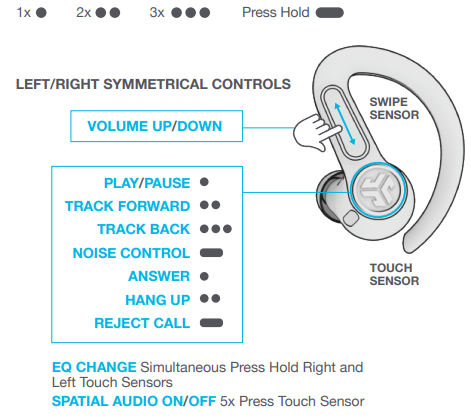
Use this method if your Bluetooth list shows “JLab JBuds Air Sport.”
- Take both earbuds out of the charging case
- Press and hold the touch sensor on both earbuds at the same time for three or more seconds
- Watch for these light patterns:
– Left earbud turns solid white
– Right earbud blinks blue and white alternately - Open Bluetooth settings on your phone, tablet, or computer
- Select “JLab JBuds Air Sport” from the available devices list
- Wait for the voice prompt that says “Bluetooth connected”
- Both earbuds will glow solid white once linked
Pro Tip: Keep both buds within two inches of each other during this process to maintain stereo sync.
Pair GO Air Sport Step by Step
Use this method if your device displays “JLab GO Air Sport.”
- Remove the earbuds and peel off all protective stickers
- Place them back in the case and close the lid for five seconds to reset the initial state
- Open the case and remove both earbuds
- One earbud will automatically begin blinking blue and white
- Enable Bluetooth on your device and select “JLab GO Air Sport”
- Listen for the “Bluetooth connected” voice confirmation
- Lights will shift to blinking white or solid white, confirming the link
Warning: If no lights appear at all, charge the case for at least 30 minutes before retrying.
Connect to a New Device
Your JLab Air Sport earbuds can store pairing info for up to eight devices, but they only stream audio to one at a time.
Break the Old Connection First
Turn off Bluetooth on the device you previously used. Alternatively, go into Bluetooth settings and select “Forget” for the JLab device. This prevents automatic reconnection to the wrong source.
Force Pairing Mode
- Remove both earbuds from the case
- If they don’t blink blue and white, place them back inside
- Close the lid and wait ten seconds
- Open the case and remove both earbuds again
- They should now enter pairing mode automatically
- Select your JLab model name on the new device
The whole process takes under one minute once the old connection is cleared.
Fix Earbuds That Won’t Sync Together

When only one earbud produces sound, the left and right units have lost their internal connection. This usually happens after a failed charge or a brief software glitch.
Try the 4-Tap Soft Reset
This method re-links the buds without erasing your saved devices.
- Select “Forget” for the JLab device in your Bluetooth settings
- Place both earbuds in the charging case
- Quickly tap the touch sensor on each earbud four times
- You’ll see four blue flashes followed by a solid blue light
- Leave them in the case for 15 seconds
- Remove both earbuds at the same time, keeping them within two inches of each other
- The left should show solid white and the right should blink blue and white
- Reconnect through your Bluetooth menu
Try the 7-Tap Factory Reset
Use this if the 4-tap method doesn’t restore stereo audio.
- Forget the JLab device on every phone and tablet you own
- Keep both earbuds in the charging case
- Tap one earbud’s sensor seven times quickly until it blinks blue four times
- Repeat the seven taps on the second earbud
- Remove both buds from the case
- One will glow solid white and the other will blink blue and white
- Pair them as if connecting for the first time
Note: This clears all stored devices, so you’ll need to re-pair with every gadget you use.
Troubleshoot Common Pairing Problems

Even with correct steps, occasional hiccups happen. Here’s how to solve the most frequent issues.
No Lights When Removing Earbuds
This points to a dead battery or leftover stickers. Charge the case and earbuds for at least one hour, then double-check that every piece of plastic film has been removed from the sensors and charging contacts.
Earbuds Don’t Appear in Your Bluetooth List
The earbuds might still be locked onto another device. Turn off Bluetooth on all nearby phones and tablets, perform the 7-tap factory reset, refresh your phone’s Bluetooth by toggling it off and on, and stay within 30 feet of the earbuds.
Only One Earbud Plays Audio
This is a sync loss between the left and right units. Run the 4-tap reset, remove both buds at the same time, and keep them within two inches during pairing. Remember that the left earbud cannot work alone. For mono listening, use only the right earbud.
Audio Cuts Out or Skips
Interference or low battery usually causes this. Stay within 30 feet of your device, move away from Wi-Fi routers and microwaves, and make sure the earbuds are fully charged.
Master the Touch Controls
Once paired, use these touch gestures to manage music and calls without grabbing your phone.
Left Earbud Functions
- Single tap lowers the volume
- Double tap activates your voice assistant
- Press and hold for one second skips to the previous track
- Triple tap cycles through EQ modes like Bass Boost and JLab Signature
Right Earbud Functions
- Single tap raises the volume or answers an incoming call
- Double tap plays or pauses music, or ends a call
- Press and hold for one second advances to the next track or rejects a call
- Triple tap toggles the voice assistant on or off
Tip: Tap lightly. Pressing too hard can trigger unintended commands.
Charging and Battery Management
Proper charging habits prevent connection problems and extend the overall lifespan of your earbuds.
Charge the Earbuds
Drop them into the case and they charge automatically. A full charge takes about one hour. Blue lights appear during charging and turn off when complete.
Charge the Case
Use the built-in USB-C or Micro-USB cable and plug into a standard 5V/1A wall adapter or laptop port. Avoid fast chargers since higher voltage can damage the battery. A full case charge takes about two hours.
Maximize Battery Life
The earbuds deliver up to six hours per charge and over 24 hours total with the case. A quick 10-minute charge gives you roughly one hour of playback. The earbuds also auto-power-off after five minutes of inactivity when not connected.
Prevent Future Pairing Issues
A few simple habits keep your JLab Air Sport earbuds working smoothly for years.
Keep Them Clean
Wipe the earbuds and case contacts with a dry cloth regularly. Use a soft brush to gently remove earwax from the mesh grilles. Dirty sensors can cause touch or power failures.
Store Them Properly
Always return the earbuds to the case when you’re not using them. The case protects them from damage and keeps them topped off.
Update Your Habits
When switching between your phone and laptop, turn off Bluetooth on the inactive device first. Restart your earbuds occasionally with a quick 4-tap reset to refresh the internal connection.
Frequently Asked Questions About Pairing JLab Air Sport Earbuds
Why won’t my JLab Air Sport earbuds connect to my phone?
The most common causes are leftover protective stickers, a low battery, or an active connection to another device. Remove all stickers, charge for at least 30 minutes, and forget the earbuds from any previously paired devices before retrying.
How do I know if my JLab earbuds are in pairing mode?
One earbud will blink blue and white alternately while the other shows a solid white light. This pattern signals that the earbuds are discoverable and ready to connect to a new device.
Can I use just one JLab earbud at a time?
Yes, but only the right earbud supports independent mono use. The left earbud requires the right one to be active in order to transmit audio.
What is the 4-tap reset on JLab earbuds?
The 4-tap reset re-syncs the left and right earbuds without erasing your saved devices. Place both buds in the case, tap each sensor four times quickly, wait 15 seconds, then remove them together to restore stereo audio.
How long does it take to fully charge JLab Air Sport earbuds?
The earbuds take about one hour for a full charge. The charging case requires roughly two hours using a standard 5V/1A power source.
How many devices can JLab Air Sport earbuds remember?
These earbuds can store pairing information for up to eight devices. However, they only maintain an active audio connection with one device at a time.
Key Takeaways for Pairing JLab Air Sport Earbuds

Learning how to pair JLab Air Sport earbuds comes down to three essentials: identify your model, remove all stickers, and use the correct reset method when sync fails. The JBuds Air Sport requires a manual three-second press, while the GO Air Sport powers on automatically. Keep both buds close together during pairing and use the 4-tap reset for sync issues or the 7-tap reset for stubborn connection problems.
Your next step is simple: grab your earbuds, peel off any stickers, and run through the pairing sequence for your specific model. If issues persist after a factory reset, reach out to JLab support at support@jlab.com for warranty assistance.



