

Your Bose Sport Earbuds suddenly refuse to pair, audio cuts out mid-workout, or touch controls stop responding. These frustrating glitches often signal a software lock that a reset can fix in under a minute. Learning how to reset Bose Sport Earbuds properly clears corrupted Bluetooth profiles, restores factory defaults, and reboots internal systems for a fresh start.
This guide walks you through the exact 10-second case-button procedure, how to identify the correct reset method for your model, and the post-reset pairing steps. You will also learn when a reset is appropriate, how to troubleshoot failed attempts, and habits that prevent future issues.
Perform a Hard Reset on Bose Sport Earbuds

A hard reset is the definitive fix for persistent glitches. It returns your earbuds to factory settings, erases all paired devices, and clears custom preferences. This method works for deep software locks, connection conflicts, and stubborn pairing errors.
Remove Earbuds and Locate the Bluetooth Button
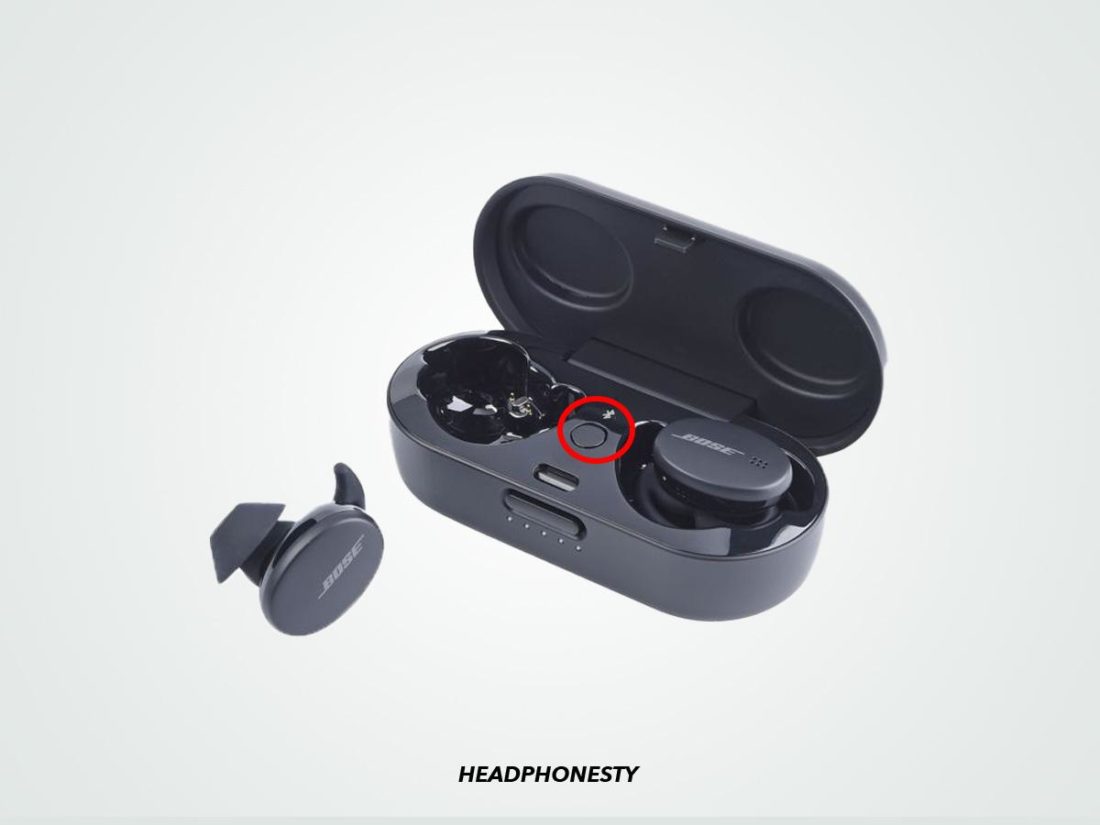
Start by taking both earbuds out of the charging case. Find the small, recessed Bluetooth button on the side of the case. It is clearly labeled and sits flush with the surface. Use your fingertip or a soft tool to press it firmly.
Hold the Button for 10 Seconds
Press and hold the Bluetooth button continuously for approximately 10 seconds. Do not release early. The reset only completes when you hear the audio confirmation, so patience is critical here.
Listen for the Voice Prompt
The key indicator of success is an audible voice prompt confirming the reset is complete. This audio signal means the internal memory has been wiped and the earbuds are ready for new pairing. If you release before hearing this prompt, the reset may not finalize.
Warning: Always wait for the voice confirmation. Releasing too soon often results in an incomplete reset where original issues persist.
Confirm Pairing Mode with LED Behavior
After the voice prompt, the earbuds enter pairing mode automatically. The status light on each earbud begins slowly blinking, signaling they are discoverable. If no light appears, check the case battery. A dead case can prevent the reset from finishing properly.
Identify Your Model to Avoid Reset Mistakes
Using the wrong reset method wastes time and fails to resolve issues. The Bose Sport Earbuds use a unique case-button procedure that differs from other Bose models. Knowing your exact device prevents frustration.
Sport Earbuds vs QuietComfort Models
| Model | Reset Method | Key Difference |
|---|---|---|
| Bose Sport Earbuds | Hold case Bluetooth button 10s until voice prompt | No charger needed, voice confirms |
| QuietComfort Earbuds II / Ultra | Case connected to power, hold back button until LED blinks blue then white | Requires USB charging during reset |
| Original QC Earbuds | Touch and hold earbud surface for 7 to 15 seconds | Uses touch control, not case button |
Why Model Identification Matters
Trying the touch-and-hold method on Sport Earbuds will not work. These earbuds do not respond to long touch resets like QuietComfort models. Similarly, connecting the Sport case to a wall charger is unnecessary for this procedure. Always verify your model name printed on the charging case or in the Bose app before starting.
Pro Tip: Check the Bose app or original packaging to confirm your exact model. The label “Bose Sport Earbuds” appears on the case exterior.
Recognize When a Reset Is Necessary
Do not reset randomly. This procedure is powerful but meant for real problems, not routine tweaks. Use it when specific symptoms appear.
Fix Connectivity Failures
If your earbuds refuse to connect to any device or keep disconnecting mid-use, a reset clears corrupted Bluetooth profiles. Common signs include:
– Devices showing “Connected” but producing no audio
– Only one earbud connecting while the other stays silent
– Automatic reconnection failing after removing the earbuds
Resolve Pairing Errors
When your phone lists “Bose Sport Earbuds” in Bluetooth settings but pairing fails, the earbuds may hold a stuck connection log. A hard reset wipes that memory and allows a fresh pairing attempt.
Stop Audio Glitches
Static, dropouts, or uneven volume between ears often stem from firmware hiccups. Resetting forces a clean boot, which frequently restores balanced, clear sound across both channels.
Restore Unresponsive Controls
If touch sensors ignore taps or hold commands, a reset can revive them. This covers:
– No response to play or pause
– Volume swipe not working
– Voice assistant failing to activate
Prepare for Resale or Gifting
Before selling or giving away your earbuds, always perform a hard reset. It erases all pairing history and personal data, protecting your privacy and giving the new owner a clean setup.
Re-pair Your Earbuds After Reset
After resetting, your Bose Sport Earbuds behave like new devices. They will not auto-connect until you manually pair them again through your phone or tablet.
Open Bluetooth Settings
Navigate to Settings then Bluetooth on your device. Confirm Bluetooth is turned on and ready to scan.
Select “Bose Sport Earbuds”
Look for “Bose Sport Earbuds” in the list of available devices. Tap the entry to begin pairing. If the earbuds do not appear:
– Ensure they are out of the case and blinking slowly
– Close and reopen Bluetooth settings
– Restart your phone’s Bluetooth radio
Complete Setup in the Bose App
For best results, open the Bose app after pairing. This lets you:
– Check for firmware updates
– Customize touch controls
– Adjust equalizer settings if supported
Expert Note: Even though the earbuds forget all devices, your phone may still show an old “Bose Sport Earbuds” entry. Delete that profile before re-pairing to avoid confusion.
Troubleshoot a Failed Reset Attempt
Sometimes the reset does not take on the first try. Here is how to address common obstacles.
No Voice Prompt Heard
If you held the button but heard nothing, try these steps:
– Try again since you may have released too soon
– Check earbud battery because low charge can block the reset
– Test audio output by playing a tone from your phone near the earbuds
LED Not Blinking
No light after the hold means the reset likely failed. Possible causes include:
– Case battery is dead
– Button was not held long enough
– Dirt or debris blocking the button slot
Fix: Charge the case for at least 30 minutes, then retry the full procedure.
Device Won’t Re-pair
If pairing fails after a successful reset, follow this sequence:
1. Delete “Bose Sport Earbuds” from your phone’s Bluetooth list
2. Reset the earbuds again using the case button
3. Re-pair from scratch through Bluetooth settings
This clears any corrupted profiles on both ends and establishes a clean connection.
Maintain Your Earbuds to Prevent Future Resets
A reset should not become routine. These habits keep your earbuds stable and reduce the need for future troubleshooting.
Update Firmware Regularly
After resetting and re-pairing, open the Bose app and check for updates. Firmware patches often fix:
– Connection instability
– Battery drain bugs
– Touch control lag
Keeping firmware current significantly reduces the need for future resets.
Avoid Deep Battery Drain
Letting the case or earbuds die completely can corrupt internal memory. Charge them when the battery drops below 20%. Regular charging preserves system health and prevents memory errors.
Clean the Button and Contacts
Dust or pocket lint can block the Bluetooth button. Use a dry toothbrush or soft cloth to gently clean:
– The button slot on the case
– Charging pins inside the case
– Earbud contact points
This ensures proper contact and reliable function over time.
Final Reset Checklist

Before you begin, confirm these prerequisites:
– Both earbuds are out of the case
– Case has at least partial charge
– You are using the Bluetooth button, not touch controls
– You will hold for 10 seconds or until the voice prompt plays
Once the reset completes:
– Wait for slow-blinking lights
– Re-pair manually via Bluetooth
– Update firmware in the Bose app
Frequently Asked Questions About Resetting Bose Sport Earbuds
How long do you hold the button to reset Bose Sport Earbuds?
Hold the Bluetooth button on the charging case for approximately 10 seconds. Release only after hearing the voice prompt that confirms the reset is complete. Releasing early may abort the process.
Do Bose Sport Earbuds need to be charged to reset?
Yes, the case needs sufficient battery power for the reset to finalize. A critically low case battery can interrupt the 10-second hold and prevent the voice prompt from playing. Charge the case for at least 30 minutes before attempting if you suspect low power.
Will resetting Bose Sport Earbuds delete my paired devices?
Yes, a hard reset erases all paired devices and custom settings from the earbuds’ internal memory. You will need to manually re-pair each device through Bluetooth settings after the reset completes.
Can I reset Bose Sport Earbuds without the charging case?
No, the reset procedure requires the charging case because the Bluetooth button is located on the case itself. Without the case, you cannot initiate the factory restore sequence.
What is the difference between a soft reset and hard reset on Bose Sport Earbuds?
A soft reset preserves paired devices and settings, while a hard reset erases everything and returns the earbuds to factory defaults. For Bose Sport Earbuds specifically, the documented hard reset serves as the comprehensive solution for both minor and major issues.
How do I know if my Bose Sport Earbuds reset was successful?
Three indicators confirm success: you hear a voice prompt, the LED status lights begin slowly blinking, and your phone no longer auto-connects to the earbuds. All three signals mean the reset completed and pairing mode is active.
Key Takeaways for Resetting Bose Sport Earbuds
Learning how to reset Bose Sport Earbuds correctly saves time and restores reliable performance. The 10-second case-button method is the only verified procedure for this model, and the voice prompt serves as your definitive success signal. Always verify your model before starting, since QuietComfort models use entirely different steps.
After resetting, manually re-pair your devices through Bluetooth settings and check the Bose app for firmware updates. These two post-reset actions prevent many common issues from recurring. With proper charging habits and regular firmware maintenance, your earbuds will deliver stable audio and responsive controls for months of uninterrupted use.



