
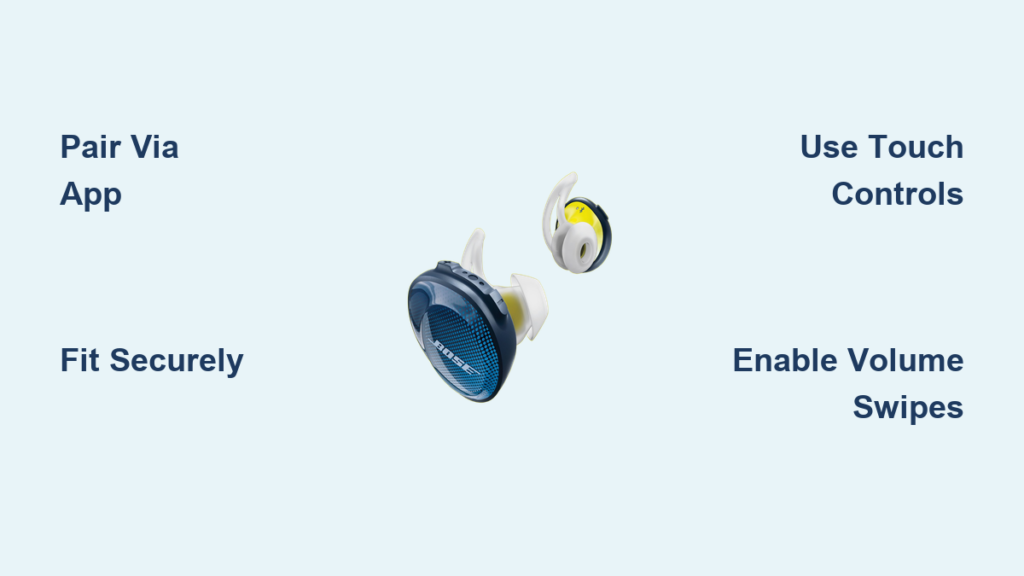
You just pulled your new Bose Sport Earbuds out of the box, and now you want to start using them right away. These wireless earbuds are built for workouts, runs, and everyday listening with secure fit and intuitive touch controls. Getting the most from them means understanding pairing, fitting, customization, and smart features.
This guide shows you exactly how to use Bose Sport Earbuds from first power-on to advanced settings. You will learn how to pair through the Bose Music app, find your perfect fit with StayHear Max tips, master touch gestures, enable volume swipes, and troubleshoot common issues with clear step-by-step instructions.
Pair Your Bose Sport Earbuds Through the Bose Music App
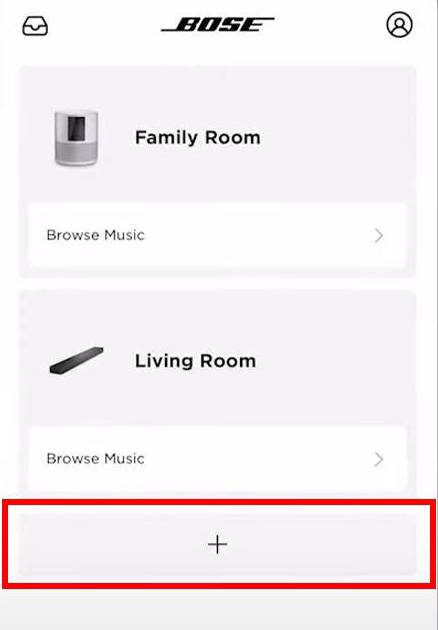
Proper pairing unlocks every feature your earbuds offer. The Bose Music app handles setup, firmware, and customization in one place.
Install the Bose Music App First
Before pairing, download the Bose Music app from the Apple App Store or Google Play Store. This app is essential for setup and ongoing management of your earbuds.
Open the app and sign in or create a Bose account when prompted. Tap “Set up new device,” select “Headphones,” then choose Bose Sport Earbuds from the available list.
Activate Pairing Mode and Connect
Remove both earbuds from the charging case. They automatically power on and enter pairing mode, shown by a flashing blue LED.
The Bose Music app detects the earbuds within seconds. Tap “Connect” when they appear. On iOS, allow Bluetooth access when prompted. On Android, confirm any pairing request that appears.
Once connected, the app displays your earbuds’ name, battery level, and firmware version. Play a test track to confirm audio plays through both earbuds.
Automatic Reconnection After First Pairing
After successful initial pairing, your earbuds reconnect automatically whenever you remove them from the case. No need to open the app or select them in Bluetooth settings, as long as Bluetooth is on and your device is nearby.
If reconnection fails, verify these points:
– Bluetooth is enabled on your device
– The earbuds have sufficient charge
– You are within standard Bluetooth range
Switch Between Up to Seven Paired Devices
Your earbuds remember the last seven paired devices. You can switch between phones, tablets, or computers without repeating full pairing.
Use the Bluetooth button on the charging case to scroll through remembered devices. Alternatively, connect directly from the Bluetooth menu of any previously paired host device.
Achieve the Right Fit for Active Wear

A secure fit affects sound quality, call clarity, and wear detection features. Testing all tip sizes ensures comfort and stability.
Choose the Correct StayHear Max Tip Size
The earbuds include three sizes (S, M, L) of StayHear Max tips. These tips feature an umbrella-shaped extension and a flexible wing that locks into your ear ridge.
To install:
1. Slide the earbud onto the correct-sized tip until it clicks
2. Insert into your ear with the wing pointing slightly forward
3. Twist gently upward until the wing secures behind the ear canal ridge
The right fit feels snug without pain, blocks some ambient noise, and stays put when you shake your head.
Test Stability During Movement
Since these are sport-focused earbuds, try jumping, jogging in place, or shaking your head vigorously. If they loosen, try a different tip size. A poor seal causes muffled sound and inconsistent touch response.
Pro Tip: Insert the earbuds before turning on music. This helps the wear detection sensors function properly.
Master Touch Controls on Both Earbuds
The Bose Sport Earbuds use capacitive touch panels supporting taps, swipes, and holds. Some features require activation in the app first.
Right Earbud Handles Core Functions
The right earbud manages playback, calls, and voice assistant activation.
- Double-tap: Play or pause audio, answer or end a call
- Press and hold: Reject an incoming call or activate your voice assistant
When activating the assistant, you will hear a tone. Release and speak your command immediately.
Important: The microphone is located exclusively in the right earbud. For clear call transmission, keep this side securely in your ear.
Left Earbud Offers a Customizable Shortcut
The left earbud has one user-defined function activated by double-tapping. Configure it in the Bose Music app:
- Open the app and select your earbuds
- Tap the settings icon in the top-right corner
- Navigate to Shortcut and enable the feature
- Choose one of four options:
– Announce battery level
– Skip to next track
– Skip to previous track
– Resume Spotify session
This shortcut works even when the app is closed.
Enable Volume Swipes on the Right Earbud
By default, volume control via swipe is disabled. To turn it on:
- In the Bose Music app, go to Product Control
- Toggle Volume Touch Control to enabled
Once enabled on the right earbud:
– Swipe up increases volume
– Swipe down decreases volume
Swipes must be smooth and vertical. Short or hesitant motions may not register.
Customize Sound Settings in the Bose Music App
Tailor your audio experience for richer bass, clearer vocals, or adaptive listening in changing environments.
Adjust EQ Profiles or Create Manual Settings
You can choose preset sound profiles or manually adjust frequencies for a personalized sound.
In the app:
– Tap Sound under your device settings
– Select a preset like Bass Boost or Vocal Focus
– Or switch to Manual EQ and slide the bars for bass, mid, and treble
Use the real-time preview to hear changes before saving your settings.
Turn On Adaptive Sound for Changing Environments
Adaptive Sound adjusts audio based on your surroundings. In noisy areas, it enhances clarity. In quiet spaces, it softens output.
To enable:
– Go to Sound then Adaptive Sound
– Toggle the feature On
This runs automatically once enabled with no daily adjustments needed.
Use Smart Features for Convenience

The Bose Sport Earbuds include intelligent automation that improves your experience during workouts and daily use.
Auto Play and Pause with Wear Detection
Built-in sensors detect when you are wearing the earbuds.
- Remove the right earbud: Audio pauses automatically
- Reinsert it: Audio resumes automatically
This works only if the earbud is fully seated. If pausing does not trigger, clean the sensor (small dot near the microphone) with a dry cloth.
Note: Removing only the left earbud does not pause playback.
Monitor Battery Levels in Multiple Ways
Battery status appears in several locations:
– Bose Music app: Shows exact percentage for earbuds and case
– iOS: Check in the Today View widget or Control Center
– Android: View in Bluetooth settings or notification shade
Earbuds provide voice prompts when battery runs low, such as “Battery low, 20% remaining.”
Charge and Manage Power Efficiently
Proper charging habits extend battery life and keep your earbuds ready for every workout.
Use the Charging Case for Extended Playback
The case holds two additional full charges, giving you up to 15 hours total of listening time.
To charge:
– Place earbuds in the case where they snap magnetically
– Close the lid
– Connect the case to power using the included USB-C cable
LED indicators show charge status:
– Solid white: Fully charged
– Flashing white: Charging in progress
– No light: Case is off or depleted
Take Advantage of Quick Charge
Need a fast boost before heading out? 15 minutes in the case provides up to 2 hours of playback.
This is perfect if you forgot to charge overnight. Just plug in the case and wait without needing a full recharge.
Troubleshoot Common Bose Sport Earbuds Issues

Even well-designed devices experience occasional hiccups. Here are fixes for the most frequent problems.
Fix Connection Problems Quickly
If earbuds do not reconnect automatically:
- Confirm Bluetooth is active on your device
- Open the charging case near your device
- Remove the earbuds and wait for reconnection
If reconnection still fails:
– Forget the device in your Bluetooth settings
– Re-pair using the Bose Music app
Tip: Restart your phone if pairing fails repeatedly.
Resolve Unresponsive Touch Controls
If taps or swipes stop working:
- Verify Volume Touch Control is enabled in the app
- Clean the touch surface with a dry, lint-free cloth
- Make sure your fingers are dry since moisture interferes with capacitive sensors
If one earbud stops responding entirely, perform a reset.
Reset Bose Sport Earbuds When Needed
To reset:
1. Place both earbuds in the charging case
2. Close the lid for 30 seconds
3. Open the lid and remove the earbuds
4. Press and hold the Bluetooth button on the case for 10 seconds until the LED flashes blue and white alternately
The earbuds are now reset. Re-pair them using the Bose Music app.
Maintain and Care for Your Earbuds
Simple maintenance keeps your earbuds performing like new for years.
Clean After Every Workout
Wipe earbuds and tips with a dry or slightly damp cloth after use. Sweat can clog sensors and degrade materials over time.
Remove tips weekly and rinse them under lukewarm water. Let them air dry completely before reattaching.
Protect from Water Damage
The earbuds carry an IPX4 rating, meaning they resist splashes and sweat but are not waterproof. Avoid:
– Submerging in water
– Wearing in the shower
– Using in heavy rain for extended periods
Dry them thoroughly if they get wet.
Store Properly When Not in Use
Always return earbuds to the case when finished. This protects them from dust, drops, and accidental damage. Store the case itself in a cool, dry place.
Frequently Asked Questions About Bose Sport Earbuds
How do I pair Bose Sport Earbuds for the first time?
Download the Bose Music app, open it, and tap “Set up new device.” Select “Headphones,” then choose Bose Sport Earbuds. Remove both earbuds from the case to activate pairing mode (flashing blue LED), then tap “Connect” in the app when they appear.
How long does the battery last on Bose Sport Earbuds?
The earbuds provide up to 5 hours per charge. The charging case holds two additional full charges, giving you approximately 15 hours total of listening time before needing to recharge the case itself.
Can I use Bose Sport Earbuds in the rain?
Yes, but with caution. The earbuds have an IPX4 rating, which protects against splashes and sweat. However, they are not waterproof. Avoid submerging them, wearing them in the shower, or exposing them to heavy rain for extended periods.
How do I enable volume control on Bose Sport Earbuds?
Volume control via swipe is disabled by default. Open the Bose Music app, select your earbuds, tap the settings icon, go to Product Control, and toggle Volume Touch Control on. Then swipe up or down on the right earbud to adjust volume.
Why is only one earbud working during calls?
The microphone is located exclusively in the right earbud. While audio plays through both earbuds during calls, the right side must stay securely inserted for clear voice transmission. If calls cut out, check that the right earbud is properly seated.
How do I reset Bose Sport Earbuds?
Place both earbuds in the case, close the lid for 30 seconds, then open it and remove them. Press and hold the Bluetooth button on the case for 10 seconds until the LED flashes blue and white alternately. Re-pair through the Bose Music app afterward.
Key Takeaways for Using Bose Sport Earbuds Effectively
You now know exactly how to use Bose Sport Earbuds from initial setup to advanced customization. Start by downloading the Bose Music app and pairing your earbuds through the guided process. Take time to test all three StayHear Max tip sizes for a secure, comfortable fit that supports both audio quality and wear detection.
Enable volume swipes and customize the left earbud shortcut to match your listening habits. Use the app’s EQ presets or manual adjustments to fine-tune your sound, and turn on Adaptive Sound for automatic audio optimization in changing environments.
Keep the charging case handy for quick top-ups. A 15-minute charge delivers up to 2 hours of playback, perfect for busy days. If issues arise, most problems resolve with a simple reset or re-pairing through the app.
Open the Bose Music app now and explore your earbuds’ settings. Personalize the controls, update the firmware, and enjoy a seamless audio experience built for your active lifestyle.



