Your Citizen watch has stopped working. The second hand is frozen, the digital display is blank, or the time is no longer accurate. Chances are, the battery is dead. You’re not alone, as millions of watch owners face this issue every year. While replacing a battery might seem simple, doing it right on a precision timepiece like a Citizen requires care, the right tools, and an understanding of your watch’s design.
The good news is that you can change the battery in a Citizen watch, but whether you should do it yourself depends on your experience, tools, and the model you own. Many Citizen watches use standard batteries, but their sealed cases and water-resistant designs mean improper handling can damage the watch or compromise its integrity. In this guide, you’ll learn how to identify your watch type, when DIY is safe, step-by-step replacement instructions, and when to visit a professional.
Identify Your Citizen Watch Type
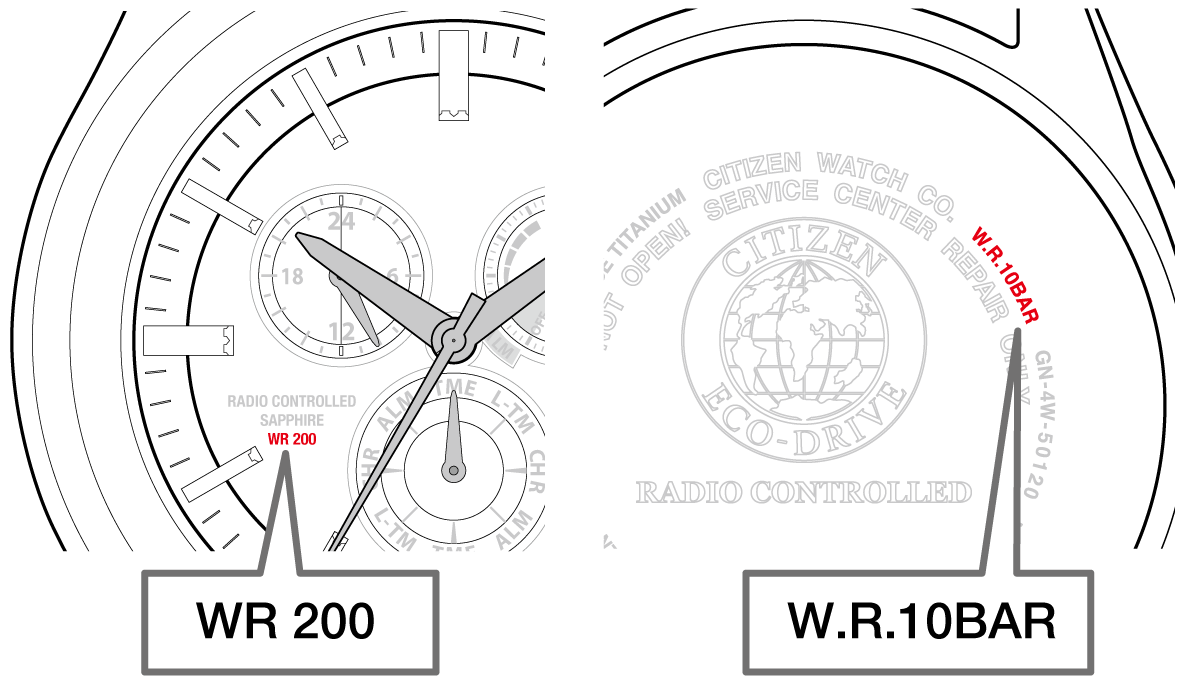
Before opening the case, determine your watch’s model and battery type. This affects the tools you need, the method to use, and the risk level involved.
Analog vs. Digi-Ana vs. Eco-Drive
Citizen offers several watch types, each with different battery requirements.
• Analog Citizen watches have traditional hands and usually contain a hidden battery under the back plate.
• Digi-Ana models combine hands with a digital display. These often have more complex internals and may require resetting after battery replacement.
• Eco-Drive watches are solar-powered and do not use replaceable batteries. If your watch is Eco-Drive, it likely needs charging or professional service instead of a battery swap.
Check the back of your watch for model and case numbers (for example, BM8000-59E). Use this information to search for specifications online.
Case Back Types
Citizen watches use three common back styles that determine how you access the battery.
- Snap-Off Back: Held by a groove and seal. Remove it using a case opener tool.
- Screw-Down Back: Has notches around the edge. Requires a special Jaxa wrench to remove.
- Screw-Through Back: Screws into the case. Common in dive and water-resistant models. This type is best left to professionals.
Knowing your back type ensures you use the correct tool and avoid damaging the case.
Can You Replace the Battery Yourself
Whether you can handle this yourself depends on your tools, confidence, and the value of the watch.
When DIY Works
A DIY approach works well under these conditions.
• You own a common, non-water-resistant model.
• You have watch repair tools and steady hands.
• The watch is not under warranty.
• You are okay with losing water resistance if not resealed properly.
When to See a Professional
Some situations require expert help.
• The watch is water-resistant (30m or more).
• It is an expensive, vintage, or heirloom piece.
• You lack specialized tools.
• It is a Digi-Ana or chronograph model that may need resetting.
Pro Tip: Most jewelers replace Citizen watch batteries for $10–$25. For water-resistant models, they also test seals and re-pressurize the case, which is difficult to do at home.
Tools Needed for DIY Replacement
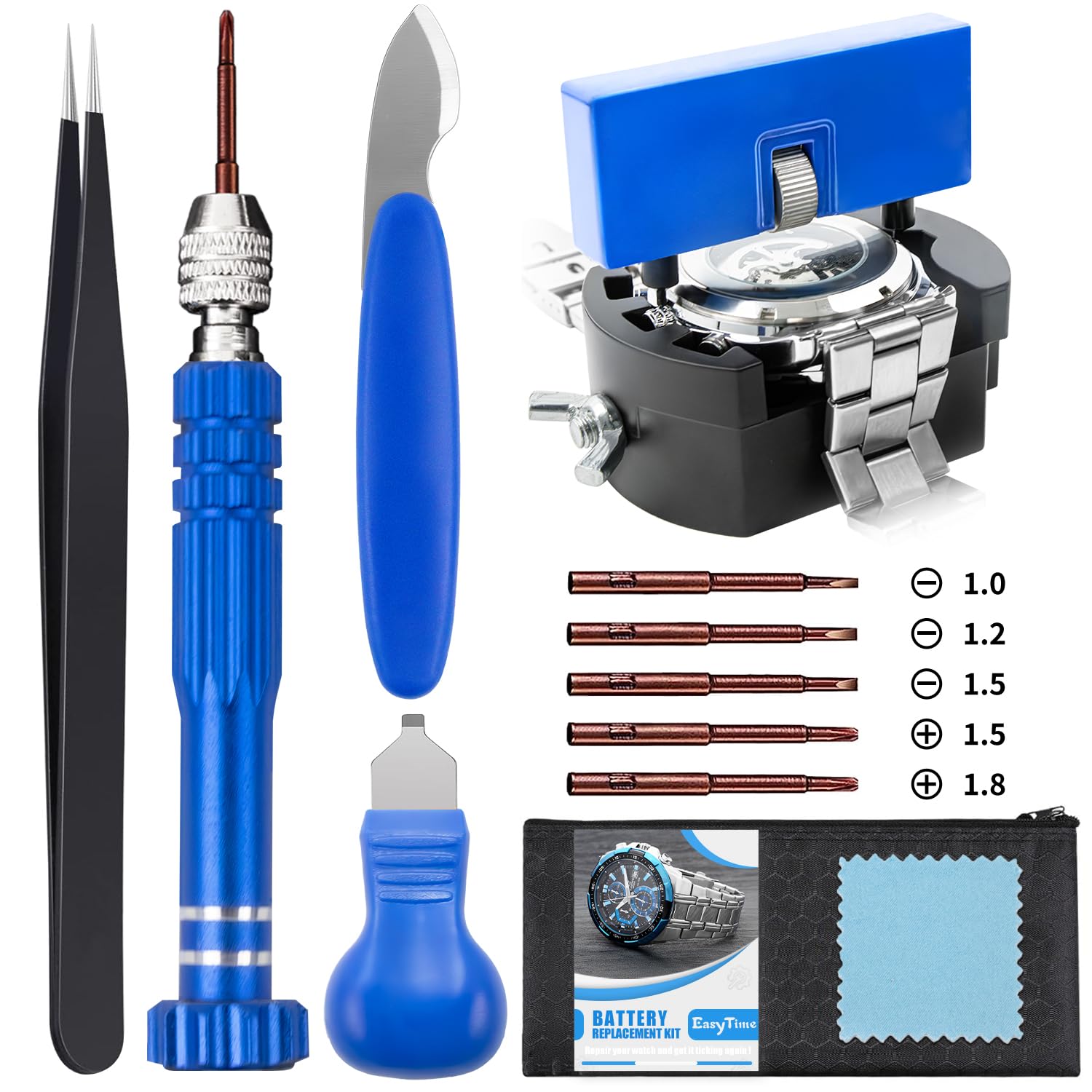
If you decide to proceed, gather these tools first to avoid mid-project trips to the store.
Essential Tools
• Case back opener (for snap-off backs)
• Jaxa tool or notch wrench (for screw-down backs)
• Plastic tweezers (to avoid scratching)
• Blade-type battery remover (not metal tweezers)
• Magnifying glass or loupe
• Soft work mat (to protect the watch)
Replacement Battery
Citizen watches typically use 3V lithium batteries like the CR2032, CR2025, or SR626SW. The exact type is printed on the old battery or listed in the manual. Always buy a fresh, high-quality battery from trusted brands like Renata, Maxell, or Panasonic.
Warning: Never use expired or off-brand batteries. They can leak and destroy the movement.
Step-by-Step: Replace the Battery
Follow these steps carefully to avoid causing damage to your watch.
Open the Case Back
For Snap-Off Backs, place the watch face-down on a soft cloth. Align the case knife or opener into the groove on the back. Gently twist to pop the back off, using even pressure to avoid bending.
For Screw-Down Backs, insert the Jaxa tool into the notches. Turn counterclockwise to unscrew. Remove slowly to avoid dropping the back.
For Screw-In Backs, these are rare but require a special spanner. Improper removal can strip screws, so this type is best left to professionals.
Remove the Old Battery
Locate the battery in the holder. It is usually under a small metal clip. Release the clip gently with a plastic tool. Use a plastic or wooden pick to lift the battery out.
Never use metal tweezers when removing a battery. They can short-circuit the movement and cause damage.
Visual Cue: Look for corrosion, leakage, or discoloration. If present, clean gently with a cotton swab and isopropyl alcohol, but only if you have experience.
Install the New Battery
Insert the new battery positive side up, unless marked otherwise. Re-secure the retaining clip. Ensure the battery sits flat and makes full contact with the terminals.
Pro Tip: Handle the battery with clean hands or gloves. Oils from your fingers can reduce battery lifespan.
Resetting After Battery Replacement
Some Citizen watches need resetting after a battery change to function properly again.
Digi-Ana Models: Reset the Hands
If your watch has both hands and a digital display, the hands may be out of sync after replacement.
To reset, pull the crown to the time-setting position. Press and hold the adjust button (if present) until hands move to the 12:00 position. Use the crown or buttons to calibrate hour and minute hands. Push the crown back in.
Consult your model manual for exact steps, as some require specific button combinations.
Analog Watches: Check Time Accuracy
After replacement, pull the crown and set the correct time. Listen for smooth ticking. If the second hand jumps in 4-second intervals, the battery may be weak or incorrectly installed.
Restore Water Resistance

This is the most overlooked but critical step after replacing your battery.
Re-Sealing the Case
Inspect the rubber gasket on the case back for cracks or dirt. Clean with a cotton swab and isopropyl alcohol if dirty. Apply a tiny drop of silicone grease (watch-specific) to the gasket. Align the back and press or screw it on firmly.
Warning: A poorly sealed case can let in moisture, fogging the dial or corroding the movement.
Pressure Testing
Only professionals can test water resistance with a pressure tester. If your watch is rated for swimming or diving, always get it tested after battery replacement.
Common Mistakes to Avoid
Even small errors can damage your watch permanently.
Using Metal Tools Inside the Case
Metal tweezers or screwdrivers can scratch the movement or cause short circuits. Always use plastic or non-conductive tools near the battery and circuit.
Forcing the Case Back
Never hammer or twist aggressively. If the back will not budge, stop immediately. You may be using the wrong tool or turning the wrong direction.
Touching the Movement
Avoid touching gears or coils with fingers or tools. Skin oils attract dust and can gum up the mechanism.
Skipping the Gasket Check
A dried or damaged gasket ruins water resistance. Replace it every 2–3 battery changes.
When to Visit a Jeweler or Service Center
Even if you are skilled, some situations demand professional help.
Signs You Need a Pro
• The watch is water-resistant (30m, 50m, or 100m).
• You see fog or moisture under the crystal.
• The watch stopped after exposure to water.
• It is an Eco-Drive or radio-controlled model.
• You are unsure about resetting Digi-Ana hands.
Authorized vs. Local Jeweler
Authorized Citizen Service Centers use OEM parts and preserve your warranty. Local jewelers are often faster and cheaper but may use generic batteries or skip pressure testing.
Tip: Call ahead to confirm they service Citizen watches and offer water resistance testing.
Battery Life and Maintenance Tips
Maximize time between replacements with proper care.
Average Battery Life
• Standard Citizen watches: 2–5 years
• Digi-Ana or chronograph models: 1.5–3 years
• Eco-Drive (solar): 10–15 years (rechargeable cell)
Extend Battery Life
• Avoid extreme temperatures.
• Turn off alarms or backlights if not needed.
• Store in a dry place when not worn.
• For Digi-Ana models, reduce screen-on time.
Frequently Asked Questions About Citizen Watch Batteries
Can I change the battery in my Citizen watch myself?
Yes, you can change the battery in a Citizen watch yourself if you have the right tools and a non-water-resistant model. However, water-resistant watches should be taken to a professional to preserve their sealing.
What battery does a Citizen watch need?
Most Citizen watches use 3V lithium batteries like the CR2032, CR2025, or SR626SW. Check the old battery or your manual to confirm the exact type needed.
How much does it cost to replace a Citizen watch battery?
Jewelers typically charge $10–$25 for Citizen watch battery replacement. This price often includes water resistance testing for suitable models.
Why won’t my Citizen watch work after battery replacement?
Your watch may not work if the battery is installed incorrectly, the contacts are dirty, or the model requires resetting. Check the battery orientation first, then consult your manual for reset instructions.
Does replacing a Citizen watch battery void the warranty?
Opening the case yourself usually voids the warranty. If your watch is still under warranty, take it to an authorized Citizen service center for battery replacement.
How do I know if my Citizen watch is Eco-Drive?
Eco-Drive watches have “Eco-Drive” printed on the dial or case back. These are solar-powered and do not have replaceable batteries. They need light exposure to recharge.
Key Takeaways for Changing Your Citizen Watch Battery
Changing the battery in a Citizen watch is possible at home, but not always advisable. For basic, non-water-resistant models, a careful DIY approach with the right tools can save time and money. However, for water-resistant, Digi-Ana, or valuable watches, professional service is the safer, smarter choice.
A jeweler can replace the battery, inspect the seals, and pressure-test the case, ensuring your watch stays accurate and protected. If you are unsure, start with a professional. Once you see how it is done, you might feel more confident tackling the next one yourself.
Your Citizen watch is built to last. With the right care, it can keep ticking for decades, long after the battery has been replaced.